How to Build an Animated Wind Login Page with a Bird Mascot, Lockout and 2FA Code
Published November 4, 2026 · 25 min read
This is the most complete login page in our series. It looks playful, with a sunny meadow, a spinning windmill, leaves drifting on the breeze and a little bluebird perched on the form. But underneath, it works like a real sign in flow:
- Live email checking with a sprout that grows for a valid address
- A windsock strength meter for the password
- A Caps Lock warning
- “Remember me”
- Three attempts, shown as leaves that blow away
- A storm lockout that survives a page refresh
- A six-digit verification code step (two-factor authentication)
- A cloud gate that opens on success
Every letter you type flies into the field like a leaf, and backspaced letters blow away.
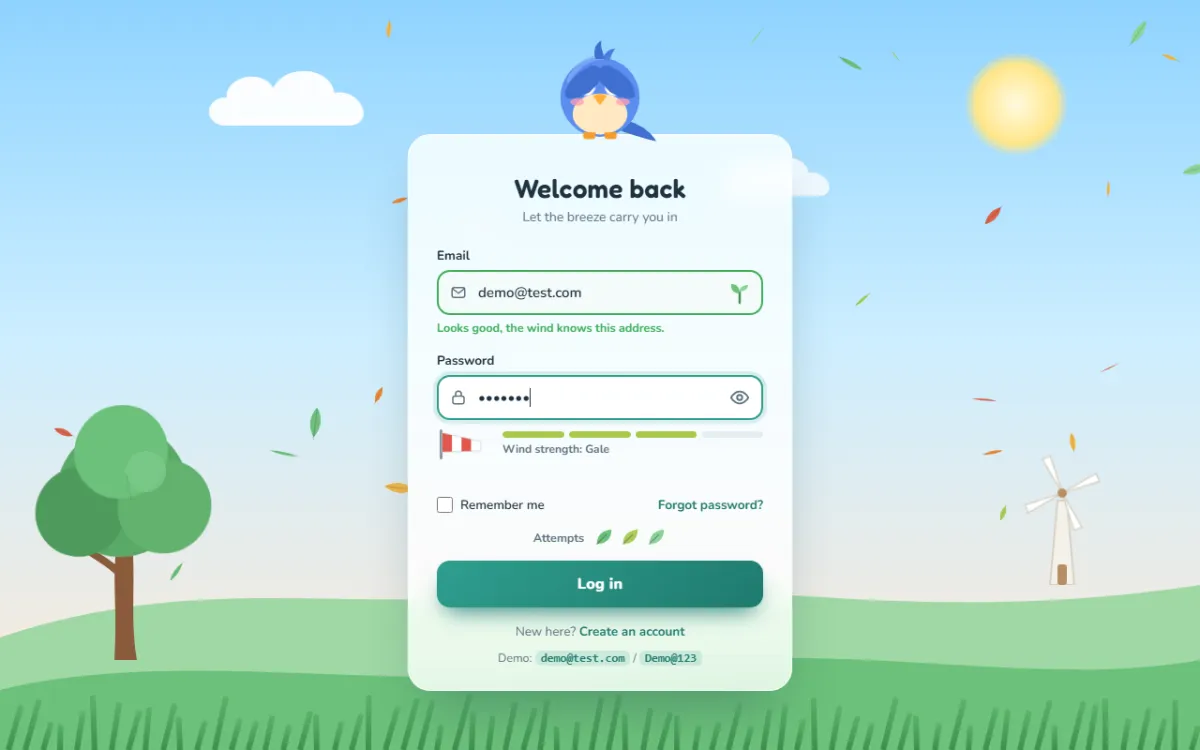
Try the live demo
Sign in with demo@test.com / Demo@123, then enter the code
123456. Or get the password wrong three times to see the storm.
It's three files: HTML, CSS and JavaScript, plus one library, GSAP, for the character animation. If GSAP fails to load, a tiny built-in fallback keeps the page working. This tutorial is long, so feel free to jump between sections. Every code block has a Copy button, and the blocks follow each file from top to bottom.
How it's organised
The JavaScript is split into small modules, each with one job:
- CONFIG: every colour, timing and limit in one object.
- Mock back end: a fake
apithat pretends to log you in. Swap it for realfetch()calls later. The comments show a Laravel example. - State machine: the page is always in exactly one state (idle, typing, submitting, error, locked, otp or success), and only allowed changes can happen.
- Wind: the canvas with leaves, wind streaks and storm rain.
- Bird: the mascot's poses and reactions.
- Flying letters: characters that arrive and leave as leaves.
- Form, attempts, lockout, OTP and success: the login flow itself.
Step 1: The HTML
1.1 The head
<!DOCTYPE html>
<html lang="en">
<head>
<meta charset="UTF-8">
<meta name="viewport" content="width=device-width, initial-scale=1.0">
<title>Wind Login</title>
<!-- If this page is served by Laravel, expose the CSRF token for fetch() calls -->
<!-- <meta name="csrf-token" content="{{ csrf_token() }}"> -->
<link rel="preconnect" href="https://fonts.googleapis.com">
<link rel="preconnect" href="https://fonts.gstatic.com" crossorigin>
<link href="https://fonts.googleapis.com/css2?family=Fredoka:wght@500;600&family=Nunito:wght@400;600;700;800&display=swap" rel="stylesheet">
<link rel="stylesheet" href="style.css">
</head>

<body data-state="idle">
Two Google Fonts: Fredoka, a rounded, friendly display font for headings and the
code digits, and Nunito for everything else. The commented-out
csrf-token meta tag is a reminder for later. If a framework like Laravel serves this
page, it can print a security token here for the JavaScript to send with each request.
1.2 The background scene
<!-- ================= BACKGROUND SCENE ================= -->
<div class="scene" aria-hidden="true">
  <div class="sun"></div>

  <svg class="cloud" style="top:8%; width:200px; animation-duration:70s; animation-delay:-20s" viewBox="0 0 200 80"><path fill="#fff" d="M30 70 C5 70 5 40 30 40 C30 15 70 10 80 30 C90 5 140 5 145 35 C175 30 190 70 160 70 Z"/></svg>
  <svg class="cloud" style="top:20%; width:140px; animation-duration:95s; animation-delay:-60s; opacity:.8" viewBox="0 0 200 80"><path fill="#fff" d="M30 70 C5 70 5 40 30 40 C30 15 70 10 80 30 C90 5 140 5 145 35 C175 30 190 70 160 70 Z"/></svg>
  <svg class="cloud" style="top:4%; width:110px; animation-duration:120s; animation-delay:-5s; opacity:.7" viewBox="0 0 200 80"><path fill="#fff" d="M30 70 C5 70 5 40 30 40 C30 15 70 10 80 30 C90 5 140 5 145 35 C175 30 190 70 160 70 Z"/></svg>

  <div class="hills">
    <svg viewBox="0 0 1440 300" preserveAspectRatio="none">
      <path fill="var(--hill-back)" d="M0 150 C240 60 420 120 640 90 C860 60 1080 140 1440 80 V300 H0 Z"/>
      <path fill="var(--hill-front)" d="M0 220 C220 160 480 230 760 190 C1020 150 1240 220 1440 180 V300 H0 Z"/>
    </svg>
  </div>

  <svg class="windmill" viewBox="0 0 90 150">
    <path d="M40 60 L50 60 L58 150 L32 150 Z" fill="#f4f1ea" stroke="#d8d1c4" stroke-width="2"/>
    <rect x="40" y="128" width="10" height="22" rx="3" fill="#b98f64"/>
    <g class="rotor">
      <g fill="#fff" stroke="#d8d1c4" stroke-width="1.5">
        <path d="M45 52 L47 10 L56 12 Z"/><path d="M45 52 L87 54 L85 63 Z"/>
        <path d="M45 52 L43 94 L34 92 Z"/><path d="M45 52 L3 50 L5 41 Z"/>
      </g>
      <circle cx="45" cy="52" r="5" fill="#b98f64"/>
    </g>
  </svg>

  <svg class="tree" viewBox="0 0 210 280">
    <path d="M96 280 C100 220 92 190 100 150 L114 150 C120 190 112 230 120 280 Z" fill="#8a5a3b"/>
    <path d="M104 190 C90 175 76 170 64 160" stroke="#8a5a3b" stroke-width="8" fill="none" stroke-linecap="round"/>
    <g class="crown">
      <circle cx="105" cy="100" r="70" fill="#5aa867"/>
      <circle cx="60" cy="120" r="48" fill="#4f9b5c"/>
      <circle cx="150" cy="118" r="50" fill="#62b26f"/>
      <circle cx="104" cy="58" r="50" fill="#6cc07a"/>
      <circle cx="130" cy="80" r="22" fill="#7fcc8b" opacity=".7"/>
    </g>
  </svg>

  <div class="grass" id="grass"></div>
</div>

<canvas id="windCanvas" aria-hidden="true"></canvas>

<div class="storm" id="storm" aria-hidden="true"></div>
<div class="storm-clouds" id="stormClouds" aria-hidden="true">
  <svg viewBox="0 0 1440 300" preserveAspectRatio="none">
    <path fill="#3b4560" d="M0 0 H1440 V170 C1380 230 1300 200 1260 180 C1220 250 1120 240 1080 200 C1020 260 920 250 880 200 C820 250 720 240 690 190 C640 250 540 240 500 200 C440 260 340 240 310 190 C260 240 170 230 140 190 C90 230 30 220 0 190 Z"/>
    <path fill="#2b3348" d="M0 0 H1440 V110 C1360 160 1290 130 1240 120 C1180 170 1080 160 1040 130 C980 170 900 160 860 120 C800 170 700 160 660 120 C600 170 500 160 460 120 C400 170 300 160 260 120 C200 160 120 150 80 120 C50 140 20 140 0 130 Z"/>
  </svg>
</div>
<div class="flash" id="flash" aria-hidden="true"></div>
The meadow is made of SVG pieces:
- three clouds, all reusing one path at different sizes and speeds,
- two layers of hills that use CSS variables for their colours
(
fill="var(--hill-back)"), so the theme can change them, - a windmill with a
.rotorgroup that spins, - a tree with a
.crowngroup that sways, - an empty
#grasscontainer that JavaScript fills with blades.
Then come the layers that only appear in a lockout: a dark .storm overlay, SVG storm
clouds and a white .flash for lightning. Everything here is
aria-hidden="true".
1.3 Live regions and the bird
<!-- ================= LIVE REGIONS ================= -->
<div id="srStatus" class="sr-only" aria-live="polite" aria-atomic="true"></div>
<div id="srAlert" class="sr-only" role="alert" aria-atomic="true"></div>

<!-- ================= LOGIN ================= -->
<main class="stage">
  <div class="card-wrap" id="cardWrap">

    <!-- Mascot: a little bluebird perched on the card -->
    <div class="bird" id="bird" aria-hidden="true">
      <svg viewBox="0 0 160 150">
        <g id="birdBody">
          <!-- tail -->
          <path d="M112 112 C130 116 146 126 154 140 C138 136 124 132 108 126 Z" fill="#3f6fd0"/>
          <!-- body -->
          <circle cx="80" cy="82" r="52" fill="#5b8def"/>
          <path d="M40 60 C50 36 70 28 92 30" stroke="#86adf5" stroke-width="7" fill="none" stroke-linecap="round" opacity=".7"/>
          <ellipse cx="80" cy="104" rx="36" ry="27" fill="#ffe8c2"/>
          <!-- tuft -->
          <path d="M74 32 C70 18 76 10 82 8 C80 16 84 22 86 32 Z" fill="#3f6fd0"/>
          <path d="M84 32 C86 22 94 18 100 18 C96 24 94 28 92 34 Z" fill="#4a7de0"/>
          <!-- cheeks -->
          <ellipse cx="50" cy="88" rx="9" ry="5" fill="#ff9fb1" opacity=".75"/>
          <ellipse cx="110" cy="88" rx="9" ry="5" fill="#ff9fb1" opacity=".75"/>
          <!-- eyes -->
          <g class="eye"><circle cx="62" cy="68" r="12" fill="#fff"/>
            <g id="pupilL"><circle cx="62" cy="68" r="6.5" fill="#1d2633"/><circle cx="60" cy="65.5" r="2.2" fill="#fff"/></g></g>
          <g class="eye"><circle cx="98" cy="68" r="12" fill="#fff"/>
            <g id="pupilR"><circle cx="98" cy="68" r="6.5" fill="#1d2633"/><circle cx="96" cy="65.5" r="2.2" fill="#fff"/></g></g>
          <!-- beak -->
          <path id="beak" d="M71 80 Q80 75 89 80 L80 93 Z" fill="#ffad33"/>
          <!-- feet gripping the card edge -->
          <g fill="#f59e2b">
            <path d="M58 128 h16 v6 a3 3 0 0 1 -3 3 h-10 a3 3 0 0 1 -3 -3 Z"/>
            <path d="M86 128 h16 v6 a3 3 0 0 1 -3 3 h-10 a3 3 0 0 1 -3 -3 Z"/>
          </g>
          <!-- wings (rotated by JS around the shoulders) -->
          <path id="wingL" d="M36 78 C20 84 18 114 26 130 C32 140 46 138 48 126 C52 108 50 88 36 78 Z" fill="#3f6fd0"/>
          <path id="wingR" d="M124 78 C140 84 142 114 134 130 C128 140 114 138 112 126 C108 108 110 88 124 78 Z" fill="#3f6fd0"/>
        </g>
      </svg>
    </div>
Live regions are how the page talks to screen reader users. Text placed in
#srStatus (aria-live="polite") is read when the user pauses. Text in
#srAlert (role="alert") interrupts straight away, for errors. Both are
visually hidden with the .sr-only class.
The bird is one SVG with ids on the parts JavaScript animates: the pupils (#pupilL,
#pupilR), the wings (#wingL, #wingR) and the whole body
group. Its feet are drawn at the bottom of the SVG, so it looks like it's gripping the top edge of
the card.
1.4 The sign in form
    <section class="card" id="card" aria-labelledby="loginTitle">

      <!-- ---------- STEP 1: credentials ---------- -->
      <div class="panel" id="loginPanel">
        <h1 id="loginTitle" class="blow">Welcome back</h1>
        <p class="sub blow">Let the breeze carry you in</p>

        <form id="loginForm" novalidate>
          <fieldset id="loginFields">
            <legend class="sr-only">Sign in</legend>

            <div class="field blow">
              <label for="email">Email</label>
              <div class="control">
                <svg class="icon" viewBox="0 0 24 24" fill="none" stroke="currentColor" stroke-width="2" stroke-linecap="round" stroke-linejoin="round" aria-hidden="true"><rect x="3" y="5" width="18" height="14" rx="3"/><path d="m4 7 8 6 8-6"/></svg>
                <input id="email" name="email" type="email" inputmode="email" autocomplete="username" placeholder="you@example.com"
                       aria-describedby="emailHint" required>
                <span class="status" id="emailStatus" aria-hidden="true">
                  <svg class="ok" viewBox="0 0 26 26"><path d="M13 24 V13" stroke="#3f8f4f" stroke-width="2.4" stroke-linecap="round"/><path d="M13 14 C6 14 3 9 4 4 C10 4 13 8 13 14 Z" fill="#6cc07a"/><path d="M13 12 C18 12 22 9 22 5 C17 5 13 7 13 12 Z" fill="#8bd497"/></svg>
                  <svg class="bad" viewBox="0 0 26 26"><path d="M6 6 C14 4 22 10 20 20 C12 22 4 16 6 6 Z" fill="#c9965a"/><path d="M7 7 L19 19" stroke="#8a5a3b" stroke-width="1.6"/></svg>
                </span>
              </div>
              <p class="hint" id="emailHint">We'll never share your email.</p>
            </div>

            <div class="field blow">
              <label for="password">Password</label>
              <div class="control">
                <svg class="icon" viewBox="0 0 24 24" fill="none" stroke="currentColor" stroke-width="2" stroke-linecap="round" stroke-linejoin="round" aria-hidden="true"><rect x="4" y="10" width="16" height="11" rx="3"/><path d="M8 10V7a4 4 0 0 1 8 0v3"/></svg>
                <input id="password" name="password" type="password" autocomplete="current-password" placeholder="Your password"
                       aria-describedby="pwHint meterLabel capsWarn" required>
                <button type="button" class="toggle" id="togglePw" aria-label="Show password" aria-pressed="false" aria-controls="password">
                  <svg class="eye-open" viewBox="0 0 24 24" fill="none" stroke="currentColor" stroke-width="2" stroke-linecap="round" stroke-linejoin="round" aria-hidden="true"><path d="M2 12s3.5-7 10-7 10 7 10 7-3.5 7-10 7S2 12 2 12Z"/><circle cx="12" cy="12" r="3"/></svg>
                  <svg class="eye-closed" viewBox="0 0 24 24" fill="none" stroke="currentColor" stroke-width="2" stroke-linecap="round" stroke-linejoin="round" aria-hidden="true"><path d="M3 3l18 18"/><path d="M10.6 5.1A10 10 0 0 1 12 5c6.5 0 10 7 10 7a17 17 0 0 1-3.2 4.2M6.6 6.6A17 17 0 0 0 2 12s3.5 7 10 7a9.8 9.8 0 0 0 5.4-1.6"/><path d="M9.9 9.9a3 3 0 0 0 4.2 4.2"/></svg>
                </button>
              </div>
              <span class="caps" id="capsWarn" aria-live="polite">⇪ Caps Lock is on</span>

              <div class="strength" aria-hidden="false">
                <svg class="windsock" viewBox="0 0 58 34" aria-hidden="true">
                  <rect x="3" y="2" width="3" height="32" rx="1.5" fill="#8a9aa3"/>
                  <g class="sock" id="sock">
                    <g class="flutter">
                      <path d="M6 6 L54 11 L54 21 L6 26 Z" fill="#fff" stroke="#cfd9de"/>
                      <path d="M6 6 L18 7.3 L18 24.7 L6 26 Z" fill="#e2574c"/>
                      <path d="M30 8.5 L42 9.8 L42 22.2 L30 23.5 Z" fill="#e2574c"/>
                    </g>
                  </g>
                </svg>
                <div class="meter">
                  <div class="bars" aria-hidden="true"><span class="bar"><i></i></span><span class="bar"><i></i></span><span class="bar"><i></i></span><span class="bar"><i></i></span></div>
                  <div class="meter-label" id="meterLabel">Wind strength: calm</div>
                </div>
              </div>
              <p class="hint" id="pwHint"></p>
            </div>

            <div class="row blow">
              <label class="check"><input type="checkbox" id="remember" name="remember"> Remember me</label>
              <!-- Point this at your reset page, e.g. Laravel: route('password.request') -->
              <a href="#">Forgot password?</a>
            </div>

            <div class="attempts blow" id="attempts">
              <span>Attempts</span>
              <span class="attempt-icons" id="attemptIcons" aria-hidden="true"></span>
              <span class="sr-only" id="attemptsText"></span>
            </div>

            <!-- lockout (storm) -->
            <div class="lock" id="lockPanel" aria-live="polite">
              <div class="title">
                <svg class="tornado" viewBox="0 0 24 24" aria-hidden="true"><g fill="none" stroke="#c8f1ff" stroke-width="2.2" stroke-linecap="round"><path d="M3 4h18"/><path d="M5 8h14"/><path d="M7 12h10"/><path d="M9 16h6"/><path d="M11 20h2"/></g></svg>
                Storm lockout
              </div>
              <div class="clock" id="lockClock">1:00</div>
              <div class="track"><i id="lockBar"></i></div>
              <p>Too many tries. The wind will calm down soon.</p>
            </div>

            <button type="submit" class="btn blow" id="loginBtn">
              <svg class="pinwheel" viewBox="0 0 26 26" aria-hidden="true"><g>
                <path d="M13 13 L13 2 C18 2 20 7 13 13Z" fill="#fff"/><path d="M13 13 L24 13 C24 18 19 20 13 13Z" fill="#ffe08a"/>
                <path d="M13 13 L13 24 C8 24 6 19 13 13Z" fill="#fff"/><path d="M13 13 L2 13 C2 8 7 6 13 13Z" fill="#ffe08a"/>
                <circle cx="13" cy="13" r="2" fill="#1f7a6e"/></g></svg>
              <span class="label">Log in</span>
            </button>
          </fieldset>
        </form>

        <!-- Point this at your sign up page, e.g. Laravel: route('register') -->
        <p class="alt blow">New here? <a href="#">Create an account</a></p>
        <p class="demo-note blow">Demo: <code>demo@test.com</code> / <code>Demo@123</code></p>
      </div>
A lot of good form practice is packed in here:
<fieldset>around all the fields. Settingfieldset.disabled = truedisables every input inside it in one go, which is perfect for the lockout. The hidden<legend>names the group for screen readers.aria-describedbylinks each input to its hint, meter label and Caps Lock warning, so screen readers read them along with the field.inputmode="email"shows the email keyboard on phones, andautocomplete="username"/"current-password"help password managers.- The status icon holds two SVGs: a green sprout (valid) and a wilted brown leaf (invalid). CSS shows the right one.
- The eye button uses
aria-pressedandaria-controls. Its two icons are switched by CSS based onaria-pressed, so the accessible state and the picture can never disagree. - The windsock is the strength meter: a pole and a striped sock that fills out as the password gets stronger.
- Attempts and the lockout panel sit inside the form, ready to be shown.
- The button contains a hidden pinwheel that spins while loading.
The class blow marks every piece that gets blown away when the panel changes.
1.5 The verification code step
      <!-- ---------- STEP 2: one-time code ---------- -->
      <div class="panel" id="otpPanel" hidden>
        <h1 id="otpTitle" class="blow2" tabindex="-1">Check your inbox</h1>
        <p class="sub blow2" id="otpSub">We blew a 6-digit code to your email.</p>
        <form id="otpForm" novalidate>
          <fieldset>
            <legend class="sr-only">Enter the 6-digit verification code</legend>
            <div class="otp-boxes blow2" id="otpBoxes" role="group" aria-label="Verification code"></div>
            <p class="hint blow2" id="otpHint" style="text-align:center"></p>
            <div class="otp-meta blow2">
              <button type="button" class="linkbtn" id="backBtn">← Use another account</button>
              <button type="button" class="linkbtn" id="resendBtn" disabled>Resend in 0:30</button>
            </div>
            <button type="submit" class="btn blow2" id="otpBtn">
              <svg class="pinwheel" viewBox="0 0 26 26" aria-hidden="true"><g>
                <path d="M13 13 L13 2 C18 2 20 7 13 13Z" fill="#fff"/><path d="M13 13 L24 13 C24 18 19 20 13 13Z" fill="#ffe08a"/>
                <path d="M13 13 L13 24 C8 24 6 19 13 13Z" fill="#fff"/><path d="M13 13 L2 13 C2 8 7 6 13 13Z" fill="#ffe08a"/>
                <circle cx="13" cy="13" r="2" fill="#1f7a6e"/></g></svg>
              <span class="label">Verify</span>
            </button>
          </fieldset>
        </form>
        <p class="demo-note blow2">Demo code: <code>123456</code></p>
      </div>
    </section>
  </div>
</main>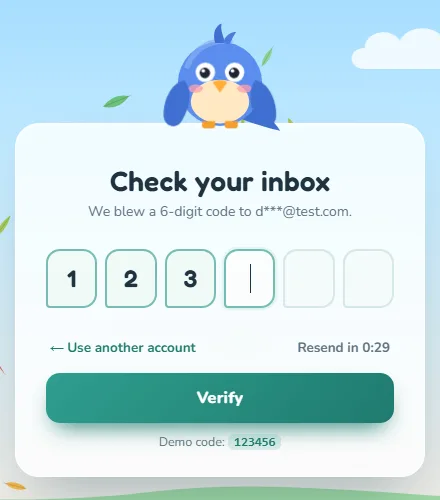
The second panel starts hidden. The six digit boxes are created by JavaScript, so
the container is empty here. The title has tabindex="-1" so the page can move focus
to it if needed. role="group" with a label tells screen readers the boxes belong
together.
1.6 The cloud gate and scripts
<!-- ================= SUCCESS: cloud gate ================= -->
<div class="gate" id="gate" aria-hidden="true">
  <div class="half l"><svg viewBox="0 0 560 1000" preserveAspectRatio="none"><path fill="#fff" d="M0 0 H500 C560 60 520 120 540 180 C600 240 520 300 545 370 C590 440 515 500 540 570 C595 640 520 700 545 770 C590 840 515 900 520 1000 H0 Z"/></svg></div>
  <div class="half r"><svg viewBox="0 0 560 1000" preserveAspectRatio="none"><path fill="#fff" d="M560 0 H60 C0 60 40 120 20 180 C-40 240 40 300 15 370 C-30 440 45 500 20 570 C-35 640 40 700 15 770 C-30 840 45 900 40 1000 H560 Z"/></svg></div>
</div>
<div class="welcome" id="welcome" aria-hidden="true">
  <div>
    <svg class="pin" viewBox="0 0 26 26" aria-hidden="true"><g>
      <path d="M13 13 L13 2 C18 2 20 7 13 13Z" fill="#2f9e8f"/><path d="M13 13 L24 13 C24 18 19 20 13 13Z" fill="#ffc94a"/>
      <path d="M13 13 L13 24 C8 24 6 19 13 13Z" fill="#2f9e8f"/><path d="M13 13 L2 13 C2 8 7 6 13 13Z" fill="#ffc94a"/>
      <circle cx="13" cy="13" r="2" fill="#1f3340"/></g></svg>
    <h2>Welcome aboard!</h2>
    <p id="welcomeText">Riding the breeze to your dashboard…</p>
    <button class="replay" id="replayBtn" type="button">Replay demo</button>
  </div>
</div>

<!-- GSAP (cdnjs) -->
<script src="https://cdnjs.cloudflare.com/ajax/libs/gsap/3.12.5/gsap.min.js"></script>
<script src="script.js"></script>
</body>
</html>
The gate is two SVG cloud halves, one for each side of the screen, with wavy inner edges that
meet in the middle. GSAP is loaded from cdnjs before our script.js.
Step 2: The CSS
2.1 Theme tokens
/* =====================================================================
   THEME TOKENS (overwritten at runtime from CONFIG.colors)
   ===================================================================== */
:root {
  --sky-top: #8fd3ff;
  --sky-mid: #cdeeff;
  --sky-bottom: #ffe9d6;
  --hill-back: #9fd8a4;
  --hill-front: #6cc07a;
  --accent: #2f9e8f;
  --accent-dark: #1f7a6e;
  --accent-soft: rgba(47, 158, 143, .16);
  --danger: #e2574c;
  --warning: #f2a33a;
  --success: #3fae5a;
  --ink: #1f3340;
  --ink-soft: #5d7380;
  --card: rgba(255, 255, 255, .82);
  --card-border: rgba(255, 255, 255, .9);
  --field: #f4fbfa;
  --field-border: #d6e8e6;
  --radius: 24px;
}

* { box-sizing: border-box; margin: 0; padding: 0; }
html, body { min-height: 100%; }
body {
  font-family: 'Nunito', system-ui, sans-serif;
  color: var(--ink);
  background: linear-gradient(180deg, var(--sky-top) 0%, var(--sky-mid) 45%, var(--sky-bottom) 100%);
  background-attachment: fixed;
  overflow-x: hidden;
}
.sr-only {
  position: absolute !important; width: 1px; height: 1px; padding: 0; margin: -1px;
  overflow: hidden; clip: rect(0 0 0 0); white-space: nowrap; border: 0;
}
All colours are CSS variables. JavaScript overwrites them from CONFIG.colors at start
up, so you can re-theme the whole page from one JavaScript object.
background-attachment: fixed keeps the sky gradient still while the page scrolls.
The .sr-only class is the standard way to hide content visually while keeping it
available to screen readers.
2.2 The background scene and storm layers
/* =====================================================================
   BACKGROUND SCENE
   ===================================================================== */
.scene { position: fixed; inset: 0; z-index: 0; pointer-events: none; overflow: hidden; }
.sun {
  position: absolute; top: 7%; right: 11%; width: 110px; height: 110px; border-radius: 50%;
  background: radial-gradient(circle, #fffbe0 0%, #ffe68a 55%, rgba(255, 220, 110, 0) 72%);
  animation: sunPulse 6s ease-in-out infinite alternate;
}
@keyframes sunPulse { to { transform: scale(1.08); opacity: .9; } }

.cloud { position: absolute; left: 0; opacity: .95; will-change: transform; animation: cloudDrift linear infinite; }
@keyframes cloudDrift { from { transform: translateX(-260px); } to { transform: translateX(calc(100vw + 60px)); } }

.hills { position: absolute; left: 0; right: 0; bottom: 0; height: 30vh; min-height: 180px; }
.hills svg { position: absolute; bottom: 0; width: 100%; height: 100%; }

.tree { position: absolute; left: max(2vw, 10px); bottom: 12vh; width: 210px; height: 280px; }
.tree .crown { transform-box: fill-box; transform-origin: 50% 100%; animation: crownSway 4.5s ease-in-out infinite alternate; }
@keyframes crownSway { from { transform: rotate(-2.5deg) skewX(-2deg); } to { transform: rotate(3.5deg) skewX(3deg); } }

.grass { position: absolute; left: 0; right: 0; bottom: 0; height: 70px; display: flex; justify-content: space-around; align-items: flex-end; }
.blade {
  width: 6px; border-radius: 6px 6px 0 0; background: linear-gradient(#5bb36a, #3f8f4f);
  transform-origin: 50% 100%; animation: bladeSway ease-in-out infinite alternate;
}
@keyframes bladeSway { from { transform: rotate(-4deg); } to { transform: rotate(16deg); } }

.windmill { position: absolute; right: 8vw; bottom: 22vh; width: 90px; height: 150px; }
.windmill .rotor { transform-box: fill-box; transform-origin: 50% 50%; animation: spin 4s linear infinite; }
@keyframes spin { to { transform: rotate(360deg); } }

#windCanvas { position: fixed; inset: 0; width: 100%; height: 100%; z-index: 1; pointer-events: none; }

/* storm layer (lockout) */
.storm { position: fixed; inset: 0; z-index: 2; pointer-events: none; opacity: 0;
  background: linear-gradient(180deg, rgba(30, 38, 58, .88), rgba(48, 58, 80, .72) 55%, rgba(30, 36, 50, .8)); }
.flash { position: fixed; inset: 0; z-index: 3; pointer-events: none; opacity: 0; background: #f4f8ff; }
.storm-clouds { position: fixed; left: 0; right: 0; top: 0; height: 40vh; z-index: 2; pointer-events: none; opacity: 0; transform: translateY(-100%); }
.storm-clouds svg { width: 100%; height: 100%; }
SVG groups such as the windmill rotor and the tree crown use
transform-box: fill-box. That makes transform-origin refer to the
group's own box, so the rotor spins around its hub and the crown sways from its base. The storm
layers start at opacity: 0, and the storm clouds wait above the screen
(translateY(-100%)), ready to roll in.
2.3 The card and fields
/* =====================================================================
   LAYOUT + CARD
   ===================================================================== */
.stage {
  position: relative; z-index: 5; min-height: 100vh; min-height: 100dvh;
  display: grid; place-items: center; padding: 120px 16px 40px;
}
.card-wrap { position: relative; width: min(410px, 100%); }
.card {
  position: relative;
  background: var(--card);
  border: 1px solid var(--card-border);
  border-radius: var(--radius);
  padding: 40px 30px 26px;
  box-shadow: 0 30px 60px -20px rgba(24, 60, 80, .35), 0 2px 0 rgba(255, 255, 255, .6) inset;
  backdrop-filter: blur(14px) saturate(140%);
  -webkit-backdrop-filter: blur(14px) saturate(140%);
  transition: background-color .6s ease, box-shadow .6s ease;
}
body[data-state="locked"] .card { background: rgba(232, 238, 248, .9); }

.panel[hidden] { display: none !important; }
h1 { font-family: 'Fredoka', 'Nunito', sans-serif; font-weight: 600; font-size: 28px; text-align: center; letter-spacing: .2px; }
.sub { text-align: center; color: var(--ink-soft); font-size: 14px; margin: 4px 0 22px; }

fieldset { border: 0; min-width: 0; }
.field { position: relative; margin-bottom: 16px; }
.field > label { display: block; font-weight: 700; font-size: 13.5px; margin-bottom: 6px; }
.control { position: relative; }
.control .icon {
  position: absolute; left: 14px; top: 50%; width: 18px; height: 18px; margin-top: -9px; color: var(--ink-soft); pointer-events: none;
}
.control input {
  width: 100%; height: 48px; padding: 0 48px 0 42px;
  border: 2px solid var(--field-border); border-radius: 14px; background: var(--field);
  font: 600 15px 'Nunito', sans-serif; color: var(--ink); outline: none;
  transition: border-color .2s, box-shadow .2s, background-color .2s;
}
.control input::placeholder { color: #9bb0b8; font-weight: 400; }
.control input:focus { border-color: var(--accent); background: #fff; box-shadow: 0 0 0 4px var(--accent-soft); }
.control input[aria-invalid="true"] { border-color: var(--danger); box-shadow: 0 0 0 4px rgba(226, 87, 76, .14); }
.control input.valid { border-color: var(--success); }
.control input:disabled { opacity: .55; cursor: not-allowed; }
The card is frosted glass: white at 82% opacity with backdrop-filter: blur(14px).
When the body has data-state="locked", the card turns a cool grey-blue to match the
storm. The state
machine sets that attribute, so CSS can react to the app's state without extra
classes.
Inputs show their state through attributes: [aria-invalid="true"] turns red, and the
.valid class turns green.
2.4 Status icons, hints, Caps Lock and the windsock
/* email status: sprout (valid) / wilted leaf (invalid) */
.status { position: absolute; right: 12px; top: 50%; width: 26px; height: 26px; margin-top: -13px; pointer-events: none; }
.status svg { position: absolute; inset: 0; opacity: 0; transform: scale(.2) rotate(-40deg); transition: transform .45s cubic-bezier(.3, 1.6, .5, 1), opacity .25s; }
.status.ok svg.ok, .status.bad svg.bad { opacity: 1; transform: none; }

.toggle {
  position: absolute; right: 6px; top: 50%; width: 38px; height: 38px; margin-top: -19px;
  border: 0; border-radius: 10px; background: transparent; color: var(--ink-soft); cursor: pointer; display: grid; place-items: center;
}
.toggle:hover { background: var(--accent-soft); color: var(--accent-dark); }
.toggle svg { width: 22px; height: 22px; }
.toggle .eye-closed { display: none; }
.toggle[aria-pressed="true"] .eye-open { display: none; }
.toggle[aria-pressed="true"] .eye-closed { display: block; }

.hint { font-size: 12.5px; min-height: 18px; margin-top: 5px; color: var(--ink-soft); }
.hint.error { color: var(--danger); font-weight: 700; }
.hint.good { color: var(--success); font-weight: 700; }

.caps {
  position: absolute; right: 0; top: -3px;
  display: inline-flex; align-items: center; gap: 6px; padding: 4px 10px; border-radius: 30px;
  background: #fff4e0; color: #9a5b00; font-size: 12px; font-weight: 800;
  opacity: 0; transform: translateY(-4px); transition: opacity .2s, transform .2s;
}
.caps.on { opacity: 1; transform: none; }

/* strength meter: windsock + 4 bars */
.strength { display: flex; align-items: center; gap: 12px; margin-top: 8px; }
.windsock { width: 58px; height: 34px; flex: none; }
.windsock .sock { transform-box: fill-box; transform-origin: 0% 50%; transform: scaleX(.12); transition: transform .6s cubic-bezier(.3, 1.5, .5, 1); }
.windsock .flutter { transform-box: fill-box; transform-origin: 0% 50%; animation: flutter var(--flutter, 1.4s) ease-in-out infinite alternate; }
@keyframes flutter { from { transform: skewY(-4deg); } to { transform: skewY(5deg); } }
.meter { flex: 1; }
.bars { display: grid; grid-template-columns: repeat(4, 1fr); gap: 5px; }
.bar { height: 7px; border-radius: 6px; background: #e3eef0; overflow: hidden; }
.bar i { display: block; height: 100%; border-radius: inherit; transform: scaleX(0); transform-origin: left; transition: transform .45s ease, background-color .3s; }
.meter-label { font-size: 12px; font-weight: 700; color: var(--ink-soft); margin-top: 4px; }

.row { display: flex; justify-content: space-between; align-items: center; flex-wrap: wrap; gap: 8px; font-size: 13.5px; margin: 4px 0 14px; }
.check { display: inline-flex; align-items: center; gap: 8px; cursor: pointer; font-weight: 600; }
.check input { width: 17px; height: 17px; accent-color: var(--accent); }
a { color: var(--accent-dark); font-weight: 700; text-decoration: none; border-radius: 4px; }
a:hover { text-decoration: underline; }
:focus-visible { outline: 3px solid var(--accent); outline-offset: 2px; }
.control input:focus-visible { outline: none; }
The sprout and wilted leaf both start invisible, small and rotated. When the status gets
.ok or .bad, the matching icon springs into place with an overshooting
curve, cubic-bezier(.3, 1.6, .5, 1), so it looks like it pops up.
The windsock is scaleX(.12) when the password is empty, and JavaScript widens it as
the password gets stronger. Inside, .flutter skews back and forth at a speed set by
the --flutter variable: a strong password makes it flap faster, like in strong
wind.
2.5 Attempts, button, lockout panel and code boxes
/* attempts */
.attempts { display: flex; align-items: center; justify-content: center; gap: 10px; margin-bottom: 14px; font-size: 12.5px; color: var(--ink-soft); font-weight: 700; }
.attempt-icons { display: flex; gap: 6px; }
.attempt-icons svg { width: 22px; height: 22px; }
.attempt-icons svg.gone { visibility: hidden; }

/* button + pinwheel loader */
.btn {
  position: relative; width: 100%; height: 50px; border: 0; border-radius: 14px; cursor: pointer;
  font: 800 16px 'Nunito', sans-serif; color: #fff; letter-spacing: .3px;
  background: linear-gradient(135deg, var(--accent), var(--accent-dark));
  box-shadow: 0 12px 24px -10px var(--accent-dark);
  display: flex; align-items: center; justify-content: center; gap: 10px; overflow: hidden;
  transition: transform .15s ease, filter .2s;
}
.btn:hover { filter: brightness(1.06); }
.btn:active { transform: scale(.98); }
.btn:disabled { cursor: not-allowed; filter: grayscale(.4) brightness(.95); }
.btn .pinwheel { width: 26px; height: 26px; display: none; }
.btn .pinwheel g { transform-box: fill-box; transform-origin: 50% 50%; animation: spin .7s linear infinite; }
.btn[aria-busy="true"] .pinwheel { display: block; }
.btn::after { /* soft gust sweep while loading */
  content: ''; position: absolute; inset: 0; opacity: 0;
  background: linear-gradient(100deg, transparent 20%, rgba(255, 255, 255, .35) 50%, transparent 80%);
  transform: translateX(-100%);
}
.btn[aria-busy="true"]::after { opacity: 1; animation: sweep 1.1s ease-in-out infinite; }
@keyframes sweep { to { transform: translateX(100%); } }

.alt { text-align: center; font-size: 13.5px; margin-top: 16px; color: var(--ink-soft); }

/* lockout panel */
.lock { display: none; margin: 4px 0 14px; padding: 14px 16px; border-radius: 16px; background: #2b3550; color: #e9f0ff; text-align: center; }
body[data-state="locked"] .lock { display: block; }
.lock .title { font-family: 'Fredoka', sans-serif; font-size: 17px; display: flex; align-items: center; justify-content: center; gap: 8px; }
.lock .clock { font-family: 'Fredoka', sans-serif; font-size: 34px; letter-spacing: 1px; margin: 4px 0; font-variant-numeric: tabular-nums; }
.lock .track { height: 6px; border-radius: 6px; background: rgba(255, 255, 255, .15); overflow: hidden; }
.lock .track i { display: block; height: 100%; background: linear-gradient(90deg, #8fd3ff, #c8f1ff); transform-origin: left; }
.lock p { font-size: 12.5px; opacity: .85; margin-top: 8px; }
.tornado { width: 22px; height: 22px; }
.tornado g { transform-box: fill-box; transform-origin: 50% 50%; animation: wobble .6s ease-in-out infinite alternate; }
@keyframes wobble { from { transform: skewX(-10deg); } to { transform: skewX(10deg); } }

/* OTP */
.otp-boxes { display: grid; grid-template-columns: repeat(6, 1fr); gap: 8px; margin: 6px 0 10px; }
.otp-boxes input {
  width: 100%; aspect-ratio: 1 / 1.15; min-height: 46px; text-align: center;
  font: 700 24px 'Fredoka', sans-serif; color: var(--ink);
  border: 2px solid var(--field-border); border-radius: 14px 14px 14px 4px; background: var(--field); outline: none;
  transition: border-color .2s, box-shadow .2s, background-color .2s;
}
.otp-boxes input:focus { border-color: var(--accent); background: #fff; box-shadow: 0 0 0 4px var(--accent-soft); }
.otp-boxes input.filled { border-color: var(--accent); background: #effaf7; }
.otp-boxes input[aria-invalid="true"] { border-color: var(--danger); }
.otp-meta { display: flex; justify-content: space-between; align-items: center; flex-wrap: wrap; gap: 8px; font-size: 13px; margin-bottom: 14px; }
.linkbtn { background: none; border: 0; font: 700 13.5px 'Nunito', sans-serif; color: var(--accent-dark); cursor: pointer; padding: 2px 4px; border-radius: 4px; }
.linkbtn:disabled { color: var(--ink-soft); cursor: default; }
.demo-note { text-align: center; font-size: 12.5px; color: var(--ink-soft); margin-top: 10px; }
.demo-note code { background: var(--accent-soft); padding: 1px 6px; border-radius: 6px; font-weight: 800; color: var(--accent-dark); }- Loading: while loading, the button has
aria-busy="true". CSS uses that to show the spinning pinwheel and a soft light sweep (::after). Once again, an accessibility attribute doubles as the styling hook. - The lockout panel only displays when the body is in the locked state.
- The code boxes are a six-column grid.
aspect-ratio: 1 / 1.15keeps them slightly taller than wide at any screen size. One corner is less rounded (14px 14px 14px 4px), a small leaf-like detail.
2.6 The bird, flying letters and feathers
/* =====================================================================
   MASCOT (bird perched on the card)
   ===================================================================== */
.bird { position: absolute; left: 50%; top: -106px; width: 130px; height: 122px; margin-left: -65px; z-index: 6; pointer-events: none; }
.bird svg { width: 100%; height: 100%; overflow: visible; }
.bird .eye { transform-box: fill-box; transform-origin: 50% 50%; animation: blink 5s infinite; }
@keyframes blink { 0%, 94%, 100% { transform: scaleY(1); } 96% { transform: scaleY(.08); } }

/* flying letters (leaves) */
.flyer {
  position: fixed; left: 0; top: 0; z-index: 30; pointer-events: none;
  width: 28px; height: 28px; display: grid; place-items: center;
  font: 800 14px 'Nunito', sans-serif; color: #fff; text-shadow: 0 1px 1px rgba(0, 0, 0, .25);
  will-change: transform, opacity;
}
.flyer::before {
  content: ''; position: absolute; inset: 0; z-index: -1;
  background: var(--leaf, #6cc07a); border-radius: 0 80% 0 80%;
  box-shadow: inset -3px -3px 0 rgba(0, 0, 0, .12);
}
.feather { position: fixed; left: 0; top: 0; z-index: 30; width: 14px; height: 6px; border-radius: 50%; background: #5b8def; pointer-events: none; }
The bird sits above the card with top: -106px and never blocks clicks
(pointer-events: none). A flying letter is a small box whose ::before
is a leaf shape. border-radius: 0 80% 0 80% rounds two opposite corners only,
which makes a classic leaf. The leaf colour comes from --leaf, set randomly per
letter.
2.7 The cloud gate, responsive rules and reduced motion
/* =====================================================================
   SUCCESS: cloud gate
   ===================================================================== */
.gate { position: fixed; inset: 0; z-index: 40; pointer-events: none; visibility: hidden; }
.gate .half { position: absolute; top: 0; bottom: 0; width: 56%; }
.gate .half.l { left: 0; transform: translateX(-102%); }
.gate .half.r { right: 0; transform: translateX(102%); }
.gate .half svg { width: 100%; height: 100%; display: block; }
.welcome {
  position: fixed; inset: 0; z-index: 41; display: grid; place-items: center; text-align: center; pointer-events: none;
  opacity: 0; color: var(--ink);
}
.welcome h2 { font-family: 'Fredoka', sans-serif; font-size: clamp(28px, 7vw, 46px); }
.welcome p { color: var(--ink-soft); margin-top: 6px; font-weight: 700; }
.welcome .pin { width: 64px; height: 64px; margin: 0 auto 12px; }
.welcome .pin g { transform-box: fill-box; transform-origin: 50% 50%; animation: spin 1s linear infinite; }
.welcome a, .welcome button { pointer-events: auto; }
.replay { margin-top: 18px; padding: 10px 20px; border: 0; border-radius: 12px; background: var(--accent); color: #fff; font: 800 14px 'Nunito'; cursor: pointer; display: none; }

/* =====================================================================
   RESPONSIVE + REDUCED MOTION
   ===================================================================== */
@media (max-width: 720px) {
  .tree { width: 150px; height: 200px; left: -30px; }
  .windmill { right: 2vw; transform: scale(.75); transform-origin: bottom right; }
}
@media (max-width: 420px) {
  .card { padding: 36px 18px 22px; }
  h1 { font-size: 24px; }
  .otp-boxes { gap: 6px; }
  .otp-boxes input { font-size: 20px; }
  .tree, .windmill { display: none; }
}
@media (prefers-reduced-motion: reduce) {
  *, *::before, *::after { animation-duration: .001ms !important; animation-iteration-count: 1 !important; transition-duration: .001ms !important; }
}
The two gate halves wait just off screen (translateX(±102%)). On small screens the
tree and windmill shrink, and on phones they disappear, so they don't crowd the form. Reduced
motion makes every CSS animation and transition finish almost instantly.
Step 3: The JavaScript
3.1 CONFIG
/* =====================================================================
   CONFIG – theme colours, timings, limits
   ===================================================================== */
const CONFIG = {
  colors: {
    skyTop: '#8fd3ff', skyMid: '#cdeeff', skyBottom: '#ffe9d6',
    hillBack: '#9fd8a4', hillFront: '#6cc07a',
    accent: '#2f9e8f', accentDark: '#1f7a6e',
    danger: '#e2574c', warning: '#f2a33a', success: '#3fae5a',
    leaves: ['#6cc07a', '#8bd497', '#f2b84b', '#e98a3c', '#d9634a', '#a7cf5b'],
    strength: ['#e2574c', '#f2a33a', '#a7c94a', '#3fae5a']
  },
  timings: {
    emailDebounce: 450,      // ms before live email validation runs
    letterFlight: 0.75,      // s for a typed letter to fly in
    fakeLatency: 1300,       // ms the mock API takes
    resendSeconds: 30,       // OTP resend cooldown
    redirectDelay: 2600      // ms after the reveal before navigating
  },
  wind: { base: 1, gust: 3.2, storm: 4.2, leafCount: 34 },
  maxAttempts: 3,
  lockoutSeconds: 60,
  otpLength: 6,
  redirectUrl: '/dashboard',
  demoMode: true,            // true: never navigate after success (set false in your real app)
  storageKeys: { lockUntil: 'windLogin.lockUntil', failures: 'windLogin.failures', email: 'windLogin.email' },
  demo: { email: 'demo@test.com', password: 'Demo@123', otp: '123456' }
};
Everything you might want to tune is here:
- colours
- how long to wait before checking the email (450ms after you stop typing)
- the number of attempts (3) and the lockout length (60 seconds)
- the code length (6) and the resend cooldown (30 seconds)
- the
localStoragekeys
demoMode: true keeps the demo from navigating after success. Set it to
false in a real app so the user is redirected to redirectUrl. The demo
credentials live here too. Remove them in production.
3.2 Utilities, the GSAP fallback and announcements
/* =====================================================================
   UTILITIES
   ===================================================================== */
const $ = (s, r = document) => r.querySelector(s);
const $$ = (s, r = document) => [...r.querySelectorAll(s)];
const sleep = ms => new Promise(r => setTimeout(r, ms));
const rand = (a, b) => a + Math.random() * (b - a);
const pick = arr => arr[(Math.random() * arr.length) | 0];
const clamp = (v, a, b) => Math.max(a, Math.min(b, v));
const reduceMotion = window.matchMedia('(prefers-reduced-motion: reduce)');
const RM = () => reduceMotion.matches;
const HAS_GSAP = typeof window.gsap !== 'undefined';

// Minimal fallback so the page still works if the CDN is blocked (no tweening, end states only)
if (!HAS_GSAP) {
  const apply = (targets, v) => {
    const list = typeof targets === 'string' ? $$(targets) : (targets.length !== undefined ? [...targets] : [targets]);
    list.forEach(el => {
      if (!el || !el.style) return;
      if ('opacity' in v || 'autoAlpha' in v) el.style.opacity = v.opacity ?? v.autoAlpha;
      if ('autoAlpha' in v) el.style.visibility = v.autoAlpha ? 'visible' : 'hidden';
      const t = [];
      if ('x' in v || 'y' in v) t.push(`translate(${typeof v.x === 'string' ? v.x : (v.x || 0) + 'px'}, ${typeof v.y === 'string' ? v.y : (v.y || 0) + 'px'})`);
      if ('rotation' in v) t.push(`rotate(${v.rotation}deg)`);
      if ('scale' in v) t.push(`scale(${v.scale})`);
      if (t.length) el.style.transform = t.join(' ');
    });
    if (v.onComplete) setTimeout(v.onComplete, 0);
  };
  const tl = () => { const o = { to: (t, v) => (apply(t, v), o), from: () => o, fromTo: (t, a, b) => (apply(t, b), o), set: (t, v) => (apply(t, v), o), call: f => (setTimeout(f, 0), o), add: () => o, kill: () => o, then: f => Promise.resolve().then(f) }; return o; };
  window.gsap = { to: (t, v) => (apply(t, v), tl()), from: () => tl(), fromTo: (t, a, b) => (apply(t, b), tl()), set: (t, v) => apply(t, v), timeline: tl, killTweensOf: () => {}, utils: { random: rand }, globalTimeline: { timeScale() {} } };
}

const store = {
  get(k) { try { return localStorage.getItem(k); } catch (e) { return null; } },
  set(k, v) { try { localStorage.setItem(k, v); } catch (e) { /* private mode / blocked */ } },
  del(k) { try { localStorage.removeItem(k); } catch (e) { } }
};

const srStatus = $('#srStatus'), srAlert = $('#srAlert');
function announce(msg, assertive = false) {
  const el = assertive ? srAlert : srStatus;
  el.textContent = '';
  requestAnimationFrame(() => { el.textContent = msg; });
}

// apply theme colours from CONFIG
(function applyTheme() {
  const c = CONFIG.colors, s = document.documentElement.style;
  s.setProperty('--sky-top', c.skyTop); s.setProperty('--sky-mid', c.skyMid); s.setProperty('--sky-bottom', c.skyBottom);
  s.setProperty('--hill-back', c.hillBack); s.setProperty('--hill-front', c.hillFront);
  s.setProperty('--accent', c.accent); s.setProperty('--accent-dark', c.accentDark);
  s.setProperty('--danger', c.danger); s.setProperty('--warning', c.warning); s.setProperty('--success', c.success);
})();- Small helpers:
$and$$find elements,rand,pickandclamphandle numbers, andRM()checks the reduced motion setting live, so changing the setting takes effect without a reload. - The GSAP fallback: if the CDN is blocked,
window.gsapis replaced by a tiny object with the same method names, which jumps straight to each animation's end state. Nothing animates, but nothing breaks either. storewrapslocalStorageintry/catch, because it throws in some private browsing modes.announce()clears the live region, then sets the message on the next frame. Without the clear, a screen reader might not repeat a message identical to the previous one, such as a second “Wrong email or password”.
3.3 The mock back end
/* =====================================================================
   MOCK BACKEND
   Replace the bodies of these functions with real calls to your Laravel API.
   ===================================================================== */
const api = {
  /**
   * Real Laravel (Sanctum SPA) version:
   *   await fetch('/sanctum/csrf-cookie', { credentials: 'include' });       // sets XSRF-TOKEN cookie
   *   const res = await fetch('/api/login', {
   *     method: 'POST', credentials: 'include',
   *     headers: { 'Content-Type': 'application/json', 'Accept': 'application/json',
   *                'X-XSRF-TOKEN': decodeURIComponent(getCookie('XSRF-TOKEN')) },
   *                // or 'X-CSRF-TOKEN': document.querySelector('meta[name=csrf-token]').content
   *     body: JSON.stringify({ email, password, remember })
   *   });
   *   if (res.status === 429) return { ok: false, locked: true, retryAfter: +res.headers.get('Retry-After') || 60 };
   *   if (res.status === 422 || res.status === 401) return { ok: false, error: 'invalid' };
   *   const data = await res.json();             // e.g. { two_factor: true }
   *   return { ok: true, otpRequired: !!data.two_factor };
   *
   * Server side: never rely on this page's counter. Throttle in Laravel, e.g.
   *   Route::post('/login', ...)->middleware('throttle:login');
   *   RateLimiter::for('login', fn (Request $r) =>
   *       Limit::perMinute(3)->by(Str::lower($r->input('email')).'|'.$r->ip()));
   */
  async login(email, password, remember) {
    await sleep(CONFIG.timings.fakeLatency);
    if (email.toLowerCase() === CONFIG.demo.email && password === CONFIG.demo.password) {
      return { ok: true, otpRequired: true };
    }
    return { ok: false, error: 'invalid' };
  },

  /**
   * Real version: POST /api/verify-otp  { code }  (same CSRF headers as above)
   *   200 → { redirect: '/dashboard' }   422 → invalid code   429 → too many tries
   */
  async verifyOtp(code) {
    await sleep(CONFIG.timings.fakeLatency * 0.8);
    return code === CONFIG.demo.otp ? { ok: true, redirect: CONFIG.redirectUrl } : { ok: false };
  },

  /** Real version: POST /api/resend-otp (throttle this route on the server too) */
  async resendOtp() { await sleep(500); return { ok: true }; }
};
The api object has three async functions: login,
verifyOtp and resendOtp. They wait a little (to feel like a network
request) and return simple results like { ok: true, otpRequired: true }. The rest of
the page only knows about these results, so connecting a real server means changing only these
three functions.
The comments show the real version for a Laravel Sanctum app: fetch the CSRF cookie, POST JSON to
/api/login, and map HTTP status codes to results. 429 means locked out, and 422 or
401 means wrong details. Most importantly, they show server-side rate limiting
with Laravel's RateLimiter.
3.4 The state machine
/* =====================================================================
   STATE MACHINE  idle → typing → submitting → error | locked | otp → success
   ===================================================================== */
const TRANSITIONS = {
  idle:       ['typing', 'submitting', 'locked', 'error'],
  typing:     ['idle', 'submitting', 'locked', 'error'],
  submitting: ['error', 'locked', 'otp'],
  error:      ['typing', 'idle', 'submitting', 'locked'],
  locked:     ['idle'],
  otp:        ['success', 'idle'],
  success:    []
};
let state = 'idle';
function setState(next) {
  if (next === state) return true;
  if (!TRANSITIONS[state].includes(next)) { console.warn(`[login] blocked transition ${state} → ${next}`); return false; }
  state = next;
  document.body.dataset.state = next;
  return true;
}
A state machine is a list of states and the moves allowed between them. Here,
TRANSITIONS says, for example, that from submitting you can go to
error, locked or otp, but never straight to
success. setState() refuses anything not on the list and logs a warning.
This prevents a whole class of bugs, such as a double click starting two logins at once.
The current state is also written to body[data-state], which the CSS uses for the
stormy card and the lockout panel.
3.5 The wind canvas and grass
/* =====================================================================
   WIND CANVAS – drifting leaves, wind streaks and storm rain
   ===================================================================== */
const Wind = (() => {
  const cv = $('#windCanvas'), ctx = cv.getContext('2d');
  let W = 0, H = 0, dpr = 1, last = 0, running = false;
  const st = { wind: CONFIG.wind.base, target: CONFIG.wind.base, rain: 0, rainTarget: 0 };
  const leaves = [], streaks = [], drops = [];

  function resize() {
    dpr = Math.min(window.devicePixelRatio || 1, 2);
    W = innerWidth; H = innerHeight;
    cv.width = W * dpr; cv.height = H * dpr;
    ctx.setTransform(dpr, 0, 0, dpr, 0, 0);
    if (!running) draw(0);
  }
  function leaf(initial) {
    return {
      x: initial ? rand(0, W) : rand(-120, -20), y: rand(-40, H * 0.9),
      s: rand(.55, 1.25), r: rand(0, 6.28), vr: rand(-2, 2), f: rand(0, 6.28), vf: rand(1.5, 3.5),
      vy: rand(-8, 22), ph: rand(0, 6.28), c: pick(CONFIG.colors.leaves)
    };
  }
  function drawLeaf(l) {
    ctx.save();
    ctx.translate(l.x, l.y); ctx.rotate(l.r); ctx.scale(l.s, l.s * Math.max(.15, Math.abs(Math.cos(l.f))));
    ctx.fillStyle = l.c;
    ctx.beginPath(); ctx.moveTo(-13, 0); ctx.quadraticCurveTo(0, -9, 13, 0); ctx.quadraticCurveTo(0, 9, -13, 0); ctx.fill();
    ctx.strokeStyle = 'rgba(0,0,0,.15)'; ctx.lineWidth = 1;
    ctx.beginPath(); ctx.moveTo(-11, 0); ctx.lineTo(15, 0); ctx.stroke();
    ctx.restore();
  }
  function draw(dt) {
    ctx.clearRect(0, 0, W, H);
    st.wind += (st.target - st.wind) * Math.min(1, dt * 2.2);
    st.rain += (st.rainTarget - st.rain) * Math.min(1, dt * 1.5);
    const w = st.wind, t = performance.now() / 1000;

    // streaks
    if (Math.random() < dt * (0.8 + w * 1.4)) streaks.push({ x: rand(-200, W * .6), y: rand(20, H * .85), len: rand(80, 220), life: 1, sp: rand(300, 520) });
    ctx.lineCap = 'round';
    for (let i = streaks.length - 1; i >= 0; i--) {
      const s = streaks[i];
      s.x += s.sp * (0.4 + w * .45) * dt; s.life -= dt * .7;
      if (s.life <= 0) { streaks.splice(i, 1); continue; }
      const a = Math.sin(s.life * Math.PI) * (.35 + st.rain * .2);
      ctx.strokeStyle = `rgba(255,255,255,${a})`; ctx.lineWidth = 2;
      ctx.beginPath(); ctx.moveTo(s.x, s.y);
      ctx.bezierCurveTo(s.x + s.len * .35, s.y - 12, s.x + s.len * .65, s.y + 12, s.x + s.len, s.y - 4);
      ctx.stroke();
    }
    // leaves
    for (const l of leaves) {
      l.x += (35 + 85 * w) * l.s * dt;
      l.y += (l.vy + Math.sin(t * 1.6 + l.ph) * 28 * Math.min(w, 2.5)) * dt;
      l.r += l.vr * dt * (0.6 + w * .5); l.f += l.vf * dt * (0.6 + w * .4);
      if (l.x > W + 60 || l.y > H + 40 || l.y < -80) Object.assign(l, leaf(false));
      drawLeaf(l);
    }
    // rain
    if (st.rain > 0.02) {
      const want = Math.floor(260 * st.rain);
      while (drops.length < want) drops.push({ x: rand(-100, W), y: rand(-H, 0), v: rand(700, 1000), l: rand(12, 24) });
      ctx.strokeStyle = `rgba(200,220,255,${.55 * st.rain})`; ctx.lineWidth = 1.4;
      ctx.beginPath();
      for (const d of drops) {
        d.y += d.v * dt; d.x += w * 60 * dt;
        if (d.y > H) { d.y = rand(-60, 0); d.x = rand(-100, W); }
        ctx.moveTo(d.x, d.y); ctx.lineTo(d.x + w * 3, d.y + d.l);
      }
      ctx.stroke();
    } else drops.length = 0;
  }
  function loop(now) {
    const dt = Math.min((now - last) / 1000, .05); last = now;
    draw(dt);
    if (running) requestAnimationFrame(loop);
  }
  function start() {
    if (RM()) { running = false; draw(0); return; }
    if (running) return;
    running = true; last = performance.now(); requestAnimationFrame(loop);
  }
  function init() {
    resize();
    for (let i = 0; i < CONFIG.wind.leafCount; i++) leaves.push(leaf(true));
    addEventListener('resize', resize);
    reduceMotion.addEventListener?.('change', () => { running = false; start(); });
    start();
  }
  return {
    init,
    set(v) { st.target = v; },
    gust(power = CONFIG.wind.gust, ms = 900) { const back = st.target; st.target = power; setTimeout(() => { if (st.target === power) st.target = back; }, ms); },
    rain(v) { st.rainTarget = v; if (RM()) { st.rain = v; draw(0); } },
    get base() { return st.target; }
  };
})();

/* grass blades */
(function grass() {
  const g = $('#grass'), n = Math.min(70, Math.floor(innerWidth / 18));
  for (let i = 0; i < n; i++) {
    const b = document.createElement('span');
    b.className = 'blade';
    b.style.height = rand(24, 62) + 'px';
    b.style.animationDuration = rand(1.4, 2.6) + 's';
    b.style.animationDelay = -rand(0, 2) + 's';
    g.appendChild(b);
  }
})();
Wind is a module, a function that runs once and returns only the controls other
code needs: set, gust and rain. Inside:
- Smooth changes: the wind strength glides towards its target each frame
(
wind += (target - wind) * dt * 2.2), so a gust swells and fades instead of switching instantly. - Leaves drift with the wind and bob on a sine wave. Each is squashed
vertically by
Math.cos(l.f)as it spins, which fakes a 3D flip on a flat canvas. - Wind streaks are faint curved lines that fade in and out.
- Rain appears with up to 260 drops when the storm sets
rain(1). All the drops are added to one path and drawn with a singlestroke(), which is much faster than drawing each drop separately.
The canvas matches the screen's pixel density (capped at 2) so it stays sharp. With reduced
motion, it draws one still frame. The grass is up to 70 <span> blades, each
with a random height and sway speed.
3.6 The bird
/* =====================================================================
   MASCOT – look at caret, cover eyes, peek, react
   ===================================================================== */
const Bird = (() => {
  const el = $('#bird'), body = $('#birdBody');
  const wingL = $('#wingL'), wingR = $('#wingR'), pupils = [$('#pupilL'), $('#pupilR')];
  let mode = 'idle', idleTimer = null, shiver = null;
  const POSE = {
    rest:  { l: 18,   r: -18 },
    cover: { l: -128, r: 128 },
    peek:  { l: -128, r: 62 }
  };
  function wings(p, d = .5) {
    gsap.to(wingL, { rotation: p.l, svgOrigin: '36 80', duration: d, ease: 'back.out(1.6)' });
    gsap.to(wingR, { rotation: p.r, svgOrigin: '124 80', duration: d, ease: 'back.out(1.6)' });
  }
  function look(x, y, d = .25) { gsap.to(pupils, { x, y, duration: d, ease: 'power2.out' }); }
  function tilt(deg) { gsap.to(body, { rotation: deg, svgOrigin: '80 136', duration: .4, ease: 'power2.out' }); }
  function wander() {
    clearTimeout(idleTimer);
    if (mode !== 'idle') return;
    look(rand(-4, 4), rand(-3, 2), .5);
    idleTimer = setTimeout(wander, rand(1600, 3200));
  }
  function set(next) {
    if (mode === 'locked' && next !== 'unlock') return;
    mode = next === 'unlock' ? 'idle' : next;
    clearTimeout(idleTimer);
    if (shiver && next === 'unlock') { shiver.kill(); shiver = null; gsap.to(el, { x: 0, duration: .2 }); }
    switch (mode) {
      case 'idle':   wings(POSE.rest); tilt(0); wander(); break;
      case 'look':   wings(POSE.rest); break;
      case 'cover':  wings(POSE.cover, .45); look(0, 2); tilt(0); break;
      case 'peek':   wings(POSE.peek, .45); look(3, 3); break;
      case 'locked':
        wings(POSE.cover, .4); tilt(0);
        if (!RM()) shiver = gsap.to(el, { x: 2.5, duration: .06, repeat: -1, yoyo: true, ease: 'none' });
        break;
    }
  }
  // follow the caret: ratio 0..1 across the field
  function follow(ratio) {
    if (mode !== 'look') return;
    const x = -5 + clamp(ratio, 0, 1) * 10;
    look(x, 3.5, .18);
    tilt((ratio - .5) * 10);
  }
  function ruffle() {
    if (RM()) return;
    gsap.fromTo(el, { scaleX: 1.12, scaleY: .9 }, { scaleX: 1, scaleY: 1, duration: .6, ease: 'elastic.out(1.2, .35)' });
    const r = el.getBoundingClientRect();
    for (let i = 0; i < 6; i++) {
      const f = document.createElement('span'); f.className = 'feather'; document.body.appendChild(f);
      gsap.fromTo(f, { x: r.left + r.width / 2 + rand(-30, 30), y: r.top + r.height * .6, rotation: rand(0, 180), opacity: 1 },
        { x: `+=${rand(40, 140)}`, y: `+=${rand(60, 160)}`, rotation: `+=${rand(180, 540)}`, opacity: 0, duration: rand(1.2, 1.8), ease: 'power1.in', onComplete: () => f.remove() });
    }
  }
  function hop() {
    if (RM()) return;
    gsap.fromTo(el, { y: 0 }, { y: -14, duration: .18, yoyo: true, repeat: 3, ease: 'power1.out' });
  }
  function flyAway() {
    clearTimeout(idleTimer); mode = 'gone';
    const tl = gsap.timeline();
    tl.to(wingL, { rotation: -70, svgOrigin: '36 80', duration: .09, repeat: 11, yoyo: true, ease: 'sine.inOut' }, 0)
      .to(wingR, { rotation: 70, svgOrigin: '124 80', duration: .09, repeat: 11, yoyo: true, ease: 'sine.inOut' }, 0)
      .to(el, { y: -40, duration: .35, ease: 'power2.out' }, 0)
      .to(el, { x: innerWidth * .6, y: -innerHeight * .8, rotation: 18, scale: .5, duration: 1.2, ease: 'power2.in' }, .35);
    return tl;
  }
  return { set, follow, look, ruffle, hop, flyAway, get mode() { return mode; } };
})();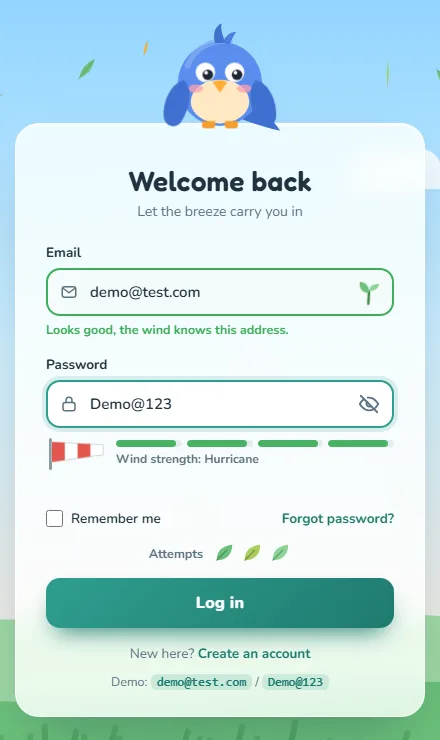
The bird has named poses stored as wing angles in POSE: rest, cover and peek.
wings() animates both wings with GSAP. svgOrigin sets the rotation
point in SVG coordinates (the shoulders), and back.out easing gives a little
overshoot.
- Idle:
wander()makes the bird glance around every 1.6 to 3.2 seconds. - Look:
follow(ratio)moves the pupils along the field and tilts the head towards the text cursor. - Locked: both wings cover the eyes and the bird shivers, using a tiny repeating left-right tween.
- Reactions:
ruffle()squashes the bird and drops six feathers,hop()bounces it, andflyAway()flaps its wings fast while it flies off the screen.
3.7 Letters that fly like leaves
/* =====================================================================
   FLYING LETTERS – characters arrive and leave as leaves on the wind
   ===================================================================== */
const measureCtx = document.createElement('canvas').getContext('2d');
function caretPoint(input) {
  const cs = getComputedStyle(input);
  measureCtx.font = `${cs.fontWeight} ${cs.fontSize} ${cs.fontFamily}`;
  const caret = input.selectionStart ?? input.value.length;
  const shown = input.type === 'password' ? '•'.repeat(caret) : input.value.slice(0, caret);
  const r = input.getBoundingClientRect();
  const x = r.left + parseFloat(cs.paddingLeft) + measureCtx.measureText(shown).width - input.scrollLeft;
  const maxX = r.right - parseFloat(cs.paddingRight);
  return { x: Math.min(x, maxX), y: r.top + r.height / 2, ratio: (Math.min(x, maxX) - r.left) / r.width };
}
function makeFlyer(ch) {
  const f = document.createElement('span');
  f.className = 'flyer';
  f.textContent = ch;
  f.style.setProperty('--leaf', pick(CONFIG.colors.leaves));
  document.body.appendChild(f);
  return f;
}
function flyIn(tx, ty, ch) {
  if (RM()) return;
  const f = makeFlyer(ch);
  const sx = tx - rand(160, 280), sy = ty + rand(-150, 120);
  const d = CONFIG.timings.letterFlight;
  gsap.timeline({ onComplete: () => f.remove() })
    .set(f, { x: sx - 14, y: sy - 14, rotation: rand(-200, 200), scale: rand(.8, 1.15), opacity: 0 })
    .to(f, { opacity: 1, duration: .12 })
    .to(f, { x: (sx + tx) / 2 - 14 + rand(-30, 30), y: Math.min(sy, ty) - rand(30, 70) - 14, rotation: `+=${rand(160, 320)}`, duration: d * .5, ease: 'sine.out' }, 0)
    .to(f, { x: tx - 14, y: ty - 14, rotation: 0, scale: .62, duration: d * .5, ease: 'power2.inOut' })
    .to(f, { opacity: 0, scale: .2, duration: .18 });
}
function blowAway(x, y, ch, strength = 1) {
  if (RM()) return;
  const f = makeFlyer(ch);
  gsap.timeline({ onComplete: () => f.remove() })
    .set(f, { x: x - 14, y: y - 14, scale: .7, opacity: 1 })
    .to(f, { x: `+=${rand(160, 380) * strength}`, y: `-=${rand(40, 200) * strength}`, rotation: rand(240, 900), scale: rand(.8, 1.2), duration: rand(.9, 1.4), ease: 'power1.in' })
    .to(f, { opacity: 0, duration: .4 }, '-=.4');
}
// letters of a whole field scatter (wrong password)
function scatterField(input) {
  const r = input.getBoundingClientRect();
  const n = Math.min(input.value.length, 16);
  const cs = getComputedStyle(input);
  measureCtx.font = `${cs.fontWeight} ${cs.fontSize} ${cs.fontFamily}`;
  const charW = measureCtx.measureText('•').width;
  for (let i = 0; i < n; i++) {
    const ch = input.type === 'password' ? '•' : input.value[i];
    setTimeout(() => blowAway(r.left + parseFloat(cs.paddingLeft) + charW * (i + .5), r.top + r.height / 2, ch, 1.3), i * 35);
  }
}
function attachLetterWind(input, onCaret) {
  let prev = input.value;
  input.addEventListener('input', () => {
    const val = input.value;
    if (val.length > prev.length) {
      const added = val.length - prev.length;
      const p = caretPoint(input);
      const end = input.selectionStart ?? val.length;
      const chars = val.slice(end - added, end).slice(-12);
      [...chars].forEach((c, i) => setTimeout(() => flyIn(p.x - (chars.length - 1 - i) * 7, p.y, input.type === 'password' ? '' : c), i * 45));
    } else if (val.length < prev.length) {
      const removed = prev.length - val.length;
      const at = input.selectionStart ?? val.length;
      const gone = prev.substr(at, removed).slice(0, 10);
      const p = caretPoint(input);
      [...gone].forEach((c, i) => setTimeout(() => blowAway(p.x + i * 8, p.y, input.type === 'password' ? '' : c, .7), i * 40));
    }
    prev = val;
    onCaret && onCaret(caretPoint(input));
  });
  const sync = () => { prev = input.value; };
  input.addEventListener('change', sync);
  return { reset: sync };
}
To fly a letter to the right spot, we need to know where the text cursor (caret) is. Browsers
don't tell you that for inputs, so caretPoint() works it out: it copies the input's
font onto a hidden canvas and uses measureText() to measure the text before the
caret. For passwords it measures bullets (•) instead, because that's what's on
screen.
flyIn() starts a leaf off to the left and arcs it through a random midpoint to the
caret, spinning as it goes, where it shrinks and fades as the real character appears.
blowAway() does the reverse for deleted characters. attachLetterWind()
compares the old and new value on every input to know what was typed or deleted. Password
letters fly as blank leaves, so nothing secret is ever shown.
3.8 Email, password, Caps Lock and remember me
/* =====================================================================
   FORM ELEMENTS
   ===================================================================== */
const form = $('#loginForm'), fields = $('#loginFields');
const email = $('#email'), pw = $('#password'), toggle = $('#togglePw');
const emailHint = $('#emailHint'), emailStatus = $('#emailStatus'), pwHint = $('#pwHint');
const loginBtn = $('#loginBtn'), capsWarn = $('#capsWarn');
const card = $('#card'), cardWrap = $('#cardWrap');

function goTyping() { if (state === 'idle' || state === 'error') setState('typing'); }

/* ---- email: caret following + debounced validation ---- */
const emailWind = attachLetterWind(email, p => Bird.follow(p.ratio));
email.addEventListener('focus', () => { goTyping(); Bird.set('look'); Bird.follow(caretPoint(email).ratio); });
['click', 'keyup', 'select'].forEach(ev => email.addEventListener(ev, () => Bird.follow(caretPoint(email).ratio)));
email.addEventListener('blur', () => { setTimeout(maybeIdle, 0); validateEmail(true); });

const EMAIL_RE = /^[^\s@]+@[^\s@]+\.[^\s@]{2,}$/;
let emailTimer = null;
email.addEventListener('input', () => {
  goTyping();
  clearTimeout(emailTimer);
  emailStatus.className = 'status';
  email.classList.remove('valid');
  email.removeAttribute('aria-invalid');
  emailHint.className = 'hint'; emailHint.textContent = 'Checking…';
  emailTimer = setTimeout(() => validateEmail(false), CONFIG.timings.emailDebounce);
});
function validateEmail(final) {
  clearTimeout(emailTimer);
  const v = email.value.trim();
  if (!v) {
    emailStatus.className = 'status'; email.classList.remove('valid'); email.removeAttribute('aria-invalid');
    emailHint.className = 'hint'; emailHint.textContent = final ? '' : "We'll never share your email.";
    return false;
  }
  const ok = EMAIL_RE.test(v);
  emailStatus.className = 'status ' + (ok ? 'ok' : 'bad');
  email.classList.toggle('valid', ok);
  if (ok) { email.removeAttribute('aria-invalid'); emailHint.className = 'hint good'; emailHint.textContent = 'Looks good, the wind knows this address.'; }
  else { email.setAttribute('aria-invalid', 'true'); emailHint.className = 'hint error'; emailHint.textContent = 'That email looks a little windswept. Please check it.'; }
  return ok;
}

/* ---- password: cover eyes, peek, strength, caps lock ---- */
const pwWind = attachLetterWind(pw);
pw.addEventListener('focus', () => { goTyping(); Bird.set(pw.type === 'text' ? 'peek' : 'cover'); });
pw.addEventListener('blur', e => { if (e.relatedTarget === toggle) return; setTimeout(maybeIdle, 0); });
toggle.addEventListener('mousedown', e => e.preventDefault());
toggle.addEventListener('click', () => {
  const show = pw.type === 'password';
  pw.type = show ? 'text' : 'password';
  toggle.setAttribute('aria-pressed', String(show));
  toggle.setAttribute('aria-label', show ? 'Hide password' : 'Show password');
  announce(show ? 'Password shown' : 'Password hidden');
  pw.focus();
  Bird.set(show ? 'peek' : 'cover');
  Wind.gust(2, 500);
});

const STAGES = ['Breeze', 'Gust', 'Gale', 'Hurricane'];
const bars = $$('.bar i'), sock = $('#sock'), meterLabel = $('#meterLabel');
function scorePassword(v) {
  if (!v) return 0;
  let s = 0;
  if (v.length >= 8) s++;
  if (/[a-z]/.test(v) && /[A-Z]/.test(v)) s++;
  if (/\d/.test(v)) s++;
  if (/[^A-Za-z0-9]/.test(v)) s++;
  if (v.length >= 12) s++;
  return clamp(Math.ceil(s * 4 / 5), 1, 4);       // 1..4
}
let lastStage = 0;
pw.addEventListener('input', () => {
  goTyping();
  const stage = scorePassword(pw.value);
  bars.forEach((b, i) => {
    b.style.transform = `scaleX(${i < stage ? 1 : 0})`;
    b.style.backgroundColor = CONFIG.colors.strength[Math.max(stage - 1, 0)];
  });
  sock.style.transform = `scaleX(${stage ? .25 + stage * .1875 : .12})`;
  sock.style.setProperty('--flutter', stage ? (1.4 - stage * .28) + 's' : '1.4s');
  meterLabel.textContent = 'Wind strength: ' + (stage ? STAGES[stage - 1] : 'calm');
  if (stage !== lastStage && stage) announce(`Password strength ${STAGES[stage - 1]}, ${stage} of 4`);
  if (stage === 4 && lastStage < 4) Wind.gust(2.2, 700);
  lastStage = stage;
  pwHint.className = 'hint'; pwHint.textContent = '';
  pw.removeAttribute('aria-invalid');
});

function capsCheck(e) {
  if (!e.getModifierState) return;
  const on = e.getModifierState('CapsLock');
  if (on !== capsWarn.classList.contains('on')) {
    capsWarn.classList.toggle('on', on);
    if (on) announce('Caps Lock is on');
  }
}
['keydown', 'keyup'].forEach(ev => { pw.addEventListener(ev, capsCheck); email.addEventListener(ev, capsCheck); });
pw.addEventListener('blur', () => capsWarn.classList.remove('on'));

function maybeIdle() {
  const a = document.activeElement;
  if (a === email || a === pw || a === toggle) return;
  if (state === 'typing') setState('idle');
  if (Bird.mode !== 'locked') Bird.set('idle');
}

/* ---- remember me ---- */
const remember = $('#remember');
const savedEmail = store.get(CONFIG.storageKeys.email);
if (savedEmail) { email.value = savedEmail; remember.checked = true; emailWind.reset(); validateEmail(false); }- Debounced email check: each keystroke resets a 450ms timer, and the check only runs once you pause. This stops the field from shouting “invalid!” while you're still typing. On blur, the check runs immediately.
- Strength:
scorePassword()gives a point each for 8+ characters, mixed case, a number, a symbol and 12+ characters. It maps that onto four wind stages: Breeze, Gust, Gale and Hurricane. Bars fill, the sock widens, its flutter speeds up, and reaching Hurricane triggers a gust. Screen readers hear the stage when it changes. - Caps Lock:
e.getModifierState('CapsLock')on key events shows the warning. It's surprisingly easy to support, and it saves people a lot of frustration. - Remember me stores only the email in
localStorage. Never store a password in the browser like this.
3.9 Attempts
/* =====================================================================
   ATTEMPTS (3 leaves)
   ===================================================================== */
const attemptIcons = $('#attemptIcons'), attemptsText = $('#attemptsText');
let failures = clamp(parseInt(store.get(CONFIG.storageKeys.failures) || '0', 10) || 0, 0, CONFIG.maxAttempts);
const LEAF_ICON = c => `<svg viewBox="0 0 24 24"><path d="M4 20 C4 9 11 4 21 3 C21 13 15 20 4 20 Z" fill="${c}"/><path d="M4 20 L15 9" stroke="rgba(0,0,0,.25)" stroke-width="1.5" stroke-linecap="round"/></svg>`;
function renderAttempts(animateIn = false) {
  attemptIcons.innerHTML = '';
  for (let i = 0; i < CONFIG.maxAttempts; i++) {
    attemptIcons.insertAdjacentHTML('beforeend', LEAF_ICON(['#6cc07a', '#a7cf5b', '#8bd497'][i % 3]));
  }
  const icons = $$('svg', attemptIcons);
  icons.forEach((s, i) => { if (i >= CONFIG.maxAttempts - failures) s.classList.add('gone'); });
  if (animateIn) gsap.fromTo(icons, { scale: 0, rotation: -90, opacity: 0 }, { scale: 1, rotation: 0, opacity: 1, duration: .6, stagger: .15, ease: 'back.out(2)' });
  attemptsText.textContent = attemptsLabel(CONFIG.maxAttempts - failures);
}
function attemptsLabel(n) {
  n = Math.max(n, 0);
  return `${n} ${n === 1 ? 'attempt' : 'attempts'} remaining`;
}
function loseAttempt() {
  const icons = $$('svg:not(.gone)', attemptIcons);
  const leaf = icons[icons.length - 1];
  if (!leaf) return;
  if (RM()) { leaf.classList.add('gone'); return; }
  gsap.to(leaf, { x: rand(120, 200), y: -rand(60, 120), rotation: 540, opacity: 0, duration: 1.1, ease: 'power1.in',
    onComplete: () => { leaf.classList.add('gone'); gsap.set(leaf, { clearProps: 'all' }); leaf.classList.add('gone'); } });
}
renderAttempts();
Each remaining attempt is a leaf icon. A failed login blows the last one away with a spin. The count is saved, so refreshing the page doesn't give you fresh attempts.
3.10 Submitting
/* =====================================================================
   SUBMIT
   ===================================================================== */
function setBusy(btn, busy, text) {
  btn.setAttribute('aria-busy', String(busy));
  btn.disabled = busy;
  if (text) $('.label', btn).textContent = text;
}
function shake(el) {
  if (RM()) return;
  gsap.fromTo(el, { x: 0 }, { keyframes: { x: [-12, 11, -8, 6, -3, 0] }, duration: .5, ease: 'power1.out' });
}

form.addEventListener('submit', async e => {
  e.preventDefault();
  if (state === 'submitting' || state === 'locked') return;

  // client-side checks (do not count as attempts)
  const okEmail = validateEmail(true);
  if (!okEmail || !pw.value) {
    if (!email.value.trim()) { email.setAttribute('aria-invalid', 'true'); emailHint.className = 'hint error'; emailHint.textContent = 'Please enter your email.'; }
    if (!pw.value) { pw.setAttribute('aria-invalid', 'true'); pwHint.className = 'hint error'; pwHint.textContent = 'Please enter your password.'; }
    setState('error');
    shake(card); Wind.gust(2.4, 600);
    announce(!okEmail ? 'Please enter a valid email address.' : 'Please enter your password.', true);
    (!okEmail ? email : pw).focus();
    return;
  }

  setState('submitting');
  setBusy(loginBtn, true, 'Catching the wind…');
  Wind.set(1.8);
  announce('Signing in, please wait.');
  let res;
  try { res = await api.login(email.value.trim(), pw.value, remember.checked); }
  catch (err) { res = { ok: false, error: 'network' }; }
  setBusy(loginBtn, false, 'Log in');
  Wind.set(CONFIG.wind.base);

  if (res.ok) {
    if (remember.checked) store.set(CONFIG.storageKeys.email, email.value.trim()); else store.del(CONFIG.storageKeys.email);
    failures = 0; store.del(CONFIG.storageKeys.failures);
    setState('otp');
    showOtp();
    return;
  }
  if (res.locked) { startLockout(res.retryAfter || CONFIG.lockoutSeconds); return; }
  if (res.error === 'network') {
    setState('error');
    announce('Could not reach the server. Please try again.', true);
    pwHint.className = 'hint error'; pwHint.textContent = 'Connection lost in the wind. Try again.';
    return;
  }
  wrongPassword();
});

function wrongPassword() {
  failures++;
  store.set(CONFIG.storageKeys.failures, String(failures));
  const left = CONFIG.maxAttempts - failures;

  // themed error: letters scatter, card shakes, bird ruffles, a strong gust
  scatterField(pw);
  Wind.gust(CONFIG.wind.gust, 1100);
  shake(card);
  Bird.ruffle();
  loseAttempt();
  attemptsText.textContent = attemptsLabel(left);

  if (left <= 0) {
    setTimeout(() => { pw.value = ''; pwWind.reset(); pw.dispatchEvent(new Event('input')); }, 120);
    setTimeout(() => startLockout(CONFIG.lockoutSeconds), 700);
    return;
  }
  announce(`Wrong email or password. ${attemptsLabel(left)}.`, true);
  pw.focus();
  // Clear the field once the letters have blown away. Clearing fires 'input', which resets the
  // meter AND the hint, so the error message is written after it, not before.
  setTimeout(() => {
    pw.value = ''; pwWind.reset(); pw.dispatchEvent(new Event('input'));
    setState('error');
    pw.setAttribute('aria-invalid', 'true');
    pwHint.className = 'hint error';
    pwHint.textContent = `Wrong email or password. ${left} ${left === 1 ? 'attempt' : 'attempts'} left.`;
  }, 120);
}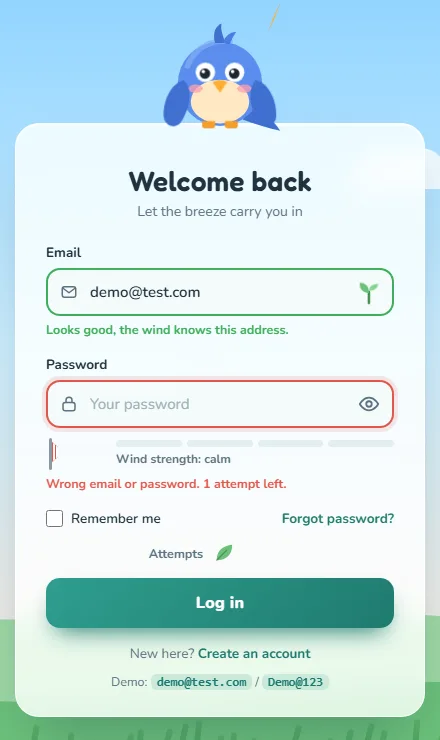
The submit handler first checks the fields in the browser. Those checks don't count as
attempts. Then it moves to submitting:
- the button shows “Catching the wind…” and the pinwheel,
- the wind picks up,
- screen readers hear “Signing in”.
It awaits api.login(), wrapped in try/catch so a network failure shows
a friendly message instead of breaking the page.
wrongPassword() is the themed error:
- the password letters scatter on a strong gust,
- the card shakes and the bird ruffles,
- one attempt leaf blows away.
The field is cleared after the letters have flown. Clearing it fires an input
event, which resets the meter and the hint, so the error message is written after that,
or it would vanish straight away. On the last attempt, the storm starts.
3.11 The storm lockout
/* =====================================================================
   LOCKOUT – storm
   ===================================================================== */
const storm = $('#storm'), stormClouds = $('#stormClouds'), flash = $('#flash');
const lockClock = $('#lockClock'), lockBar = $('#lockBar');
let lockTimer = null, lightningTimer = null;

function startLockout(seconds) {
  const until = Date.now() + seconds * 1000;
  store.set(CONFIG.storageKeys.lockUntil, String(until));
  enterLock(until, seconds);
}
function enterLock(until, total) {
  if (!setState('locked')) { state = 'locked'; document.body.dataset.state = 'locked'; }
  fields.disabled = true;
  document.activeElement && document.activeElement.blur();
  Bird.set('locked');
  pwHint.textContent = ''; pwHint.className = 'hint';

  // storm rolls in
  Wind.set(CONFIG.wind.storm); Wind.rain(1);
  gsap.to(storm, { opacity: 1, duration: 1.2, ease: 'power2.out' });
  gsap.to(stormClouds, { y: 0, opacity: 1, duration: 1.4, ease: 'power3.out' });
  if (!RM()) {
    shake(card);
    const strike = () => {
      gsap.timeline()
        .to(flash, { opacity: .85, duration: .05 }).to(flash, { opacity: 0, duration: .12 })
        .to(flash, { opacity: .6, duration: .05 }).to(flash, { opacity: 0, duration: .4 });
      lightningTimer = setTimeout(strike, rand(3500, 7000));
    };
    lightningTimer = setTimeout(strike, 400);
  }

  const totalMs = (total || CONFIG.lockoutSeconds) * 1000;
  const tick = () => {
    const ms = Math.max(0, until - Date.now());
    const s = Math.ceil(ms / 1000);
    lockClock.textContent = `${Math.floor(s / 60)}:${String(s % 60).padStart(2, '0')}`;
    lockBar.style.transform = `scaleX(${clamp(ms / totalMs, 0, 1)})`;
    if (s === 30 || s === 10) announce(`${s} seconds until you can try again.`);
    if (ms <= 0) { clearInterval(lockTimer); unlock(); }
  };
  tick();
  lockTimer = setInterval(tick, 250);
  announce(`Too many failed attempts. Login is locked for ${Math.ceil((until - Date.now()) / 1000)} seconds.`, true);
}
function unlock() {
  clearTimeout(lightningTimer);
  store.del(CONFIG.storageKeys.lockUntil);
  failures = 0; store.del(CONFIG.storageKeys.failures);

  // storm clears, sun breaks through
  Wind.rain(0); Wind.set(CONFIG.wind.base);
  gsap.to(stormClouds, { y: '-100%', opacity: 0, duration: 1.4, ease: 'power2.in' });
  gsap.to(storm, { opacity: 0, duration: 1.6, ease: 'power2.inOut' });
  gsap.timeline().to(flash, { opacity: .35, duration: .5 }).to(flash, { opacity: 0, duration: 1.2 });
  Bird.set('unlock'); Bird.hop();

  fields.disabled = false;
  renderAttempts(true);
  setState('idle');
  announce('The storm has passed. You can try logging in again.', true);
  setTimeout(() => email.focus(), 300);
}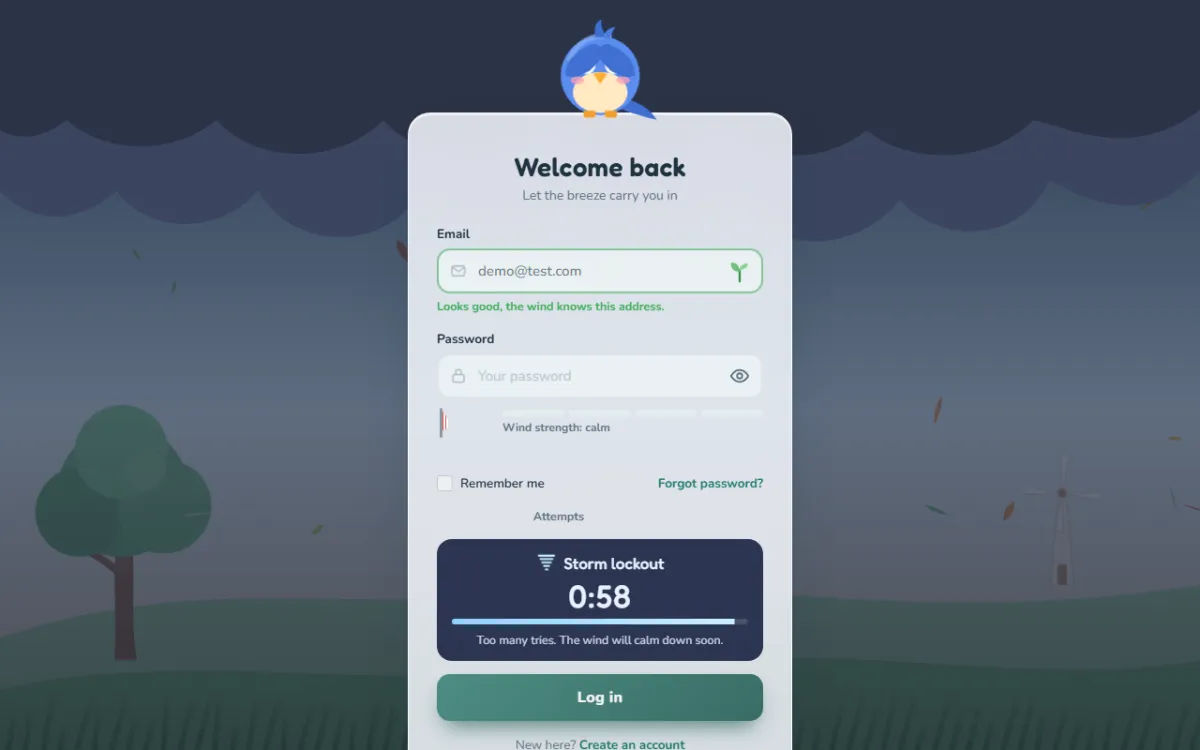
The lockout saves an end time (Date.now() plus 60 seconds) in
localStorage, not a countdown. On every tick, the remaining time is worked out from
that end time, which keeps it accurate even if the browser slows timers in a background tab. And
because it's saved, refreshing the page restores the storm.
During the storm:
- the fieldset is disabled,
- the bird hides and shivers,
- rain pours,
- lightning flashes at random intervals,
- the timer is announced at 30 and 10 seconds.
unlock() clears the sky with a burst of sunshine, the bird hops, and three fresh
leaves spring back.
Important: a lockout in the browser is only a nice experience, not security.
Anyone can clear their storage or call your API directly. The real limit must be on the server,
as the Laravel RateLimiter comment in the mock back end shows.
3.12 The six-digit code
/* =====================================================================
   OTP STEP
   ===================================================================== */
const otpPanel = $('#otpPanel'), loginPanel = $('#loginPanel'), otpBoxes = $('#otpBoxes');
const otpForm = $('#otpForm'), otpBtn = $('#otpBtn'), otpHint = $('#otpHint');
const resendBtn = $('#resendBtn'), backBtn = $('#backBtn');
let resendTimer = null, verifying = false;

for (let i = 0; i < CONFIG.otpLength; i++) {
  const inp = document.createElement('input');
  inp.type = 'text'; inp.inputMode = 'numeric'; inp.maxLength = 1; inp.pattern = '[0-9]*';
  inp.autocomplete = i === 0 ? 'one-time-code' : 'off';
  inp.setAttribute('aria-label', `Digit ${i + 1} of ${CONFIG.otpLength}`);
  otpBoxes.appendChild(inp);
}
const boxes = $$('input', otpBoxes);
const code = () => boxes.map(b => b.value).join('');

function boxCenter(b) { const r = b.getBoundingClientRect(); return { x: r.left + r.width / 2, y: r.top + r.height / 2 }; }
function fillBox(b, d) {
  b.value = d; b.classList.add('filled'); b.removeAttribute('aria-invalid');
  const c = boxCenter(b); flyIn(c.x, c.y, d);
  if (!RM()) gsap.fromTo(b, { scale: .85 }, { scale: 1, duration: .45, delay: CONFIG.timings.letterFlight * .8, ease: 'back.out(3)' });
}
function clearBox(b, blow = true) {
  if (b.value && blow) { const c = boxCenter(b); blowAway(c.x, c.y, b.value, .6); }
  b.value = ''; b.classList.remove('filled');
}
boxes.forEach((b, i) => {
  b.addEventListener('input', () => {
    const d = b.value.replace(/\D/g, '').slice(-1);
    b.value = '';
    if (!d) return;
    fillBox(b, d);
    if (i < boxes.length - 1) boxes[i + 1].focus();
    if (code().length === CONFIG.otpLength) setTimeout(verifyOtp, CONFIG.timings.letterFlight * 1000);
  });
  b.addEventListener('keydown', e => {
    if (e.key === 'Backspace') {
      e.preventDefault();
      if (b.value) clearBox(b);
      else if (i > 0) { boxes[i - 1].focus(); clearBox(boxes[i - 1]); }
    } else if (e.key === 'Delete') { e.preventDefault(); clearBox(b); }
    else if (e.key === 'ArrowLeft' && i > 0) { e.preventDefault(); boxes[i - 1].focus(); }
    else if (e.key === 'ArrowRight' && i < boxes.length - 1) { e.preventDefault(); boxes[i + 1].focus(); }
    else if (e.key === 'Home') { e.preventDefault(); boxes[0].focus(); }
    else if (e.key === 'End') { e.preventDefault(); boxes[boxes.length - 1].focus(); }
  });
  b.addEventListener('focus', () => b.select());
  b.addEventListener('paste', e => {
    e.preventDefault();
    const digits = (e.clipboardData || window.clipboardData).getData('text').replace(/\D/g, '').slice(0, CONFIG.otpLength - i);
    if (!digits) return;
    [...digits].forEach((d, k) => setTimeout(() => fillBox(boxes[i + k], d), k * 70));
    const nextIdx = Math.min(i + digits.length, boxes.length - 1);
    boxes[nextIdx].focus();
    announce(`${digits.length} digits pasted`);
    setTimeout(() => { if (code().length === CONFIG.otpLength) verifyOtp(); }, digits.length * 70 + CONFIG.timings.letterFlight * 1000);
  });
});

function panelSwap(outPanel, inPanel, outSel, inSel, dir = 1) {
  return new Promise(resolve => {
    const outs = $$(outSel, outPanel);
    gsap.timeline({ onComplete: resolve })
      .to(outs, { x: 260 * dir, y: () => rand(-80, -20), rotation: () => rand(20, 70) * dir, opacity: 0, duration: .55, stagger: .05, ease: 'power2.in' })
      .call(() => {
        outPanel.hidden = true; gsap.set(outs, { clearProps: 'transform,opacity' });
        inPanel.hidden = false;
      })
      .fromTo($$(inSel, inPanel), { x: -240 * dir, rotation: -30 * dir, opacity: 0 },
        { x: 0, rotation: 0, opacity: 1, duration: .6, stagger: .06, ease: 'back.out(1.4)' });
  });
}

async function showOtp() {
  Bird.set('idle'); Bird.hop();
  Wind.gust(2.6, 900);
  const masked = email.value.trim().replace(/^(.)(.*)(@.*)$/, (m, a, b, c) => a + '*'.repeat(Math.max(b.length, 2)) + c);
  $('#otpSub').textContent = `We blew a ${CONFIG.otpLength}-digit code to ${masked}.`;
  boxes.forEach(b => clearBox(b, false));
  otpHint.textContent = ''; otpHint.className = 'hint';
  if (RM()) { loginPanel.hidden = true; otpPanel.hidden = false; }
  else await panelSwap(loginPanel, otpPanel, '.blow', '.blow2', 1);
  card.setAttribute('aria-labelledby', 'otpTitle');
  boxes[0].focus();
  announce(`Password accepted. Enter the ${CONFIG.otpLength}-digit code sent to ${masked}.`);
  startResend();
}
function startResend() {
  clearInterval(resendTimer);
  let s = CONFIG.timings.resendSeconds;
  resendBtn.disabled = true;
  const t = () => {
    resendBtn.textContent = s > 0 ? `Resend in 0:${String(s).padStart(2, '0')}` : 'Resend code';
    if (s <= 0) { resendBtn.disabled = false; clearInterval(resendTimer); }
    s--;
  };
  t(); resendTimer = setInterval(t, 1000);
}
resendBtn.addEventListener('click', async () => {
  resendBtn.disabled = true; resendBtn.textContent = 'Sending…';
  await api.resendOtp();
  Wind.gust(2.4, 700);
  announce('A new code is on its way.');
  otpHint.className = 'hint good'; otpHint.textContent = 'New code sent!';
  startResend();
});
backBtn.addEventListener('click', async () => {
  clearInterval(resendTimer);
  setState('idle');
  pw.value = ''; pwWind.reset(); pw.dispatchEvent(new Event('input'));
  if (RM()) { otpPanel.hidden = true; loginPanel.hidden = false; }
  else await panelSwap(otpPanel, loginPanel, '.blow2', '.blow', -1);
  card.setAttribute('aria-labelledby', 'loginTitle');
  email.focus();
});
otpForm.addEventListener('submit', e => { e.preventDefault(); verifyOtp(); });

async function verifyOtp() {
  if (verifying || state !== 'otp') return;
  const c = code();
  if (c.length < CONFIG.otpLength) {
    otpHint.className = 'hint error'; otpHint.textContent = `Enter all ${CONFIG.otpLength} digits.`;
    announce(`Enter all ${CONFIG.otpLength} digits.`, true);
    shake(otpBoxes);
    const first = boxes.find(b => !b.value); first && first.focus();
    return;
  }
  verifying = true;
  setBusy(otpBtn, true, 'Checking…');
  boxes.forEach(b => b.readOnly = true);
  let res;
  try { res = await api.verifyOtp(c); } catch (e) { res = { ok: false } }
  verifying = false;
  boxes.forEach(b => b.readOnly = false);
  setBusy(otpBtn, false, 'Verify');
  if (res.ok) { success(res.redirect || CONFIG.redirectUrl); return; }

  // wrong code: digits blow away
  shake(otpBoxes); Wind.gust(CONFIG.wind.gust, 900); Bird.ruffle();
  boxes.forEach((b, i) => { b.setAttribute('aria-invalid', 'true'); setTimeout(() => clearBox(b), i * 60); });
  otpHint.className = 'hint error'; otpHint.textContent = 'That code blew the wrong way. Try again.';
  announce('Incorrect code. Please try again.', true);
  setTimeout(() => boxes[0].focus(), 400);
}
Code inputs are fiddly to get right. This one handles everything people expect:
- Mobile keyboards:
inputMode = 'numeric'shows the number pad.autocomplete = 'one-time-code'on the first box lets phones offer the code from a text message. - One digit per box, with the cursor moving forward automatically. Non-digits are ignored.
- Backspace clears the box or moves back. Arrow keys, Home and End move between boxes.
- Paste spreads a copied code across the boxes, starting from the current one.
- Auto-submit once all six digits are in.
Each box has its own label (“Digit 3 of 6”). panelSwap() blows the old
panel's pieces away and sweeps the new ones in from the other side. The email is masked
(d***@test.com) when shown, a common privacy habit. The resend button counts down 30
seconds before it can be used again.
3.13 Success and start-up
/* =====================================================================
   SUCCESS – everything blows away, the cloud gate opens
   ===================================================================== */
const gate = $('#gate'), welcome = $('#welcome');
async function success(url) {
  setState('success');
  clearInterval(resendTimer);
  announce('Verified. Welcome aboard! Redirecting to your dashboard.', true);
  const canNavigate = !CONFIG.demoMode && /^https?:$/.test(location.protocol);
  const go = () => {
    if (canNavigate) location.assign(url);
    else { $('#welcomeText').textContent = `Demo complete. A real app would now open ${url}`; $('#replayBtn').style.display = 'inline-block'; }
  };
  if (RM()) {
    gsap.set(gate, { autoAlpha: 1 }); gsap.set('.gate .half', { x: 0 }); gsap.set(welcome, { opacity: 1 });
    setTimeout(go, 800); return;
  }

  Wind.set(5.5);
  const parts = $$('.blow2', otpPanel);
  const tl = gsap.timeline();
  tl.add(Bird.flyAway(), 0)
    .to(parts, { x: () => rand(300, 600), y: () => rand(-260, -60), rotation: () => rand(90, 400), opacity: 0, duration: .8, stagger: .07, ease: 'power2.in' }, .25)
    .to(cardWrap, { x: innerWidth * .9, y: -innerHeight * .7, rotation: 160, scale: .25, opacity: 0, duration: 1.2, ease: 'power3.in' }, .7)
    .set(gate, { visibility: 'visible' }, 1.5)
    .to('.gate .half.l', { x: '0%', duration: .9, ease: 'power3.inOut' }, 1.5)
    .to('.gate .half.r', { x: '0%', duration: .9, ease: 'power3.inOut' }, 1.5)
    .to(welcome, { opacity: 1, duration: .5 }, 2.25)
    .fromTo('#welcome h2', { y: 30, scale: .9 }, { y: 0, scale: 1, duration: .7, ease: 'back.out(2)' }, 2.25)
    .call(() => Wind.set(CONFIG.wind.base), [], 2.4)
    // the gate opens like a door of clouds
    .to('.gate .half.l', { x: '-102%', duration: 1.1, ease: 'power3.inOut' }, 3.4)
    .to('.gate .half.r', { x: '102%', duration: 1.1, ease: 'power3.inOut' }, 3.4)
    .to(flash, { opacity: .9, duration: .6 }, 3.6)
    .to(welcome, { opacity: 0, duration: .4 }, 3.9);
  setTimeout(() => {
    if (canNavigate) go();
    else { gsap.to(flash, { opacity: 0, duration: .6 }); gsap.to(welcome, { opacity: 1, duration: .4 }); go(); }
  }, 3400 + CONFIG.timings.redirectDelay - 1800);
}
$('#replayBtn').addEventListener('click', () => location.reload());/* =====================================================================
INIT
===================================================================== */
Wind.init();
Bird.set('idle');
gsap.set($('#wingL'), { rotation: 18, svgOrigin: '36 80' });
gsap.set($('#wingR'), { rotation: -18, svgOrigin: '124 80' });
// restore an active lockout (survives refresh)
const lockUntil = parseInt(store.get(CONFIG.storageKeys.lockUntil) || '0', 10);
if (lockUntil > Date.now()) {
failures = CONFIG.maxAttempts;
renderAttempts();
enterLock(lockUntil, CONFIG.lockoutSeconds);
} else if (lockUntil) {
store.del(CONFIG.storageKeys.lockUntil); store.del(CONFIG.storageKeys.failures); failures = 0; renderAttempts();
}
// entrance: the card is blown in
if (!RM()) {
gsap.from(cardWrap, { x: -120, rotation: -6, opacity: 0, duration: 1, ease: 'back.out(1.3)' });
gsap.from('#bird', { y: -160, x: -200, rotation: -25, duration: 1.2, delay: .3, ease: 'power3.out' });
}
The success animation is one GSAP timeline, a sequence where each step has a start time:
- 0s: the bird flies away.
- 0.25s: the form pieces blow off.
- 0.7s: the whole card tumbles away.
- 1.5s: the cloud halves close.
- 2.25s: “Welcome aboard!” pops up.
- 3.4s: the gate opens onto a white flash.
In demo mode the page stays put and offers a replay. Otherwise it navigates to
redirectUrl.
At start-up, the code sets the wind and bird, restores any active lockout from storage, and blows the card and bird in from the left.
Connecting a real server
- Replace the bodies of
api.login,api.verifyOtpandapi.resendOtpwithfetch()calls. Follow the comments for headers, CSRF and status codes. - Rate-limit login, code verification and resend on the server. Return HTTP 429
with a
Retry-Afterheader, and the page will show the storm for that long. - Remove the demo credentials from
CONFIGand the demo notes from the HTML. - Set
demoMode: falseand pointredirectUrl, the “Forgot password?” link and “Create an account” at your real pages. - Serve everything over HTTPS.
Test it yourself
- Type in the email field. Letters fly in as leaves and the bird follows your cursor. Pause, and a sprout or a wilted leaf appears.
- Type a password and watch the windsock grow from Breeze to Hurricane.
- Turn on Caps Lock in the password field.
- Click the eye. The bird peeks.
- Enter a wrong password three times, then refresh during the storm. It's still there.
- Sign in with the demo details, paste
123456into the first box, and watch the gate. - Try the whole thing using only the keyboard, and with a screen reader if you have one.
Share what you built
Changed the meadow to autumn or the bird to a robin? Share a screenshot as a link with sshot.online, or share your code with the free code sharing tool. No account needed.
Conclusion
You've built a login flow that's both delightful and properly engineered:
- a config object and a swappable API layer
- a state machine that rules out impossible states
- live regions for screen reader feedback
- a code input that handles paste and keyboard navigation
- a lockout that survives refreshes
- graceful fallbacks for blocked scripts and reduced motion
The playful parts (leaves, windsock, storm and cloud gate) sit on top of that solid base, which is exactly how great interfaces are made.
Frequently asked questions
Does the wind login page need GSAP?
GSAP powers the bird and transitions, loaded from cdnjs. If it fails to load, a small built-in fallback jumps to the end state of each animation, so the login still works.
Is the 3-attempt lockout secure?
Not on its own. The browser lockout is for user experience only. Real protection must be rate limiting on the server, which returns HTTP 429. The page then shows the storm for the time the server specifies.
How do the letters fly into the input?
The script measures the text before the cursor with canvas measureText to find
the caret position, then animates a leaf-shaped element from off to the side into that point
with GSAP. Password characters fly as blank leaves.
How does the 6-digit code input support paste and SMS autofill?
Each box accepts one digit. A paste handler spreads copied digits across the boxes, and the
first box uses autocomplete="one-time-code" with inputmode="numeric",
so phones can suggest the code from a text message.
How do I connect it to Laravel or another back end?
Replace the three functions in the api object with fetch calls to
your endpoints, send the CSRF token, map status codes like 401, 422 and 429 to the results the
page expects, and set demoMode to false.
Related articles
How to Build a Cyberpunk Login Page with HTML, CSS and JavaScript
A full tutorial for a neon login page with sign in, sign up and recovery views: glitch text, a spinning neon border, particles, validation and a loading screen.
Read More →
How to Build an Animated Ocean Login Page with HTML, CSS and JavaScript
Build an underwater login page with SVG fish that flee your cursor, schools of sardines, a leaping dolphin, splashes, bubbles and a frosted glass form.
Read More →
How to Build an Animated Panda Login Page with HTML, CSS and JavaScript
A step-by-step tutorial: build a login form where a CSS panda follows your typing, covers its eyes for the password, peeks, and reacts. Full code and live demo.
Read More →