How to Build a Real Estate Website with HTML, CSS and JavaScript
Published November 6, 2026 · 15 min read
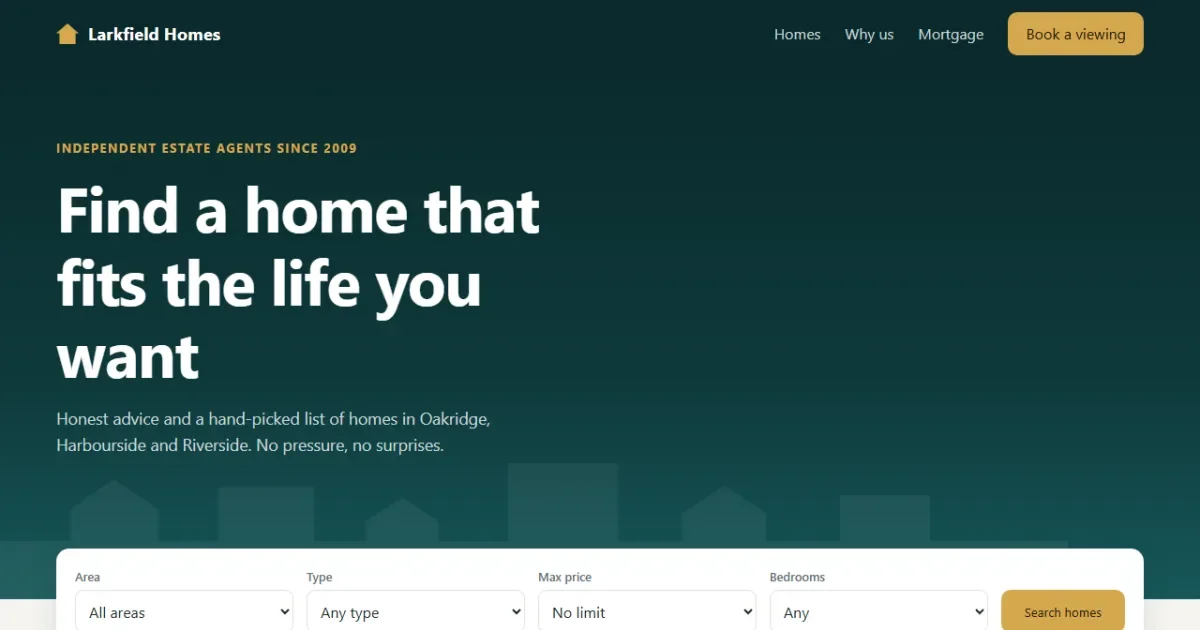
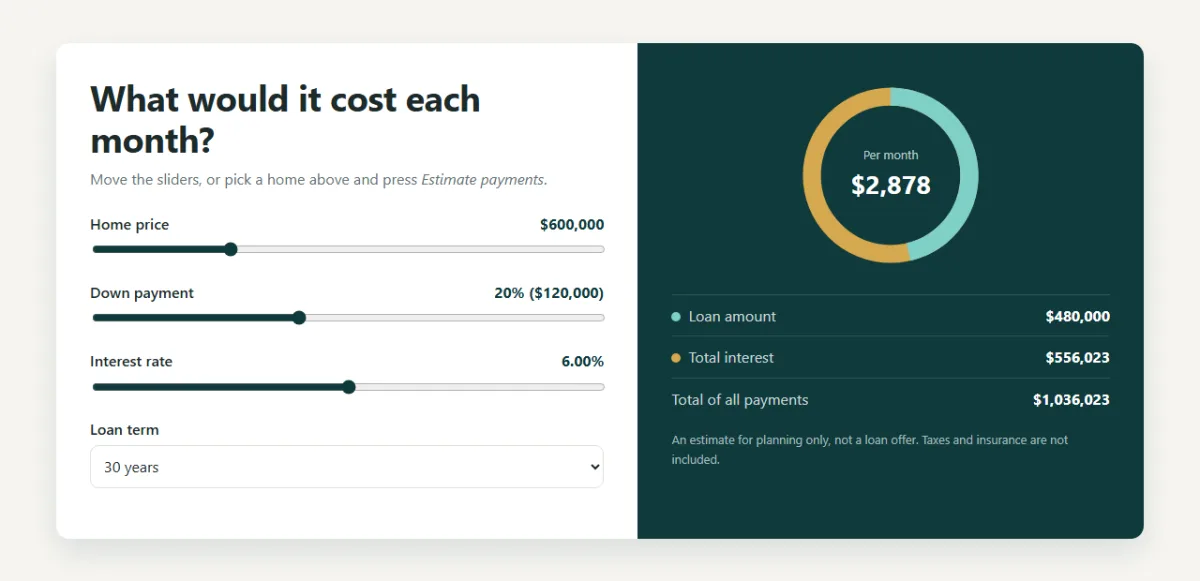
In this tutorial you'll build a complete website for a made-up estate agency, Larkfield Homes. It works like a real property site: visitors can search and sort the listings, save their favourites, open any home in a popup and see what it would cost each month in a mortgage calculator with a live chart.
Open the live demo Save a few homes with the heart button, reload the page, and they'll still be there.
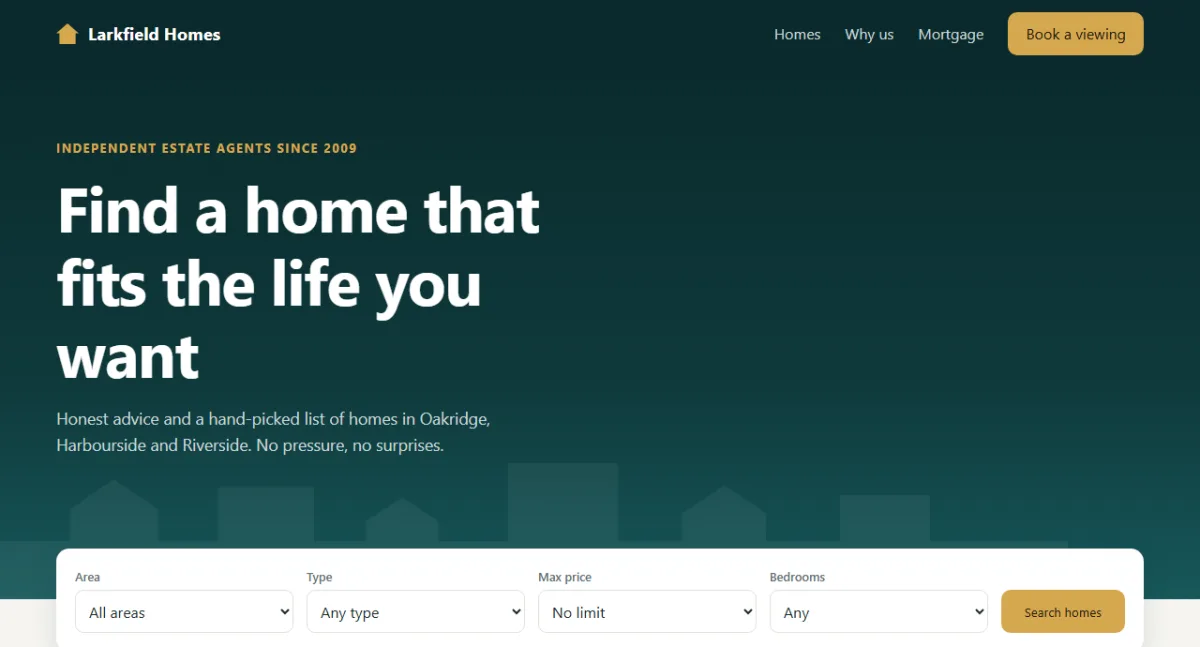
Everything is plain HTML, CSS and JavaScript, with no frameworks, no libraries and no image files. Even the house pictures are small SVGs that the CSS recolours. The tutorial has three parts, one per language:
- Part 1, HTML: the page structure, the search form and a reusable icon sheet.
- Part 2, CSS: the property cards, the popup, the chart and the responsive design.
- Part 3, JavaScript: search, sorting, saved homes, the popup and the calculator.
What you'll learn
- how to build a page from a data array with
filter(),sort()andmap() - how to reuse one SVG drawing many times with
<symbol>and<use> - how to give every card its own colours with one custom property
- how to remember choices with
localStorage, safely - how to build an accessible popup with the native
<dialog>element - how to keep a search in the address bar with
URLSearchParams - how to draw a donut chart using nothing but one SVG circle
Project setup
Create a folder with three empty files:
realestate-landing/
├── index.html   ← the page structure, forms and SVG icons
├── style.css    ← layout, colours, cards, popup, mobile styles
└── script.js    ← listings, search, saved homes, calculator
Each file is split into sections marked with comments like
/* ---------- HERO ---------- */. The code blocks below follow those markers from top to
bottom, so if you copy every block in order you'll rebuild each file exactly.
Plan the page first
A property site lives or dies on one job: helping people find a home that fits. So the search comes first, right in the hero, and the listings come straight after it.
- Header with navigation
- Hero with a short promise
- Search bar
- Listings, with sorting and saved homes
- Home details popup
- Why choose this agency
- Mortgage calculator
- Call to action and footer
Here's the big difference from a brochure page: the listings aren't in the HTML. On a real site they change every day and come from a database, so we'll keep them in a JavaScript array and build the cards from it. The page is a template, and the data fills it in.
Part 1: The HTML
This part sets out the page skeleton. Without CSS and JavaScript it looks bare, and the listings area is empty until Part 3.
1.1 The head and a sheet of reusable drawings
<!DOCTYPE html>
<html lang="en">
<head>
  <meta charset="UTF-8">
  <meta name="viewport" content="width=device-width, initial-scale=1">
  <title>Larkfield Homes | Find Your Next Home</title>
  <meta name="description" content="Larkfield Homes is a demo real estate website built with plain HTML, CSS and JavaScript.">
  <link rel="stylesheet" href="style.css">
</head>
<body><!-- ---------- ICONS ---------- -->
<svg class="sprite" aria-hidden="true">
<symbol id="art-house" viewBox="0 0 320 180">
<rect class="art-ground" y="150" width="320" height="30"/>
<path class="art-wall" d="M90 92h140v62H90z"/>
<path class="art-roof" d="M72 96l88-58 88 58z"/>
<path class="art-door" d="M148 112h24v42h-24z"/>
<path class="art-window" d="M106 110h26v22h-26zM188 110h26v22h-26z"/>
</symbol>
<symbol id="art-townhouse" viewBox="0 0 320 180">
<rect class="art-ground" y="150" width="320" height="30"/>
<path class="art-wall" d="M70 60h60v94H70zM190 60h60v94h-60z"/>
<path class="art-wall-2" d="M130 44h60v110h-60z"/>
<path class="art-roof" d="M64 62l36-24 36 24zM184 62l36-24 36 24zM124 46l36-24 36 24z"/>
<path class="art-door" d="M90 124h20v30H90zM150 124h20v30h-20zM210 124h20v30h-20z"/>
<path class="art-window" d="M84 76h32v24H84zM144 62h32v24h-32zM204 76h32v24h-32zM144 94h32v20h-32z"/>
</symbol>
<symbol id="art-apartment" viewBox="0 0 320 180">
<rect class="art-ground" y="150" width="320" height="30"/>
<path class="art-wall" d="M104 22h112v132H104z"/>
<path class="art-window" d="M118 36h24v20h-24zM178 36h24v20h-24zM118 68h24v20h-24zM178 68h24v20h-24zM118 100h24v20h-24zM178 100h24v20h-24z"/>
<path class="art-door" d="M148 126h24v28h-24z"/>
<path class="art-wall-2" d="M216 74h44v80h-44z"/>
<path class="art-window" d="M226 88h24v14h-24zM226 114h24v14h-24z"/>
</symbol>
<symbol id="icon-heart" viewBox="0 0 24 24">
<path d="M12 20.5S3.5 15.4 3.5 9.2A4.7 4.7 0 0 1 12 6.4a4.7 4.7 0 0 1 8.5 2.8c0 6.2-8.5 11.3-8.5 11.3z"/>
</symbol>
</svg>This hidden SVG is a sheet of drawings. Each <symbol> defines one picture and
draws nothing on its own. Anywhere on the page, <use href="#art-house"/> stamps
out a copy. Nine cards can share three drawings, so the file stays small.
The shapes have classes like art-roof instead of fixed colours. That's what lets CSS
paint each copy differently in Part 2.
1.2 The header and hero
<!-- ---------- HEADER ---------- -->
<header class="site-header" id="siteHeader">
  <div class="wrap nav">
    <a class="logo" href="#top"><span class="logo-mark" aria-hidden="true"></span>Larkfield Homes</a>
    <button class="menu-btn" id="menuBtn" type="button" aria-label="Open menu" aria-controls="mainNav" aria-expanded="false"><span></span></button>
    <nav class="main-nav" id="mainNav" aria-label="Main">
      <a href="#homes">Homes</a>
      <a href="#why">Why us</a>
      <a href="#mortgage">Mortgage</a>
      <a class="btn btn-gold" href="#contact">Book a viewing</a>
    </nav>
  </div>
</header>

<main id="top"><!-- ---------- HERO ---------- -->
<section class="hero">
<div class="wrap">
<p class="eyebrow">Independent estate agents since 2009</p>
<h1>Find a home that fits the life you want</h1>
<p class="lead">Honest advice and a hand-picked list of homes in Oakridge, Harbourside and
Riverside. No pressure, no surprises.</p>
</div>
<svg class="hero-skyline" viewBox="0 0 1200 170" preserveAspectRatio="xMidYMax slice" aria-hidden="true">
<path d="M0 170V112h70V80l44-30 44 30v32h60V58h96v54h52V92l36-24 36 24v20h70V34h110v78h64V84l42-28 42 28v28h74V66h90v46h138v58z"/>
</svg>
</section>The menu button uses aria-controls, aria-expanded and
aria-label, so screen readers know what it does and whether it's open. The skyline is
one long SVG path. preserveAspectRatio="xMidYMax slice" keeps it pinned to the bottom
and centred, and crops the sides on small screens instead of squashing it.
1.3 The search form
<!-- ---------- SEARCH ---------- -->
<div class="wrap">
  <form class="search" id="searchForm">
    <div class="search-field">
      <label for="fArea">Area</label>
      <select id="fArea" name="area">
        <option value="">All areas</option>
        <option>Oakridge</option>
        <option>Harbourside</option>
        <option>Riverside</option>
      </select>
    </div>
    <div class="search-field">
      <label for="fType">Type</label>
      <select id="fType" name="type">
        <option value="">Any type</option>
        <option value="house">House</option>
        <option value="townhouse">Townhouse</option>
        <option value="apartment">Apartment</option>
      </select>
    </div>
    <div class="search-field">
      <label for="fPrice">Max price</label>
      <select id="fPrice" name="price">
        <option value="">No limit</option>
        <option value="400000">$400,000</option>
        <option value="600000">$600,000</option>
        <option value="800000">$800,000</option>
        <option value="1000000">$1,000,000</option>
      </select>
    </div>
    <div class="search-field">
      <label for="fBeds">Bedrooms</label>
      <select id="fBeds" name="beds">
        <option value="">Any</option>
        <option value="1">1+</option>
        <option value="2">2+</option>
        <option value="3">3+</option>
        <option value="4">4+</option>
      </select>
    </div>
    <button class="btn btn-gold" type="submit">Search homes</button>
  </form>
</div>
Each <select> has a <label> and a name. The names
matter: JavaScript will read the whole form at once with FormData, using those names.
Every list starts with an option whose value is empty, which we'll treat as "no
filter". Prices are stored as plain numbers in value and shown nicely in the text.
1.4 The listings and the popup
<!-- ---------- LISTINGS ---------- -->
<section class="listings" id="homes">
  <div class="wrap">
    <div class="list-head">
      <div>
        <h2>Homes for sale</h2>
        <p class="result-count" id="resultCount" aria-live="polite">Loading homes</p>
      </div>
      <div class="list-tools">
        <label class="saved-toggle"><input type="checkbox" id="savedOnly"> <span>Saved (<span id="savedCount">0</span>)</span></label>
        <label class="sr-only" for="sortBy">Sort homes</label>
        <select id="sortBy">
          <option value="newest">Newest first</option>
          <option value="price-asc">Price: low to high</option>
          <option value="price-desc">Price: high to low</option>
          <option value="area-desc">Largest first</option>
        </select>
      </div>
    </div>

    <div class="home-grid" id="homeGrid"></div>

    <div class="no-results" id="noResults" hidden>
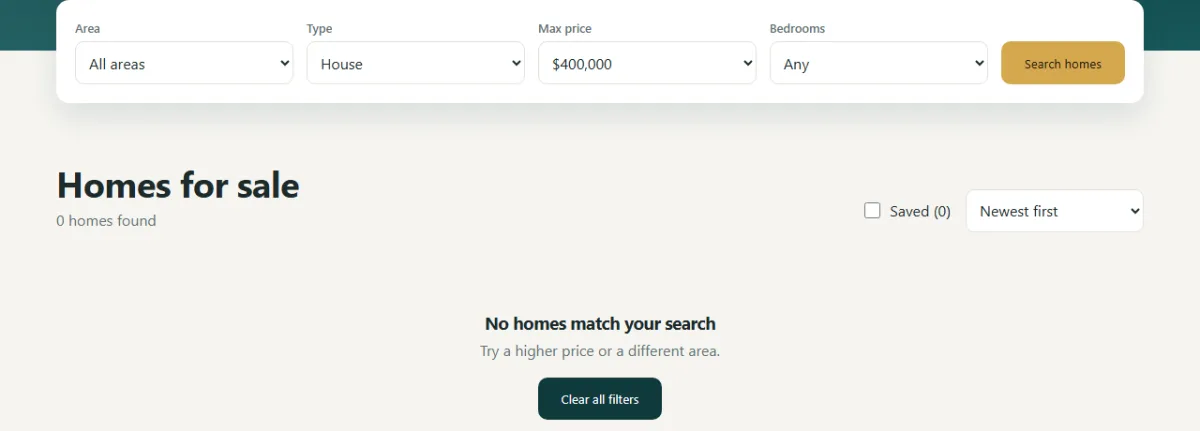
      <h3>No homes match your search</h3>
      <p>Try a higher price or a different area.</p>
      <button class="btn btn-dark" type="button" id="clearFilters">Clear all filters</button>
    </div>

    <noscript><p>Please turn on JavaScript to browse the homes, or call us on (555) 0187.</p></noscript>
  </div>
</section>
#homeGrid is empty on purpose, because JavaScript fills it. The result count has
aria-live="polite", so screen readers announce the new number after each search. The
<noscript> message gives people a way forward if the script can't run.
<!-- ---------- DETAILS DIALOG ---------- -->
<dialog class="home-dialog" id="homeDialog" aria-labelledby="dialogTitle">
<div class="dialog-body" id="dialogBody"></div>
<form method="dialog">
<button class="dialog-close" aria-label="Close details">×</button>
</form>
</dialog><dialog> is the browser's built-in popup. The close button sits in a form with
method="dialog", a neat shortcut: submitting that form closes the dialog with no
JavaScript at all.
1.5 The rest of the page
<!-- ---------- WHY US ---------- -->
<section class="why" id="why">
  <div class="wrap">
    <h2>Buying a home is big. We keep it simple.</h2>
    <div class="why-grid">
      <article class="why-card reveal">
        <span class="why-num">01</span>
        <h3>We know the streets</h3>
        <p>Our agents live in the areas they sell, so you hear about the school run and the noisy
           junction before you buy.</p>
      </article>
      <article class="why-card reveal">
        <span class="why-num">02</span>
        <h3>Clear numbers</h3>
        <p>Every listing shows its full price and running costs. Our fee is on one page, in plain
           English.</p>
      </article>
      <article class="why-card reveal">
        <span class="why-num">03</span>
        <h3>One person, start to finish</h3>
        <p>The agent who shows you round is the one who answers your calls until you have the
           keys.</p>
      </article>
    </div>
  </div>
</section><!-- ---------- MORTGAGE ---------- -->
<section class="mortgage" id="mortgage">
<div class="wrap mortgage-grid">
<form class="calc" id="calcForm">
<h2>What would it cost each month?</h2>
<p>Move the sliders, or pick a home above and press <em>Estimate payments</em>.</p>
<div class="calc-row">
<label for="calcPrice">Home price <output id="calcPriceOut"></output></label>
<input id="calcPrice" name="price" type="range" min="100000" max="2000000" step="1000" value="600000">
</div>
<div class="calc-row">
<label for="calcDeposit">Down payment <output id="calcDepositOut"></output></label>
<input id="calcDeposit" name="deposit" type="range" min="0" max="50" step="1" value="20">
</div>
<div class="calc-row">
<label for="calcRate">Interest rate <output id="calcRateOut"></output></label>
<input id="calcRate" name="rate" type="range" min="0" max="12" step="0.05" value="6">
</div>
<div class="calc-row">
<label for="calcYears">Loan term</label>
<select id="calcYears" name="years">
<option value="15">15 years</option>
<option value="20">20 years</option>
<option value="25">25 years</option>
<option value="30" selected>30 years</option>
</select>
</div>
</form>
<div class="calc-result">
<div class="donut">
<svg viewBox="0 0 120 120" role="img" aria-labelledby="donutLabel">
<title id="donutLabel">Share of the total cost that is loan and interest</title>
<circle class="donut-track" cx="60" cy="60" r="48" pathLength="100"/>
<circle class="donut-bar" id="donutBar" cx="60" cy="60" r="48" pathLength="100"/>
</svg>
<div class="donut-text">
<span>Per month</span>
<strong id="monthlyPay">$0</strong>
</div>
</div>
<dl class="calc-lines">
<div><dt><i class="dot dot-loan"></i>Loan amount</dt><dd id="loanAmount">$0</dd></div>
<div><dt><i class="dot dot-interest"></i>Total interest</dt><dd id="totalInterest">$0</dd></div>
<div><dt>Total of all payments</dt><dd id="totalPaid">$0</dd></div>
</dl>
<p class="calc-note">An estimate for planning only, not a loan offer. Taxes and insurance are not included.</p>
</div>
</div>
</section>The calculator is a normal form with range sliders. The chart is two circles stacked on top of each
other: a full gold ring for the interest and a teal bar on top for the loan.
pathLength="100" is a lovely SVG feature. It tells the browser to treat the circle's
edge as exactly 100 units long, whatever its real size, so we can size the bar with a plain
percentage.
<!-- ---------- CONTACT ---------- -->
<section class="contact" id="contact">
  <div class="wrap contact-box">
    <div>
      <h2>Seen something you like?</h2>
      <p>Viewings run seven days a week. Call us or send a message and we'll find a time.</p>
    </div>
    <div class="contact-actions">
      <a class="btn btn-gold" href="tel:+15550187">(555) 0187</a>
      <a class="btn btn-line" href="mailto:hello@example.com">hello@example.com</a>
    </div>
  </div>
</section>

</main><!-- ---------- FOOTER ---------- -->
<footer class="site-footer">
<div class="wrap footer-row">
<span class="logo"><span class="logo-mark" aria-hidden="true"></span>Larkfield Homes</span>
<p>Demo website for a coding tutorial. These homes and this agency are not real.</p>
</div>
</footer>
<script src="script.js"></script>
</body>
</html>The script tag is at the very end of <body>, so the HTML above it exists by the
time it runs. That's the end of Part 1.
Part 2: The CSS
Now for the look: a calm teal and gold theme that feels trustworthy, which is what you want when someone's spending this much money.
2.1 Variables and shared styles
/* ---------- BASE ---------- */
:root {
  --deep: #0f3a3c;
  --deep-2: #0a2a2c;
  --gold: #d6a84f;
  --gold-dark: #b8892f;
  --bg: #f6f5f1;
  --card: #ffffff;
  --text: #1d2a2b;
  --muted: #637173;
  --line: #e2e1da;
  --radius: 14px;
  --shadow: 0 14px 34px rgba(15, 58, 60, .12);
}

*, *::before, *::after { box-sizing: border-box; }

html { scroll-behavior: smooth; scroll-padding-top: 84px; }

body {
  margin: 0;
  background: var(--bg);
  color: var(--text);
  font-family: -apple-system, BlinkMacSystemFont, "Segoe UI", Roboto, Helvetica, Arial, sans-serif;
  line-height: 1.6;
}

/* Stop the page behind an open dialog from scrolling */
body:has(dialog[open]) { overflow: hidden; }

h1, h2, h3 { margin: 0; line-height: 1.15; letter-spacing: -.02em; }
h2 { font-size: clamp(1.7rem, 3.4vw, 2.4rem); }

.wrap { width: min(1160px, 100% - 40px); margin-inline: auto; }

.sprite { display: none; }

.btn {
  display: inline-block;
  padding: 13px 24px;
  border: 1px solid transparent;
  border-radius: 10px;
  font: 600 .95rem inherit;
  font-family: inherit;
  text-decoration: none;
  cursor: pointer;
  transition: background .2s, transform .2s;
}
.btn:hover { transform: translateY(-1px); }
.btn-gold { background: var(--gold); color: #20190a; }
.btn-gold:hover { background: #e2b963; }
.btn-dark { background: var(--deep); color: #fff; }
.btn-line { border-color: rgba(255, 255, 255, .45); color: #fff; }

:focus-visible { outline: 3px solid var(--gold); outline-offset: 2px; }

.sr-only {
  position: absolute;
  width: 1px;
  height: 1px;
  overflow: hidden;
  clip-path: inset(50%);
  white-space: nowrap;
}
The colours, corner radius and main shadow live in :root, so a rebrand takes a few
lines. body:has(dialog[open]) is worth noticing. :has() lets a parent
react to its children, so here the page stops scrolling whenever a dialog is open, with no
JavaScript. .sprite { display: none; } hides the sheet of drawings.
2.2 The header
/* ---------- HEADER ---------- */
.site-header {
  position: sticky;
  top: 0;
  z-index: 20;
  background: var(--deep-2);
  color: #fff;
  transition: box-shadow .2s;
}
.site-header.scrolled { box-shadow: 0 8px 22px rgba(0, 0, 0, .3); }

.nav { display: flex; align-items: center; justify-content: space-between; height: 72px; }

.logo {
  display: inline-flex;
  align-items: center;
  gap: 10px;
  color: inherit;
  font-size: 1.15rem;
  font-weight: 700;
  text-decoration: none;
}

/* A house shape cut with clip-path */
.logo-mark {
  width: 24px;
  height: 22px;
  background: var(--gold);
  clip-path: polygon(50% 0, 100% 48%, 86% 48%, 86% 100%, 14% 100%, 14% 48%, 0 48%);
}

.main-nav { display: flex; align-items: center; gap: 26px; }
.main-nav a:not(.btn) { color: #c9d6d6; text-decoration: none; }
.main-nav a:not(.btn):hover { color: #fff; }
.main-nav .btn { padding: 9px 18px; }

.menu-btn { display: none; }
position: sticky keeps the header in view while you scroll. The logo is a gold
rectangle cut into a house shape with clip-path: polygon(...). Each pair of percentages
is one corner of the shape.
2.3 The hero and search bar
/* ---------- HERO ---------- */
.hero {
  position: relative;
  padding: 76px 0 150px;
  background: linear-gradient(180deg, var(--deep-2), var(--deep) 60%, #17585a);
  color: #fff;
  overflow: hidden;
}
.hero .wrap { position: relative; z-index: 1; }
.hero h1 { max-width: 15ch; font-size: clamp(2.4rem, 6vw, 4.2rem); }
.lead { max-width: 34rem; margin: 18px 0 0; color: #c9d6d6; font-size: 1.1rem; }

.eyebrow {
  margin: 0 0 14px;
  color: var(--gold);
  font-size: .8rem;
  font-weight: 700;
  letter-spacing: .13em;
  text-transform: uppercase;
}

.hero-skyline {
  position: absolute;
  left: 0;
  bottom: 0;
  width: 100%;
  height: 170px;
  fill: rgba(255, 255, 255, .06);
}/* ---------- SEARCH ---------- */
.search {
position: relative;
z-index: 2;
display: grid;
grid-template-columns: repeat(4, 1fr) auto;
align-items: end;
gap: 14px;
margin-top: -54px;
padding: 20px;
border-radius: var(--radius);
background: var(--card);
box-shadow: var(--shadow);
}
.search-field label { display: block; margin-bottom: 4px; color: var(--muted); font-size: .8rem; font-weight: 600; }
select {
width: 100%;
height: 46px;
padding: 0 10px;
border: 1px solid var(--line);
border-radius: 9px;
background: #fff;
color: var(--text);
font: inherit;
}
.search .btn { height: 46px; padding-block: 0; }max-width: 15ch on the headline limits it to about 15 characters wide, which keeps
the line breaks tidy on any screen.
The search bar's margin-top: -54px pulls it up over the hero, a common trick that
connects two sections and draws the eye. position: relative with a
z-index keeps it on top. The grid uses repeat(4, 1fr) auto: four equal
fields, then a button that's only as wide as it needs to be.
2.4 The property cards
/* ---------- LISTINGS ---------- */
.listings { padding: 64px 0 80px; }

.list-head { display: flex; flex-wrap: wrap; align-items: flex-end; justify-content: space-between; gap: 16px; }
.result-count { margin: 4px 0 0; color: var(--muted); }
.list-tools { display: flex; align-items: center; gap: 16px; }
.list-tools select { width: 190px; }
.saved-toggle { display: inline-flex; align-items: center; gap: 7px; white-space: nowrap; cursor: pointer; }
.saved-toggle input { width: 17px; height: 17px; accent-color: var(--deep); }

.home-grid {
  display: grid;
  grid-template-columns: repeat(3, 1fr);
  gap: 24px;
  margin-top: 26px;
}

.home-card {
  position: relative;
  display: flex;
  flex-direction: column;
  overflow: hidden;
  border-radius: var(--radius);
  background: var(--card);
  box-shadow: 0 2px 8px rgba(15, 58, 60, .06);
  animation: cardIn .35s ease backwards;
  transition: transform .2s, box-shadow .2s;
}
.home-card:hover { transform: translateY(-4px); box-shadow: var(--shadow); }

@keyframes cardIn {
  from { opacity: 0; transform: translateY(12px); }
}

/* Each home sets its own --hue, so one set of rules gives every card a different colour */
.home-art, .dialog-art {
  display: block;
  width: 100%;
  background: linear-gradient(160deg, hsl(var(--hue) 62% 86%), hsl(var(--hue) 48% 70%));
}
.home-art { height: 190px; }
.art-ground { fill: hsl(var(--hue) 34% 42%); }
.art-wall { fill: #fdfbf6; }
.art-wall-2 { fill: hsl(var(--hue) 40% 92%); }
.art-roof { fill: hsl(var(--hue) 38% 32%); }
.art-door { fill: hsl(var(--hue) 45% 28%); }
.art-window { fill: hsl(205 62% 68%); }

.badge {
  position: absolute;
  top: 12px;
  left: 12px;
  padding: 3px 11px;
  border-radius: 999px;
  background: var(--deep);
  color: #fff;
  font-size: .75rem;
  font-weight: 700;
}

.fav-btn {
  position: absolute;
  top: 10px;
  right: 10px;
  display: grid;
  place-items: center;
  width: 40px;
  height: 40px;
  padding: 0;
  border: 0;
  border-radius: 50%;
  background: rgba(255, 255, 255, .92);
  cursor: pointer;
}
.fav-btn svg { width: 22px; height: 22px; fill: none; stroke: var(--deep); stroke-width: 2; transition: transform .2s; }
.fav-btn:hover svg { transform: scale(1.12); }
.fav-btn[aria-pressed="true"] svg { fill: #d9443a; stroke: #d9443a; }

.home-info { display: flex; flex: 1; flex-direction: column; padding: 16px 18px 18px; }
.home-price { font-size: 1.35rem; font-weight: 800; letter-spacing: -.01em; }
.home-info h3 { margin: 4px 0 2px; font-size: 1.02rem; font-weight: 600; letter-spacing: 0; }
.home-area { margin: 0 0 12px; color: var(--muted); font-size: .9rem; }

.home-specs {
  display: flex;
  gap: 16px;
  margin: auto 0 0;
  padding: 11px 0 0;
  border-top: 1px solid var(--line);
  color: var(--muted);
  font-size: .86rem;
  list-style: none;
}

/* The button covers the whole card, and the heart sits above it */
.home-open {
  position: absolute;
  inset: 0;
  width: 100%;
  border: 0;
  background: none;
  cursor: pointer;
}
.home-open:focus-visible { outline-offset: -4px; }
.fav-btn { z-index: 1; }

.no-results { padding: 60px 20px; text-align: center; }
.no-results p { margin: 6px 0 16px; color: var(--muted); }
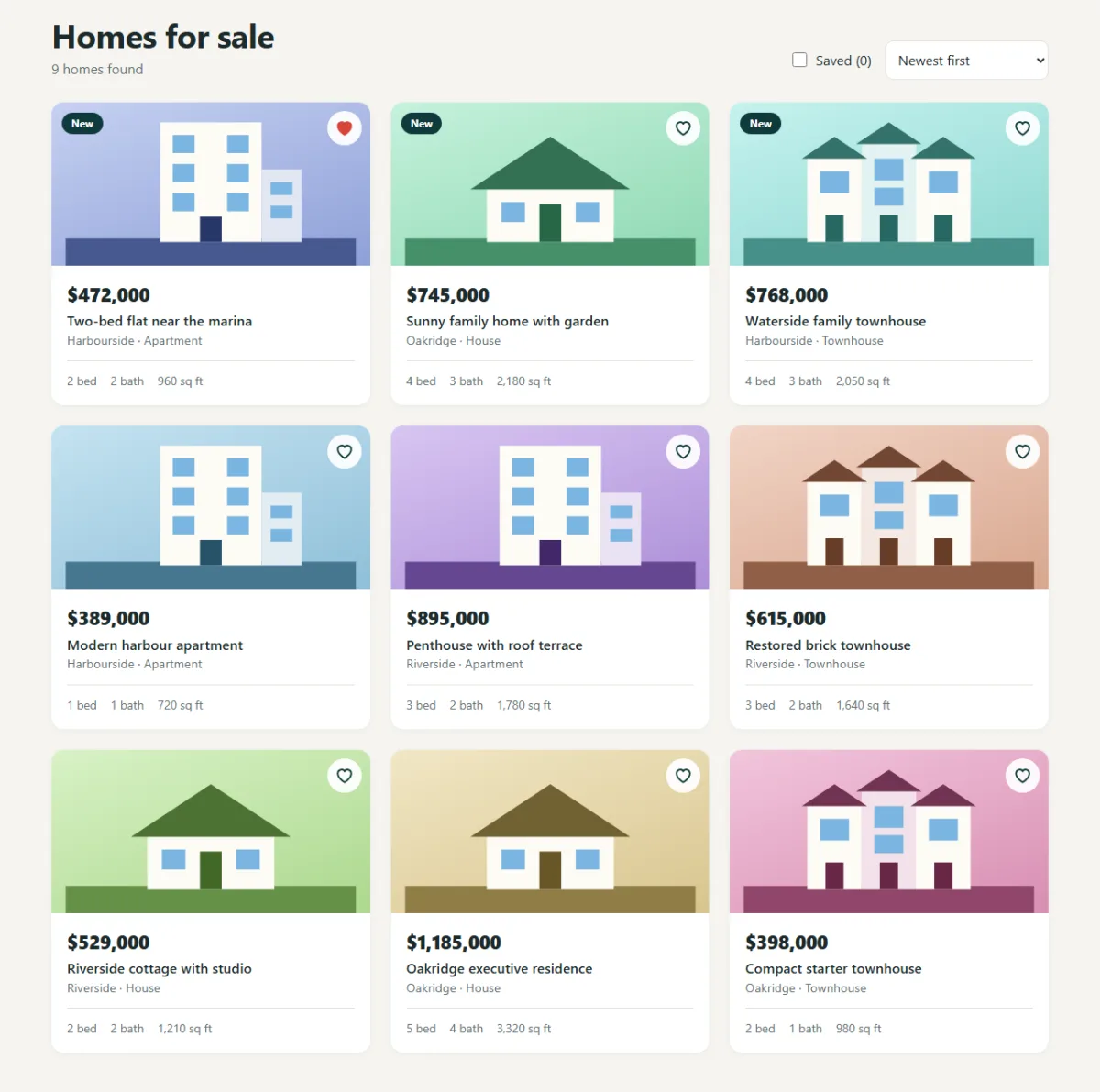
Three techniques make these cards work.
One variable, nine colour schemes. Each card sets its own --hue, a
position on the colour wheel from 0 to 360. Every colour in the picture is written with
hsl(var(--hue) ...), so changing that one number repaints the sky, the roof and the
door together, and they always match. Custom properties even pass through <use>
into the shared drawing, which ordinary CSS selectors can't reach.
A whole-card button. .home-open is an invisible button stretched over
the card with position: absolute; inset: 0, so a click anywhere opens the details, and
keyboard users get one clear stop per card. The heart has a higher z-index, so it stays
clickable on top.
Lined-up footers. The card body is a flex column, and
margin: auto 0 0 on .home-specs pushes the details to the bottom, so they
line up across a row even when a title wraps. The heart turns red with
.fav-btn[aria-pressed="true"]: again, the CSS reads the accessibility state.
2.5 The details popup
/* ---------- DETAILS DIALOG ---------- */
.home-dialog {
  width: min(640px, 100% - 32px);
  max-height: calc(100dvh - 32px);
  padding: 0;
  border: 0;
  border-radius: var(--radius);
  color: var(--text);
}
.home-dialog::backdrop { background: rgba(10, 42, 44, .65); backdrop-filter: blur(3px); }
.home-dialog[open] { animation: dialogIn .22s ease; }

@keyframes dialogIn {
  from { opacity: 0; transform: translateY(16px) scale(.98); }
}

.dialog-art { height: 240px; }
.dialog-text { padding: 22px 26px 26px; }
.dialog-text h2 { font-size: 1.45rem; }
.dialog-text .home-price { margin: 6px 0 2px; }
.dialog-text p { color: var(--muted); }

.feature-list {
  display: grid;
  grid-template-columns: 1fr 1fr;
  gap: 6px 18px;
  margin: 0 0 20px;
  padding: 0;
  list-style: none;
  font-size: .94rem;
}
.feature-list li::before { content: "\2713"; margin-right: 8px; color: var(--gold-dark); font-weight: 700; }

.dialog-specs {
  display: grid;
  grid-template-columns: repeat(4, 1fr);
  gap: 8px;
  margin: 14px 0;
  padding: 12px 0;
  border-block: 1px solid var(--line);
  text-align: center;
}
.dialog-specs dt { color: var(--muted); font-size: .76rem; }
.dialog-specs dd { margin: 0; font-weight: 700; }

.dialog-close {
  position: absolute;
  top: 10px;
  right: 10px;
  width: 40px;
  height: 40px;
  border: 0;
  border-radius: 50%;
  background: rgba(255, 255, 255, .92);
  font-size: 1.5rem;
  line-height: 1;
  cursor: pointer;
}
::backdrop styles the layer behind an open dialog, here a dark tint with a slight
blur. 100dvh is the height of the screen that's really visible on a phone, allowing for
the browser's address bar, which plain 100vh doesn't do.
2.6 The why section and calculator
/* ---------- WHY US ---------- */
.why { padding: 80px 0; background: var(--card); }
.why h2 { max-width: 20ch; }
.why-grid { display: grid; grid-template-columns: repeat(3, 1fr); gap: 34px; margin-top: 36px; }
.why-card { padding-top: 16px; border-top: 3px solid var(--gold); }
.why-num { color: var(--gold-dark); font-weight: 700; }
.why-card h3 { margin: 6px 0 8px; font-size: 1.2rem; }
.why-card p { margin: 0; color: var(--muted); }/* ---------- MORTGAGE ---------- */
.mortgage { padding: 80px 0; }
.mortgage-grid {
display: grid;
grid-template-columns: 1.15fr 1fr;
overflow: hidden;
border-radius: var(--radius);
box-shadow: var(--shadow);
}
.calc { padding: 36px; background: var(--card); }
.calc > p { margin: 8px 0 22px; color: var(--muted); }
.calc-row { margin-bottom: 18px; }
.calc-row label { display: flex; justify-content: space-between; margin-bottom: 4px; font-weight: 600; }
.calc-row output { color: var(--deep); font-weight: 700; font-variant-numeric: tabular-nums; }
.calc-row input[type="range"] { width: 100%; accent-color: var(--deep); }
.calc-result { padding: 36px; background: var(--deep); color: #fff; }
.donut { position: relative; width: 210px; margin: 0 auto 22px; }
.donut svg { display: block; transform: rotate(-90deg); }
.donut circle { fill: none; stroke-width: 11; }
.donut-track { stroke: var(--gold); }
.donut-bar {
stroke: #7fd0c6;
stroke-dasharray: 0 100;
transition: stroke-dasharray .35s ease;
}
.donut-text {
position: absolute;
inset: 0;
display: flex;
flex-direction: column;
align-items: center;
justify-content: center;
}
.donut-text span { color: #b9cccc; font-size: .8rem; }
.donut-text strong { font-size: 1.7rem; font-variant-numeric: tabular-nums; }
.calc-lines { margin: 0; }
.calc-lines div {
display: flex;
justify-content: space-between;
padding: 9px 0;
border-top: 1px solid rgba(255, 255, 255, .14);
}
.calc-lines dt { color: #c9d6d6; }
.calc-lines dd { margin: 0; font-weight: 700; font-variant-numeric: tabular-nums; }
.dot { display: inline-block; width: 10px; height: 10px; margin-right: 8px; border-radius: 50%; }
.dot-loan { background: #7fd0c6; }
.dot-interest { background: var(--gold); }
.calc-note { margin: 12px 0 0; color: #a4bcbc; font-size: .8rem; }A circle's stroke starts at the 3 o'clock position, so
transform: rotate(-90deg) on the SVG starts the chart at 12 o'clock instead. The bar's
length is its stroke-dasharray: a dash the size of the loan's share, followed by a gap
for the rest. Because of the transition, the ring glides to its new size as you drag a
slider. tabular-nums gives every digit the same width, so the numbers don't jiggle.
2.7 Contact, animations and phones
/* ---------- CONTACT AND FOOTER ---------- */
.contact { padding-bottom: 80px; }
.contact-box {
  display: flex;
  flex-wrap: wrap;
  align-items: center;
  justify-content: space-between;
  gap: 24px;
  padding: 40px;
  border-radius: var(--radius);
  background: var(--deep);
  color: #fff;
}
.contact-box p { margin: 6px 0 0; color: #c9d6d6; }
.contact-actions { display: flex; flex-wrap: wrap; gap: 12px; }

.site-footer { padding: 26px 0; background: var(--deep-2); color: #9fb4b4; }
.site-footer .logo { color: #fff; }
.footer-row { display: flex; flex-wrap: wrap; align-items: center; justify-content: space-between; gap: 12px; }
.footer-row p { margin: 0; font-size: .86rem; }/* ---------- ANIMATIONS ---------- */
.js .reveal:not(.visible) { opacity: 0; }
.js .reveal.visible { animation: rise .55s ease both; }
.js .reveal.visible:nth-child(2) { animation-delay: .1s; }
.js .reveal.visible:nth-child(3) { animation-delay: .2s; }
@keyframes rise {
from { opacity: 0; transform: translateY(16px); }
to { opacity: 1; transform: none; }
}.js .reveal:not(.visible) only hides an item once the script has loaded, so if
JavaScript fails, nothing stays invisible.
/* ---------- SMALL SCREENS ---------- */
@media (max-width: 960px) {
  .home-grid { grid-template-columns: repeat(2, 1fr); }
  .search { grid-template-columns: repeat(2, 1fr); }
  .search .btn { grid-column: 1 / -1; }
  .mortgage-grid { grid-template-columns: 1fr; }
}

@media (max-width: 860px) {
  .menu-btn {
    display: block;
    position: relative;
    width: 44px;
    height: 44px;
    border: 0;
    background: none;
    cursor: pointer;
  }
  .menu-btn span, .menu-btn span::before, .menu-btn span::after {
    position: absolute;
    left: 10px;
    width: 24px;
    height: 2px;
    background: #fff;
    transition: transform .2s, background .2s;
  }
  .menu-btn span { top: 21px; }
  .menu-btn span::before, .menu-btn span::after { content: ""; left: 0; }
  .menu-btn span::before { top: -7px; }
  .menu-btn span::after { top: 7px; }
  .menu-btn[aria-expanded="true"] span { background: transparent; }
  .menu-btn[aria-expanded="true"] span::before { transform: translateY(7px) rotate(45deg); }
  .menu-btn[aria-expanded="true"] span::after { transform: translateY(-7px) rotate(-45deg); }

  .main-nav {
    display: none;
    position: absolute;
    top: 72px;
    left: 0;
    right: 0;
    flex-direction: column;
    align-items: stretch;
    gap: 4px;
    padding: 12px 20px 22px;
    background: var(--deep-2);
    box-shadow: 0 16px 24px rgba(0, 0, 0, .3);
  }
  .main-nav.open { display: flex; }
  .main-nav a:not(.btn) { padding: 10px 0; }
  .main-nav .btn { margin-top: 8px; text-align: center; }
}

@media (max-width: 620px) {
  .hero { padding: 52px 0 120px; }
  .home-grid, .why-grid { grid-template-columns: 1fr; }
  .search { padding: 16px; }
  .list-tools { flex-wrap: wrap; width: 100%; }
  .list-tools select { width: 100%; }
  .calc, .calc-result, .contact-box { padding: 24px; }
  .dialog-specs { grid-template-columns: 1fr 1fr; }
  .feature-list { grid-template-columns: 1fr; }
}
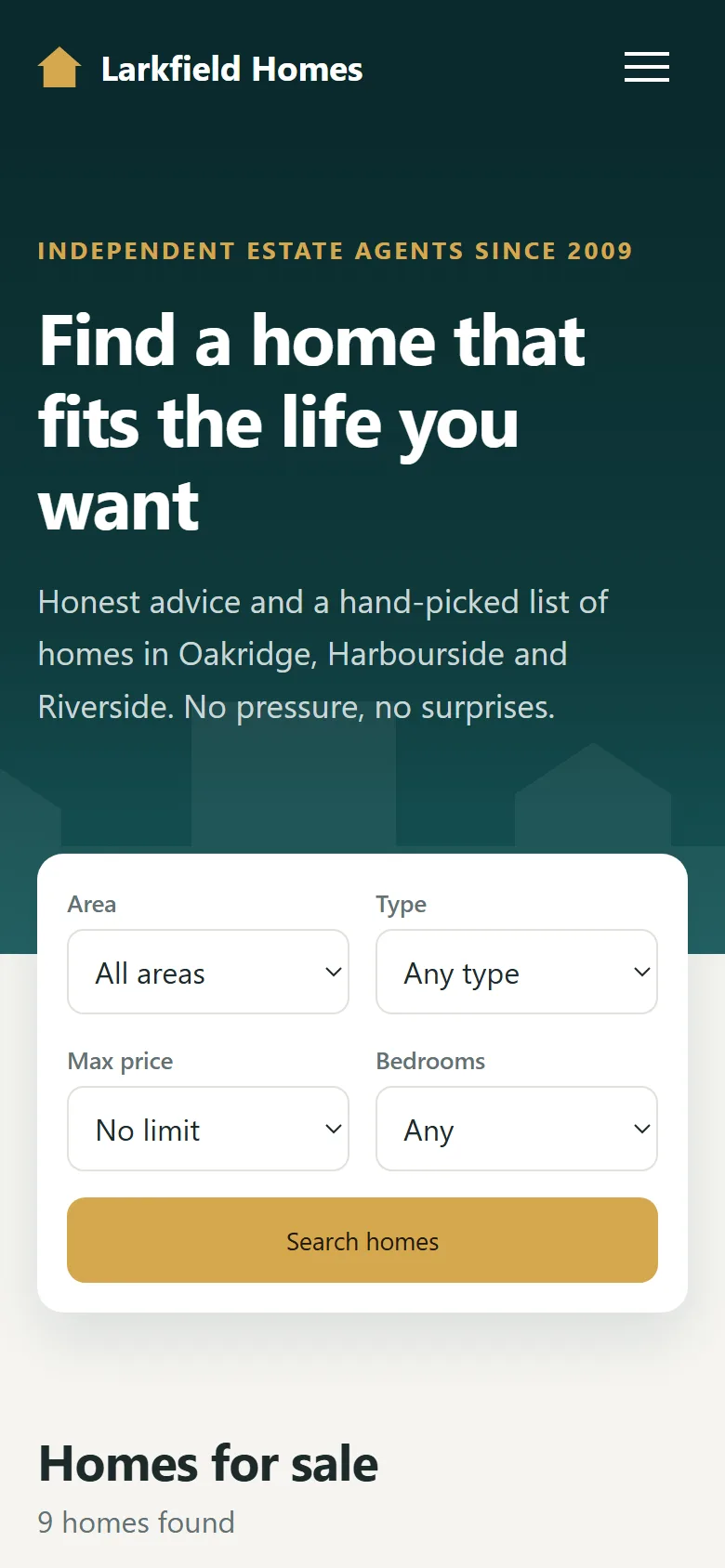
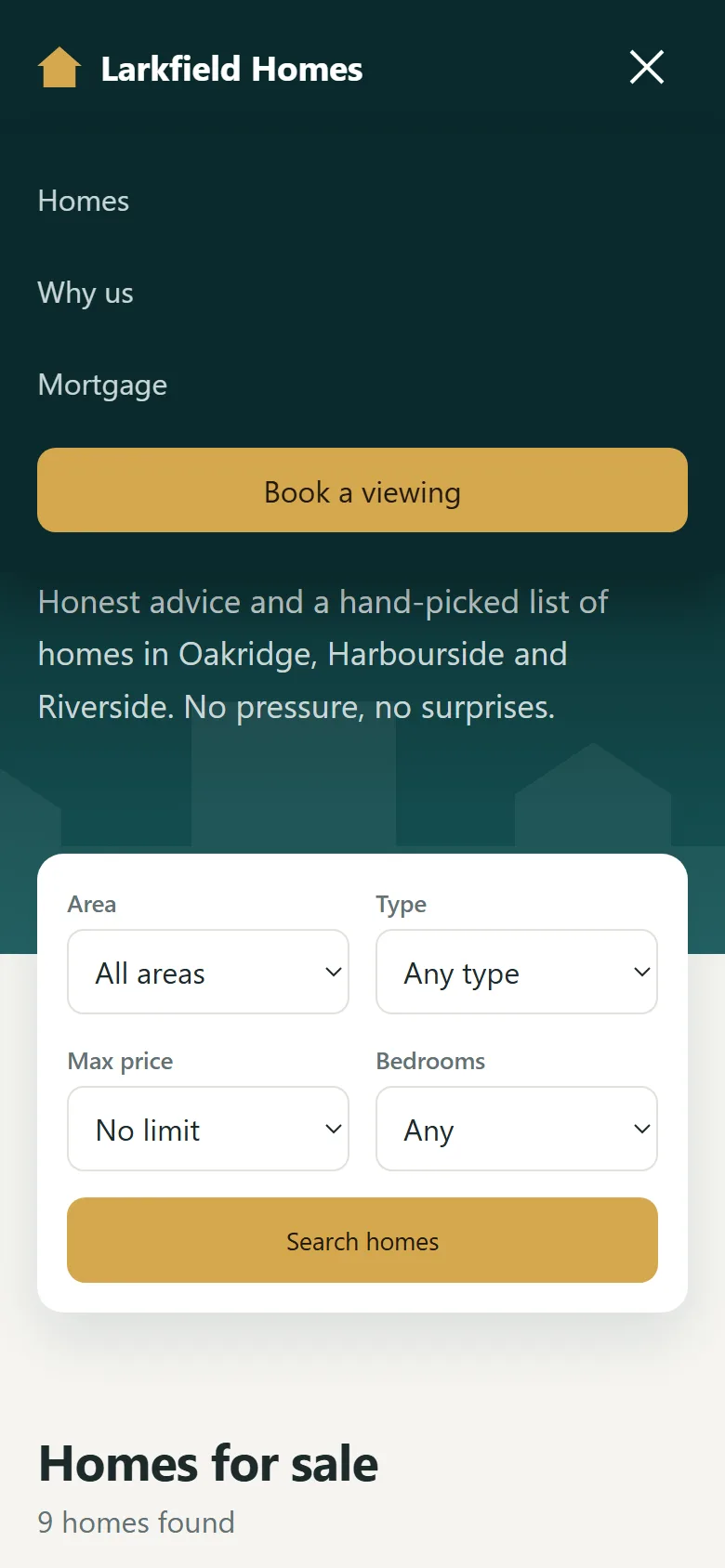
At 960px, the grids drop to two columns and the calculator stacks. At 860px, the links move behind
a hamburger button, whose bars turn into an X when aria-expanded="true". At 620px,
everything is one column.
/* ---------- REDUCED MOTION ---------- */
@media (prefers-reduced-motion: reduce) {
  html { scroll-behavior: auto; }
  *, *::before, *::after {
    animation-duration: .01ms !important;
    animation-delay: 0ms !important;
    transition-duration: .01ms !important;
  }
}
This turns off animation for people who've asked for less motion in their system settings. That's the end of Part 2. The listings are still empty, so let's fill them.
Part 3: The JavaScript
The whole script follows one simple idea: the data decides what's on screen. We
never move or edit cards by hand. When anything changes, render() works out the new
list and redraws it.
3.1 The data
/* ---------- SAMPLE HOMES ---------- */
// On a real site this list would come from your server as JSON.
// "listed" is the number of days since the home went on sale; "hue" colours its picture.
const HOMES = [
  { id: 1, title: 'Sunny family home with garden', type: 'house', area: 'Oakridge', price: 745000, beds: 4, baths: 3, size: 2180, year: 1998, listed: 2, hue: 150,
    about: 'A bright four-bedroom home on a quiet road, a short walk from the park and two good schools.',
    features: ['South-facing garden', 'Double garage', 'New kitchen', 'Home office'] },
  { id: 2, title: 'Modern harbour apartment', type: 'apartment', area: 'Harbourside', price: 389000, beds: 1, baths: 1, size: 720, year: 2019, listed: 5, hue: 200,
    about: 'A one-bedroom apartment on the sixth floor with open views across the water.',
    features: ['Water views', 'Private balcony', 'Lift and concierge', 'Bike storage'] },
  { id: 3, title: 'Restored brick townhouse', type: 'townhouse', area: 'Riverside', price: 615000, beds: 3, baths: 2, size: 1640, year: 1912, listed: 9, hue: 20,
    about: 'Original fireplaces and high ceilings, with a new roof and rewiring finished last year.',
    features: ['Original fireplaces', 'New roof', 'Courtyard garden', 'Walk to the station'] },
  { id: 4, title: 'Riverside cottage with studio', type: 'house', area: 'Riverside', price: 529000, beds: 2, baths: 2, size: 1210, year: 1956, listed: 14, hue: 95,
    about: 'A two-bedroom cottage with a separate garden studio, ideal for working from home.',
    features: ['Garden studio', 'River path access', 'Wood burner', 'Off-street parking'] },
  { id: 5, title: 'Two-bed flat near the marina', type: 'apartment', area: 'Harbourside', price: 472000, beds: 2, baths: 2, size: 960, year: 2015, listed: 1, hue: 225,
    about: 'A corner apartment with two bedrooms and light from three sides, moments from the marina.',
    features: ['Corner position', 'Two bathrooms', 'Secure parking', 'Residents gym'] },
  { id: 6, title: 'Oakridge executive residence', type: 'house', area: 'Oakridge', price: 1185000, beds: 5, baths: 4, size: 3320, year: 2006, listed: 21, hue: 45,
    about: 'A generous five-bedroom home on a large plot, with a heated pool and a guest suite.',
    features: ['Heated pool', 'Guest suite', 'Triple garage', 'Half-acre plot'] },
  { id: 7, title: 'Compact starter townhouse', type: 'townhouse', area: 'Oakridge', price: 398000, beds: 2, baths: 1, size: 980, year: 2003, listed: 30, hue: 330,
    about: 'An easy first home with a small garden, close to the shops and the bus route.',
    features: ['Low running costs', 'Small garden', 'Allocated parking', 'Near the bus route'] },
  { id: 8, title: 'Penthouse with roof terrace', type: 'apartment', area: 'Riverside', price: 895000, beds: 3, baths: 2, size: 1780, year: 2021, listed: 7, hue: 265,
    about: 'A top-floor apartment with a wraparound terrace and sunset views along the river.',
    features: ['Wraparound terrace', 'Two parking spaces', 'Floor-to-ceiling glass', 'Smart heating'] },
  { id: 9, title: 'Waterside family townhouse', type: 'townhouse', area: 'Harbourside', price: 768000, beds: 4, baths: 3, size: 2050, year: 2012, listed: 3, hue: 175,
    about: 'Four floors of family space with a private mooring at the end of the garden.',
    features: ['Private mooring', 'Roof garden', 'Integral garage', 'Lower-ground den'] }
];

const TYPE_NAMES = { house: 'House', townhouse: 'Townhouse', apartment: 'Apartment' };
const STORAGE_KEY = 'larkfield-saved';

const money = new Intl.NumberFormat('en-US', {
  style: 'currency', currency: 'USD', maximumFractionDigits: 0
});
const number = new Intl.NumberFormat('en-US');
Each home is one object, and they all have the same fields. Intl.NumberFormat is the
browser's built-in number formatter: money.format(745000) gives
$745,000, with no string handling of our own.
3.2 Menu, header and reveal
/* ---------- MOBILE MENU AND HEADER ---------- */
const menuBtn = document.getElementById('menuBtn');
const mainNav = document.getElementById('mainNav');
const siteHeader = document.getElementById('siteHeader');

function setMenu(open) {
  menuBtn.setAttribute('aria-expanded', open);
  menuBtn.setAttribute('aria-label', open ? 'Close menu' : 'Open menu');
  mainNav.classList.toggle('open', open);
}

menuBtn.addEventListener('click', () => {
  setMenu(menuBtn.getAttribute('aria-expanded') !== 'true');
});
mainNav.addEventListener('click', (e) => {
  if (e.target.closest('a')) setMenu(false);
});
document.addEventListener('keydown', (e) => {
  if (e.key === 'Escape') setMenu(false);
});
window.addEventListener('scroll', () => {
  siteHeader.classList.toggle('scrolled', window.scrollY > 10);
}, { passive: true });/* ---------- SCROLL REVEAL ---------- */
document.documentElement.classList.add('js');
const revealer = new IntersectionObserver((entries) => {
entries.forEach((entry) => {
if (!entry.isIntersecting) return;
entry.target.classList.add('visible');
revealer.unobserve(entry.target);
});
}, { threshold: 0.2 });
document.querySelectorAll('.reveal').forEach((el) => revealer.observe(el));setMenu() is the one place that opens or closes the menu, so its attribute, label and
class can't disagree. IntersectionObserver fires when an item scrolls into view, and
unobserve makes each animation play only once.
3.3 Saved homes
/* ---------- SAVED HOMES ---------- */
// localStorage can throw in private windows, so every use sits in try/catch.
// The page still works without it: saved homes just last until you close the tab.
function loadSaved() {
  try {
    return new Set(JSON.parse(localStorage.getItem(STORAGE_KEY)) || []);
  } catch {
    return new Set();
  }
}

function storeSaved() {
  try {
    localStorage.setItem(STORAGE_KEY, JSON.stringify([...saved]));
  } catch {
    /* nothing to do: the Set in memory is still correct */
  }
}

const saved = loadSaved();
const savedCount = document.getElementById('savedCount');

function toggleSaved(id) {
  if (saved.has(id)) saved.delete(id);
  else saved.add(id);
  storeSaved();
  savedCount.textContent = saved.size;
}
The saved ids are kept in a Set, which is a list that can't hold duplicates and has
fast has(), add() and delete() methods.
localStorage only stores text, so JSON.stringify turns the ids into a
string and JSON.parse turns them back. Both functions sit in try/catch
because localStorage can throw an error: it may be blocked in a private window or hold
damaged data. Without this, one bad value would stop the whole page from loading. With it, the
worst case is that saved homes last only until the tab closes.
3.4 Building a card
/* ---------- CARDS ---------- */
const homeGrid = document.getElementById('homeGrid');
const resultCount = document.getElementById('resultCount');
const noResults = document.getElementById('noResults');
function cardHTML(home, index) {
const isSaved = saved.has(home.id);
return `
<article class="home-card" style="--hue:${home.hue}; animation-delay:${index * 40}ms">
<svg class="home-art" aria-hidden="true"><use href="#art-${home.type}"/></svg>
<div class="home-info">
<p class="home-price" style="margin:0">${money.format(home.price)}</p>
<h3>${home.title}</h3>
<p class="home-area">${home.area} · ${TYPE_NAMES[home.type]}</p>
<ul class="home-specs">
<li>${home.beds} bed</li>
<li>${home.baths} bath</li>
<li>${number.format(home.size)} sq ft</li>
</ul>
</div>
<button class="home-open" type="button" data-open="${home.id}"
aria-label="View details: ${home.title}, ${money.format(home.price)}"></button>
${home.listed <= 3 ? '<span class="badge">New</span>' : ''}
<button class="fav-btn" type="button" data-save="${home.id}" aria-pressed="${isSaved}"
aria-label="Save ${home.title}">
<svg aria-hidden="true"><use href="#icon-heart"/></svg>
</button>
</article>`;
}cardHTML() takes one home and returns a string of HTML. It's a template
literal, marked by backticks, so ${home.title} drops values straight in. Look
at the first line of the template: style="--hue:${home.hue}" is where each card gets
its colour. animation-delay uses the card's position, so they fade in one after another.
The "New" badge appears only if the home was listed in the last three days.
A word of warning: we only use innerHTML here because every value comes from our own
array. Never put text typed by a visitor, or anything from a server you don't control, into a
template like this without escaping it first.
3.5 Filtering and sorting
/* ---------- FILTER AND SORT ---------- */
const searchForm = document.getElementById('searchForm');
const sortBy = document.getElementById('sortBy');
const savedOnly = document.getElementById('savedOnly');

const SORTERS = {
  'newest': (a, b) => a.listed - b.listed,
  'price-asc': (a, b) => a.price - b.price,
  'price-desc': (a, b) => b.price - a.price,
  'area-desc': (a, b) => b.size - a.size
};

function matches(home, f) {
  if (f.get('area') && home.area !== f.get('area')) return false;
  if (f.get('type') && home.type !== f.get('type')) return false;
  if (f.get('price') && home.price > Number(f.get('price'))) return false;
  if (f.get('beds') && home.beds < Number(f.get('beds'))) return false;
  if (savedOnly.checked && !saved.has(home.id)) return false;
  return true;
}

function render() {
  const filters = new FormData(searchForm);

  // filter() builds a new array, so sort() never reorders HOMES itself
  const results = HOMES
    .filter((home) => matches(home, filters))
    .sort(SORTERS[sortBy.value]);

  homeGrid.innerHTML = results.map(cardHTML).join('');
  homeGrid.hidden = results.length === 0;
  noResults.hidden = results.length > 0;
  resultCount.textContent = `${results.length} ${results.length === 1 ? 'home' : 'homes'} found`;

  updateUrl(filters);
}
This is the heart of the project, and it fits in very few lines.
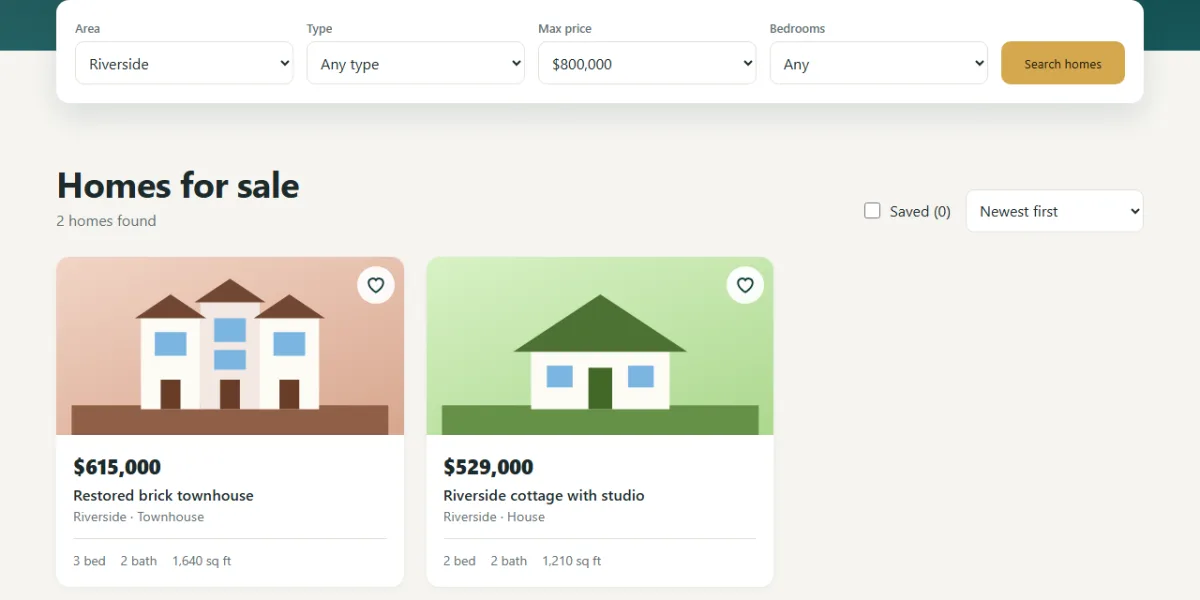
matches()answers one question: should this home be shown? Each line rejects it if a filter is set and doesn't match. Anything that gets to the end passes. Writing it as a list of early exits keeps each rule easy to read.SORTERSholds one compare function per option. A compare function returns a negative number ifashould come first, soa.price - b.pricesorts from low to high. The object's keys match the<option>values, soSORTERS[sortBy.value]picks the right one with noifstatements.render()chains the steps:filter(), thensort(), thenmap(cardHTML)to turn each home into HTML, thenjoin('')to make one string.
The order matters. sort() changes the array it's called on, and
filter() always returns a new array, so our original HOMES list is never
reordered.
3.6 Keeping the search in the address bar
/* ---------- SHAREABLE URL ---------- */
// Keep the search in the address bar, so a visitor can bookmark it or send it to someone
function updateUrl(filters) {
  const params = new URLSearchParams();
  filters.forEach((value, key) => { if (value) params.set(key, value); });
  if (sortBy.value !== 'newest') params.set('sort', sortBy.value);

  const query = params.toString();
  const url = location.pathname + (query ? `?${query}` : '') + location.hash;

  // Some browsers refuse this on a page opened straight from a file, so don't let it stop the page
  try {
    history.replaceState(null, '', url);
  } catch {
    /* the search still works, it just isn't kept in the address bar */
  }
}

function readUrl() {
  const params = new URLSearchParams(location.search);
  ['area', 'type', 'price', 'beds'].forEach((name) => {
    if (params.has(name)) searchForm.elements[name].value = params.get(name);
  });
  if (SORTERS[params.get('sort')]) sortBy.value = params.get('sort');
}
Property hunters send each other links all the time, so the search should live in the URL.
updateUrl() turns the filters into something like
?area=Oakridge&price=800000, and URLSearchParams handles the escaping
for us. history.replaceState() changes the address without reloading the page and
without filling up the back button's history. readUrl() does the reverse when the page
loads, so a shared link opens on the same search.
The try/catch is there because some browsers refuse this call on a page
opened straight from a file on your computer. A convenience should never be able to break the page.
We also keep location.hash in the address, so a link like #mortgage isn't
wiped out.
3.7 The details popup
/* ---------- DIALOG ---------- */
const homeDialog = document.getElementById('homeDialog');
const dialogBody = document.getElementById('dialogBody');
function openHome(home) {
dialogBody.style.setProperty('--hue', home.hue);
dialogBody.innerHTML = `
<svg class="dialog-art" aria-hidden="true"><use href="#art-${home.type}"/></svg>
<div class="dialog-text">
<h2 id="dialogTitle">${home.title}</h2>
<p class="home-price">${money.format(home.price)}</p>
<p>${home.area} · ${TYPE_NAMES[home.type]} · Built ${home.year}</p>
<dl class="dialog-specs">
<div><dt>Bedrooms</dt><dd>${home.beds}</dd></div>
<div><dt>Bathrooms</dt><dd>${home.baths}</dd></div>
<div><dt>Size</dt><dd>${number.format(home.size)} sq ft</dd></div>
<div><dt>Listed</dt><dd>${home.listed === 1 ? '1 day' : `${home.listed} days`} ago</dd></div>
</dl>
<p>${home.about}</p>
<ul class="feature-list">${home.features.map((f) => `<li>${f}</li>`).join('')}</ul>
<button class="btn btn-dark" type="button" data-estimate="${home.price}">Estimate payments</button>
</div>`;
homeDialog.showModal();
}
// Clicks on the grid, using one listener for every card (event delegation)
homeGrid.addEventListener('click', (e) => {
const saveBtn = e.target.closest('[data-save]');
if (saveBtn) {
const id = Number(saveBtn.dataset.save);
toggleSaved(id);
saveBtn.setAttribute('aria-pressed', saved.has(id));
if (savedOnly.checked) render();
return;
}
const openBtn = e.target.closest('[data-open]');
if (openBtn) openHome(HOMES.find((h) => h.id === Number(openBtn.dataset.open)));
});
// A click on the dimmed backdrop lands on the dialog element itself
homeDialog.addEventListener('click', (e) => {
if (e.target === homeDialog) {
homeDialog.close();
return;
}
const estimate = e.target.closest('[data-estimate]');
if (estimate) {
calcPrice.value = estimate.dataset.estimate;
updateMortgage();
homeDialog.close();
document.getElementById('mortgage').scrollIntoView();
}
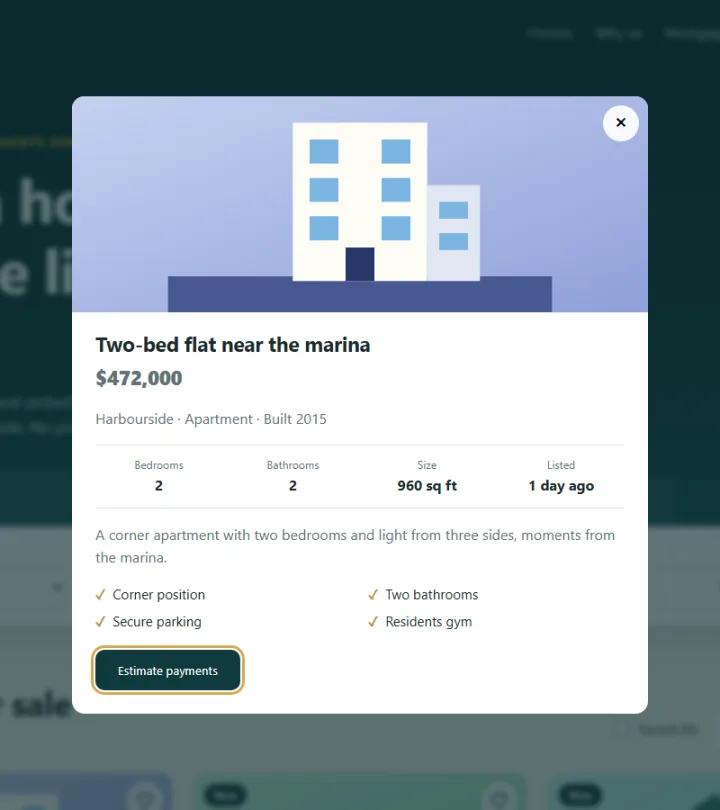
});Building a good popup used to be hard. showModal() now does it all: the dialog sits
above everything, the rest of the page can't be reached with the keyboard, Esc closes it,
and focus returns to the card that opened it.
Only one thing is missing, closing with a click outside. A click on the dimmed backdrop counts as a
click on the <dialog> element itself, while a click on the contents lands on
something inside it. So e.target === homeDialog tells us it was the backdrop.
The grid uses event delegation. The cards get replaced on every render, so
listeners attached to them would be lost. One listener on the grid never goes away, and
closest('[data-save]') works out what was clicked.
3.8 The mortgage calculator
/* ---------- MORTGAGE ---------- */
const calcForm = document.getElementById('calcForm');
const calcPrice = document.getElementById('calcPrice');

function monthlyPayment(loan, yearlyRate, years) {
  const months = years * 12;
  const r = yearlyRate / 100 / 12;
  if (r === 0) return loan / months;   // the formula would divide by zero
  return loan * r * (1 + r) ** months / ((1 + r) ** months - 1);
}

function updateMortgage() {
  const data = new FormData(calcForm);
  const price = Number(data.get('price'));
  const depositPct = Number(data.get('deposit'));
  const rate = Number(data.get('rate'));
  const years = Number(data.get('years'));

  const loan = price * (1 - depositPct / 100);
  const monthly = monthlyPayment(loan, rate, years);
  const total = monthly * years * 12;
  const interest = total - loan;

  document.getElementById('calcPriceOut').textContent = money.format(price);
  document.getElementById('calcDepositOut').textContent = `${depositPct}% (${money.format(price - loan)})`;
  document.getElementById('calcRateOut').textContent = `${rate.toFixed(2)}%`;
  document.getElementById('monthlyPay').textContent = money.format(monthly);
  document.getElementById('loanAmount').textContent = money.format(loan);
  document.getElementById('totalInterest').textContent = money.format(interest);
  document.getElementById('totalPaid').textContent = money.format(total);

  // pathLength="100" on the circle lets us give the bar its size as a simple percentage
  const loanShare = total > 0 ? (loan / total) * 100 : 0;
  document.getElementById('donutBar').style.strokeDasharray = `${loanShare} ${100 - loanShare}`;
}

calcForm.addEventListener('input', updateMortgage);
The monthly payment on a fixed-rate loan has a standard formula:
M = P × r × (1 + r)^n ÷ ((1 + r)^n − 1)
Here P is the loan, r is the monthly rate as a decimal, so 6% a
year is 0.06 / 12 = 0.005, and n is the number of monthly payments. For
a $600,000 home with 20% down at 6% over 30 years:
- Loan: $600,000 × 0.8 = $480,000
- Monthly rate: 0.005, over 360 payments
- Monthly payment: $2,877.84
- Total paid: $2,877.84 × 360 = about $1,036,023
- Total interest: about $556,023
Watch out for the edge case. At 0% interest, (1 + r)^n - 1 is 0, and dividing by zero
gives NaN on the screen. So monthlyPayment() handles it first: with no
interest, the payment is just the loan divided by the months. The slider can reach 0, so this does
happen.
The chart takes one line. The loan's share of the total becomes the dash length, and the rest
becomes the gap. Because the circle has pathLength="100", those are simple
percentages.
3.9 Starting everything
/* ---------- START ---------- */
searchForm.addEventListener('change', render);
sortBy.addEventListener('change', render);
savedOnly.addEventListener('change', render);

searchForm.addEventListener('submit', (e) => {
  e.preventDefault();
  render();
  document.getElementById('homes').scrollIntoView();
});

document.getElementById('clearFilters').addEventListener('click', () => {
  searchForm.reset();
  savedOnly.checked = false;
  render();
});

savedCount.textContent = saved.size;
readUrl();
render();
updateMortgage();
A change event from any select bubbles up to the form, so one listener covers all
four filters, and the results update straight away. The search button simply scrolls down to them.
The last four lines set up the page: show the saved count, read the URL, draw the homes and
calculate the first mortgage figures.
Test it yourself
- Choose Oakridge and a maximum of $800,000. You should see 2 homes, and the address bar should change.
- Reload the page. The same search should still be there.
- Sort by Price: low to high. The first home should be $389,000.
- Save two homes, reload, then tick Saved. Both should still be there.
- Open a home and press Esc. Focus should return to that card.
- Open a home and press Estimate payments. The calculator should take its price.
- Drag the interest rate to 0. The total interest should read $0, not
NaN. - Search for a house under $400,000 to see the empty state, then clear it.
Using it on a real site
- Real listings: change
const HOMEStolet HOMES = []. At the bottom of the script, replace therender()call withfetch('/api/homes').then((r) => r.json()).then((list) => { HOMES = list; render(); });. Show a loading state while you wait, and escape all the text from the server. - Big lists: with thousands of homes, send the filters to the server and page through the results. Ours work well for dozens or a few hundred.
- Search engines: listings built in the browser are slower for search engines to
pick up. Have your server output a real page for each home, with its own URL and
RealEstateListingstructured data. - Photos: replace the
<svg>incardHTML()with an<img>withloading="lazy",widthandheight. - Mortgage figures: label them as estimates. A real payment also depends on taxes, insurance and the lender's terms, so don't present this as a loan offer.
Share your version
Built your own property site? Share a screenshot as a link with sshot.online, or share your code with the free code sharing tool. No account needed. For more practice, the restaurant website tutorial takes the opposite approach: its content sits in the HTML, and JavaScript only filters it. To go deeper on the array methods used here, read the guide to map, filter and reduce.
Conclusion
You've built a working property website in three parts. Along the way you used:
filter(),sort()andmap()to turn data into a page<symbol>,<use>and a--huevariable for reusable, recolourable art- a
SetandlocalStoragefor saved homes that survive a reload - the native
<dialog>for an accessible popup URLSearchParamsandreplaceStatefor shareable searches- the standard loan formula and one SVG circle for a live chart
Frequently asked questions
Do I need a framework to build a real estate website?
No. This site is one HTML file, one CSS file and one JavaScript file, with no frameworks, libraries or image files. A framework helps on very large sites, but filtering and sorting a list only takes a few lines of plain JavaScript.
How is the monthly mortgage payment calculated?
It uses the standard fixed-rate formula: M = P × r × (1 + r)^n ÷ ((1 + r)^n − 1), where P is the loan, r is the monthly interest rate and n is the number of monthly payments. A $480,000 loan at 6% over 30 years comes to $2,877.84 a month.
Where are the saved homes stored?
In the visitor's browser, using localStorage. They survive a page reload without any account, but they stay on that one browser and device. To sync them between devices you would save them on a server.
How do I load real property listings?
Replace the HOMES array with a fetch() call to your own API, then call render() when the data arrives. Escape any text from the server before putting it into HTML.
Why use the dialog element for the popup?
A dialog opened with showModal() handles the hard parts for you: it sits above the whole page, keeps keyboard focus inside, closes on Esc and returns focus to the button that opened it.
Related articles
How to Build a Restaurant Website with HTML, CSS and JavaScript
A complete restaurant site in 3 parts: a live open-now status, a filterable menu, a table booking form that only offers real times, and a swipeable reviews carousel.
Read More →
How to Build an HR Software Landing Page with HTML, CSS and JavaScript
A SaaS-style HR landing page in 3 parts: a CSS dashboard mockup, accessible feature tabs, a pricing toggle with a team-size slider, an FAQ and a demo form.
Read More →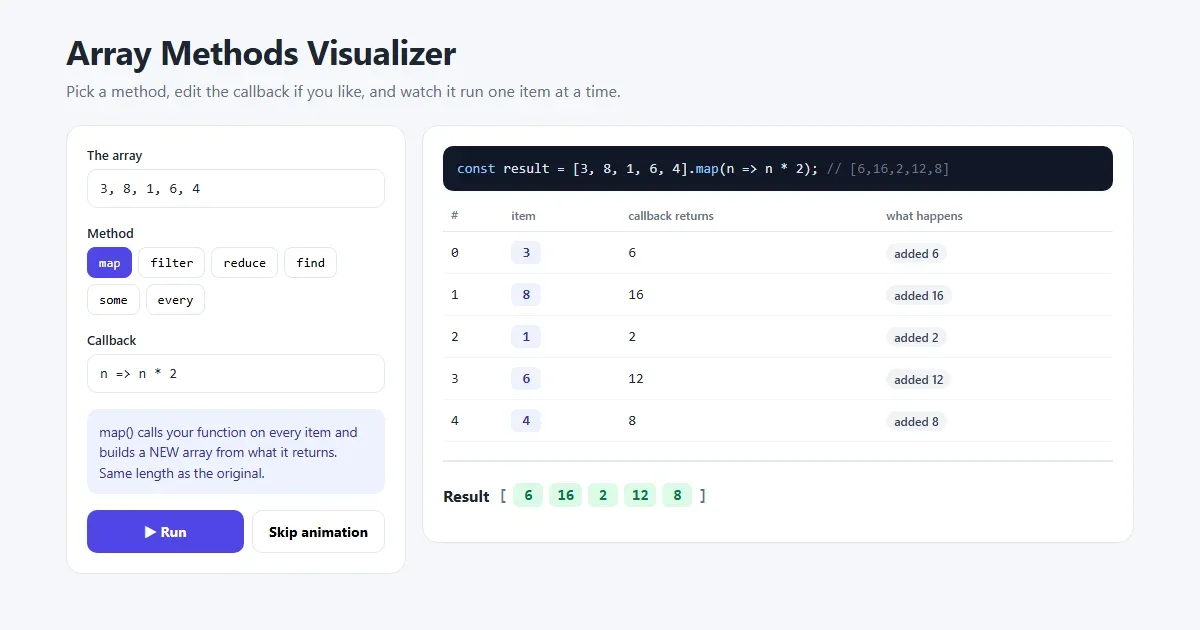
JavaScript map(), filter() and reduce() Explained with Examples
The three array methods you will use every day, explained step by step with pictures and real examples, plus find(), some(), every() and chaining.
Read More →