JavaScript map(), filter() and reduce() Explained with Examples
Published November 5, 2026 · 13 min read
map(), filter() and reduce() are the three array methods
you'll use most in modern JavaScript, in React components, API responses, shopping carts and
almost everywhere else. They replace most for loops with code that's shorter and
easier to read.
This guide explains each one step by step, with real examples you can copy, and a visualizer that shows exactly what happens on every item.
Open the array methods visualizer Watch each method run one item at a time.
The short version
| Method | What it does | Returns |
|---|---|---|
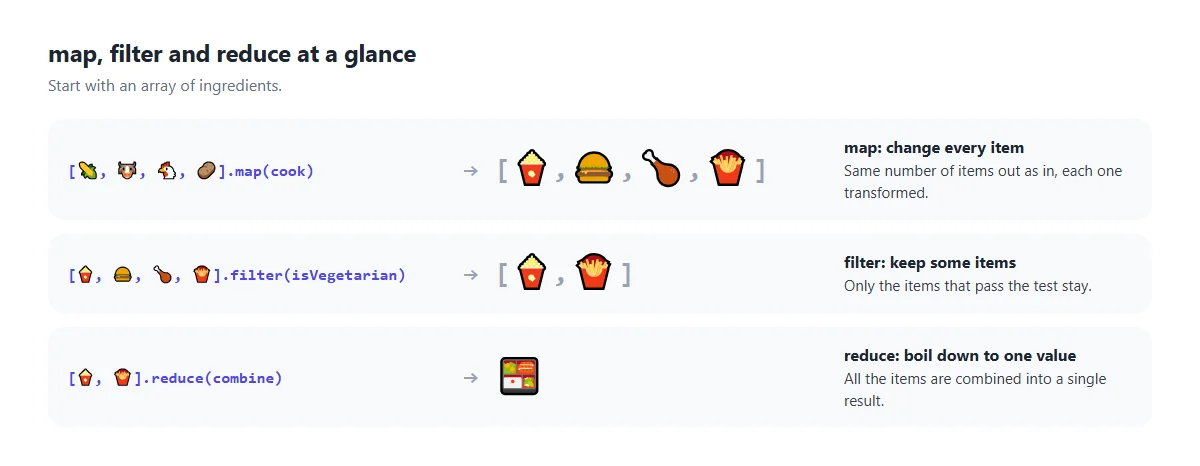
map() | Changes every item | A new array, same length |
filter() | Keeps the items that pass a test | A new array, same or shorter |
reduce() | Combines all items into one value | Anything: a number, string, object… |
find() | Gets the first item that passes a test | One item, or undefined |
some() / every() | Checks if any / all items pass | true or false |
None of these change the original array. They all give you something new.
How a callback works
Each method takes a callback: a small function that the method calls once for every item, passing the item in. Most people write it as an arrow function:
numbers.map(function (n) { return n * 2; });   // classic function
numbers.map((n) => { return n * 2; });          // arrow function with braces
numbers.map(n => n * 2);                        // short arrow: the value is returned automatically
The callback also receives the item's index and the whole array, if you need
them: (item, index, array) => ….
1. map(): change every item
const numbers = [3, 8, 1, 6, 4];

const doubled = numbers.map(n => n * 2);

console.log(doubled); // [6, 16, 2, 12, 8]
console.log(numbers); // [3, 8, 1, 6, 4]  (unchanged)
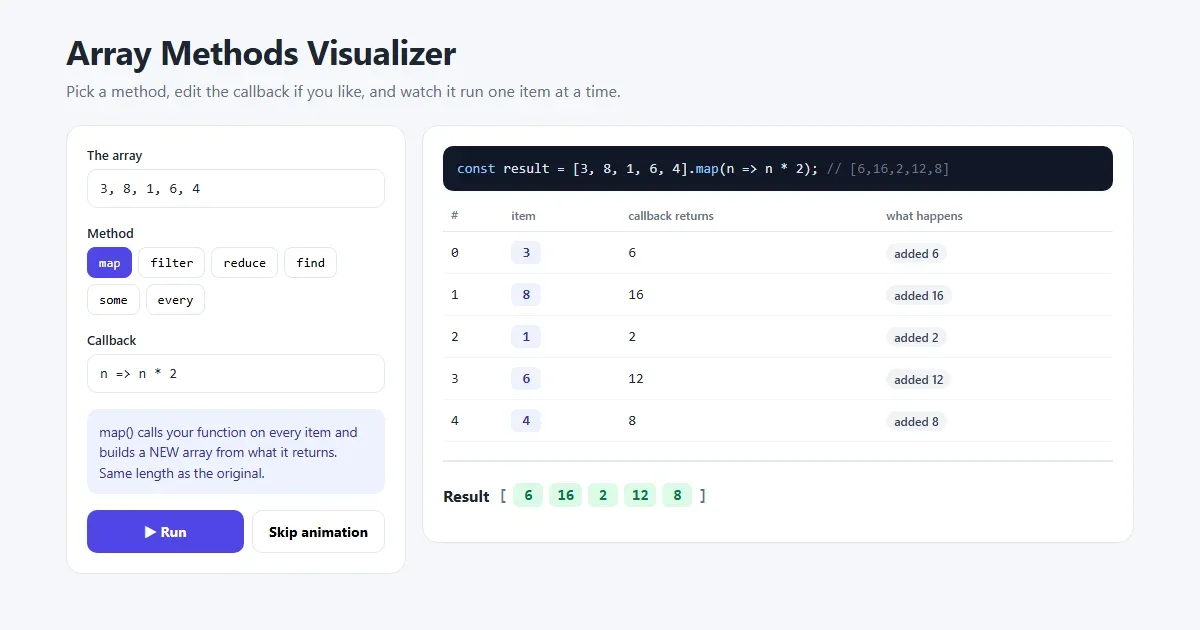
map() calls your function on every item and collects whatever it returns into a
new array of the same length. Think of it as “for each item, give me a new
version of it”.
In real code, you'll often use it to pull one field out of a list of objects, or to turn data into HTML:
const users = [
  { id: 1, name: "Aisha", age: 28 },
  { id: 2, name: "Omar",  age: 17 },
  { id: 3, name: "Lena",  age: 34 }
];

const names = users.map(user => user.name);
// ["Aisha", "Omar", "Lena"]

const listItems = users.map(user => `<li>${user.name}</li>`).join("");
// "<li>Aisha</li><li>Omar</li><li>Lena</li>"
If you've used React, users.map(user => <li key={user.id}>…</li>) is
exactly this.
2. filter(): keep the items that pass a test
const numbers = [3, 8, 1, 6, 4];

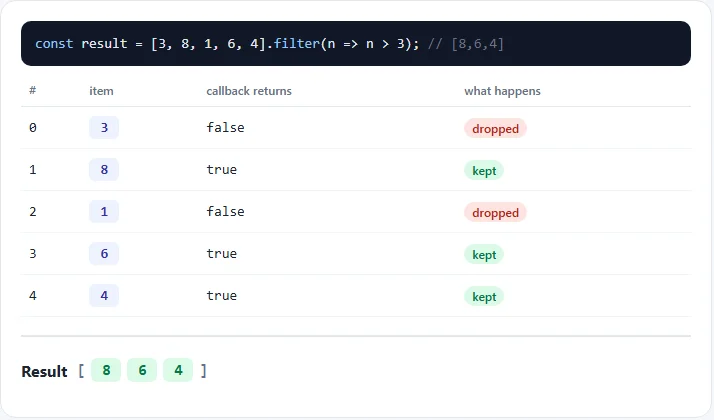
const big = numbers.filter(n => n > 3);
// [8, 6, 4]
Your callback should return true to keep an item or false to drop it.
The result is a new array with only the kept items, in their original order.
// adults only
const adults = users.filter(user => user.age >= 18);

// remove one item by id (common in to-do lists and carts)
const withoutOmar = users.filter(user => user.id !== 2);

// remove empty values
const clean = ["a", "", "b", null, "c"].filter(Boolean);
// ["a", "b", "c"]
The last trick works because filter keeps anything truthy.
Boolean("") and Boolean(null) are false, so empty values
are removed.
3. reduce(): combine everything into one value
const numbers = [3, 8, 1, 6, 4];

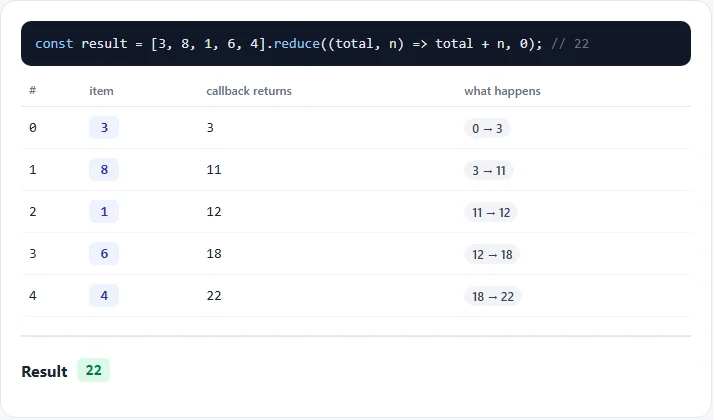
const total = numbers.reduce((sum, n) => sum + n, 0);
// 22
reduce() is the one people find hardest, but the idea is simple. It carries
one value through the array, called the accumulator (here,
sum):
- It starts with the starting value you pass as the second argument
(
0). - For each item, it calls your function with the accumulator and the item.
- Whatever you return becomes the accumulator for the next item.
- After the last item, the accumulator is the result.
Step by step: 0 + 3 = 3, 3 + 8 = 11, 11 + 1 = 12, 12 + 6 = 18, 18 + 4 = 22.
The accumulator can be anything, not just a number:
// total price of a shopping cart
const cart = [
  { name: "Shoes", price: 89, qty: 1 },
  { name: "Socks", price: 5,  qty: 3 }
];
const cartTotal = cart.reduce((sum, item) => sum + item.price * item.qty, 0);
// 104

// count how often each word appears
const words = ["css", "js", "css", "html", "css"];
const counts = words.reduce((acc, word) => {
  acc[word] = (acc[word] || 0) + 1;
  return acc;
}, {});
// { css: 3, js: 1, html: 1 }
Always pass a starting value. Without one, reduce uses the first
item as the starting value, which breaks when the items are objects, and throws an error on an
empty array.
4. find(), some() and every()
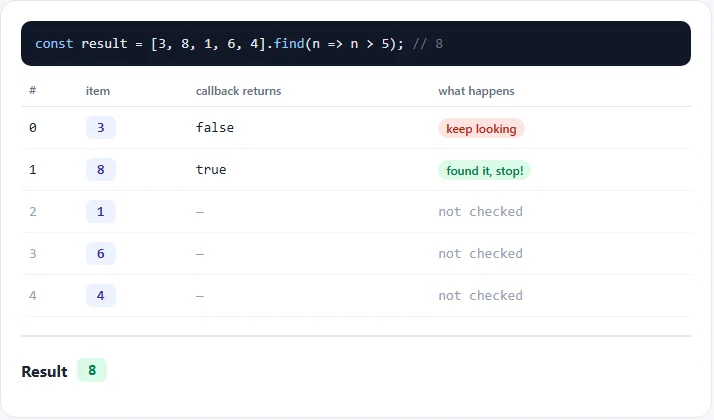
const numbers = [3, 8, 1, 6, 4];

numbers.find(n => n > 5);        // 8       first match
numbers.findIndex(n => n > 5);   // 1       position of the first match
numbers.some(n => n > 7);        // true    at least one passes
numbers.every(n => n > 0);       // true    all of them pass
numbers.includes(6);             // true    is this exact value in the array?

users.find(user => user.id === 3);  // { id: 3, name: "Lena", age: 34 }
These are faster than filter when you only need one answer, because they
stop early. find stops at the first match, some at the
first true, and every at the first false.
A common mix-up: filter always returns an array, even with one
match. find returns the item itself.
Chaining: put them together
Because map and filter return arrays, you can call another method
straight after them. Read a chain from top to bottom like a recipe:
const products = [
  { name: "Laptop",  price: 999, inStock: true  },
  { name: "Mouse",   price: 25,  inStock: false },
  { name: "Monitor", price: 199, inStock: true  }
];

const inStockTotal = products
  .filter(p => p.inStock)         // keep Laptop and Monitor
  .map(p => p.price)              // [999, 199]
  .reduce((sum, p) => sum + p, 0); // 1198
map vs forEach
forEach() also runs a function on every item, but it returns
nothing (undefined). Use it when you want to do something with each
item, like logging it or adding it to the page. Use map when you want a new
array back.
numbers.forEach(n => console.log(n));   // just does something, returns undefined
const squares = numbers.map(n => n * n); // builds a new array
Common mistakes
- Forgetting
returnwith curly braces.numbers.map(n => { n * 2 })gives[undefined, undefined, …]. With braces you must writereturn, or drop the braces. - Returning an object from a short arrow.
n => { value: n }is read as a block, not an object. Wrap it in brackets:n => ({ value: n }). reducewithout a starting value. It crashes on empty arrays and gives odd results with objects. Always pass one.- Using
filterwhen you want one item. You get an array back. Usefind. ["1", "2", "3"].map(parseInt)gives[1, NaN, NaN], becausemappasses the index as a second argument andparseIntreads it as a number base. Use.map(Number)or.map(s => parseInt(s, 10)).- Changing the original objects inside
map.users.map(u => { u.active = true; return u; })modifies the original users too. Return a copy instead:users.map(u => ({ ...u, active: true })).
Try it in the visualizer
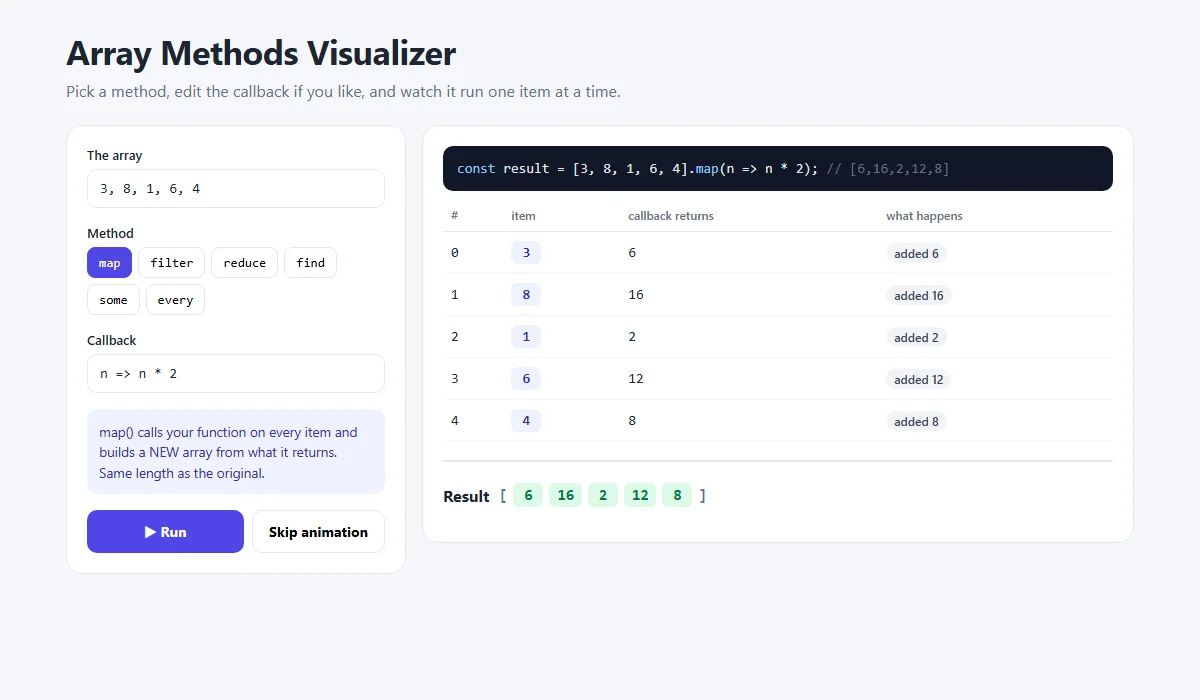
In the array methods visualizer you can type your own array (numbers or words), pick any of the six methods, edit the callback, and press Run. Each item appears one at a time with what the callback returned and what happened to it.
Try these:
- Change the array to
apple, kiwi, bananaand use map withs => s.length. - Use reduce with
(longest, s) => s.length > longest.length ? s : longestand a starting value of""to find the longest word. - Break the callback on purpose, for example
n => n +, and read the error.
Share your code
Wrote a neat chain? Share it with the free code sharing tool, or share a screenshot as a link with sshot.online. No account needed.
Frequently asked questions
What is the difference between map and filter?
map() returns a new array with every item changed by your function, always the
same length. filter() returns a new array with only the items your function
returns true for, so it can be shorter.
What does reduce do in JavaScript?
reduce() combines all items of an array into one value. It passes an accumulator
and each item to your function, and whatever you return becomes the accumulator for the next
item. It is used for sums, totals, counting and grouping.
Do map, filter and reduce change the original array?
No. They return new values and leave the original array as it was. However, if your callback changes the objects inside the array, those objects are changed, so return copies instead.
What is the difference between map and forEach?
map() returns a new array built from your function's return values.
forEach() returns undefined and is only for doing something with
each item, like logging or updating the page.
Why does my map return undefined values?
Your arrow function has curly braces but no return statement. Either add
return, or remove the braces so the value is returned
automatically.
What is the difference between filter and find?
filter() returns an array of every matching item. find() returns only
the first matching item itself, or undefined if nothing matches, and stops
searching as soon as it finds one.
Related articles
How to Build an Add to Cart Animation and Shopping Cart with HTML, CSS and JavaScript
Products that fly into the cart in an arc, a slide-out cart drawer, a free shipping progress bar, counting totals and a delivery truck checkout button.
Read More →
How to Build an Animated OTP Verification Page with HTML, CSS and JavaScript
Six digit boxes that pop, paste and autofill, a fake text message with the code, a resend countdown ring, a wrong-code shake and a confetti finish.
Read More →
CSS Flexbox Explained: A Visual Guide with Examples
Every Flexbox property in pictures: direction, justify-content, align-items, wrap, gap, flex-grow, plus a navbar, equal-height cards and a sticky footer.
Read More →