JavaScript Promises and async/await Explained with Examples
Published November 7, 2026 · 15 min read
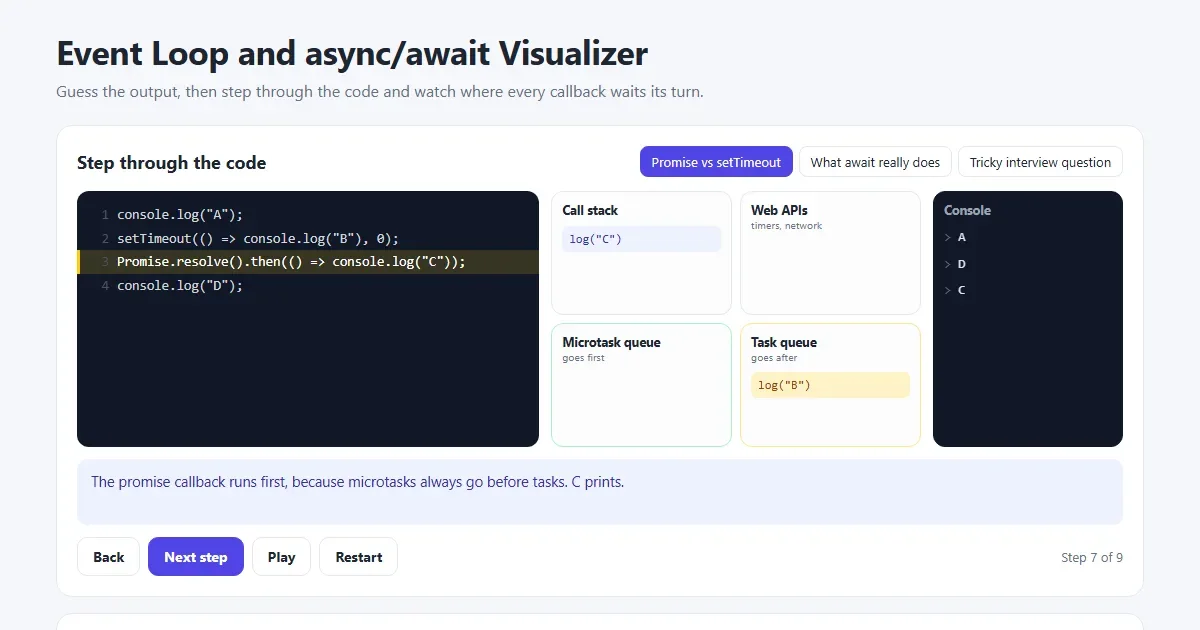
Sooner or later every JavaScript developer writes code like this, and is surprised by what comes out:
console.log("A");
setTimeout(() => console.log("B"), 0);
Promise.resolve().then(() => console.log("C"));
console.log("D");
The answer is A, D, C, B. B has a delay of zero and still prints last. By the end
of this guide you'll know exactly why, and you'll be able to use Promises and
async/await with confidence.
Open the event loop visualizer Step through this code one moment at a time.
The short version
| Term | What it means |
|---|---|
| Synchronous | Runs now, one line at a time |
| Asynchronous | Starts now, finishes later, and other code runs in between |
| Promise | An object standing for a value you will get later |
async | Makes a function always return a Promise |
await | Pauses this function until a Promise settles |
| Event loop | Decides which waiting code runs next |
Why JavaScript needs this
JavaScript runs one thing at a time on a single thread. If it stopped and waited two seconds for a server, the whole page would freeze for two seconds: no scrolling, no clicks, nothing.
So slow jobs are handed to the browser instead. JavaScript says “fetch this, and let me know when you're done”, then carries on. The hard part is writing code that continues when the answer arrives, and that's what Promises are for.
What is a Promise?
Think of a coffee shop. You pay and get a receipt, not a coffee. The receipt is a Promise: it stands for something you'll have later. You can sit down and do other things while you wait. Later you either get your coffee, or they tell you they've run out.
A Promise is always in one of three states:
- Pending: still waiting.
- Fulfilled: it worked, and there is a value.
- Rejected: it failed, and there is an error.
Once a Promise is fulfilled or rejected it is settled, and it never changes again.
You'll mostly use Promises that other code gives you, such as fetch(), but here is how
to create one:
function wait(ms) {
  return new Promise((resolve, reject) => {
    if (ms < 0) {
      reject(new Error("Time can't be negative"));
      return;
    }
    setTimeout(() => resolve("Waited " + ms + "ms"), ms);
  });
}
You call resolve when the work succeeds and reject when it fails.
Using a Promise with then and catch
wait(1000)
  .then((message) => {
    console.log(message);          // "Waited 1000ms"
    return message.length;         // goes to the next then
  })
  .then((length) => console.log(length))   // 13
  .catch((error) => console.log(error.message))
  .finally(() => console.log("Finished"));
then runs when the Promise is fulfilled, catch runs when anything above it
fails, and finally runs either way. Each then returns a new Promise, which
is why you can chain them.
async/await: the same thing, easier to read
async and await let you write Promise code that reads from top to bottom,
like normal code. These two functions do the same job:
// With then
function showUser() {
  return fetchUser()
    .then((user) => fetchOrders(user.id))
    .then((orders) => console.log(orders));
}

// With async/await
async function showUser() {
  const user = await fetchUser();
  const orders = await fetchOrders(user.id);
  console.log(orders);
}
There are two rules to remember:
asyncmakes a function return a Promise. Evenreturn 5gives you a Promise that resolves to 5.awaitwaits for a Promise and gives you its value. It can only be used inside anasyncfunction, or at the top level of a module.
What await really does
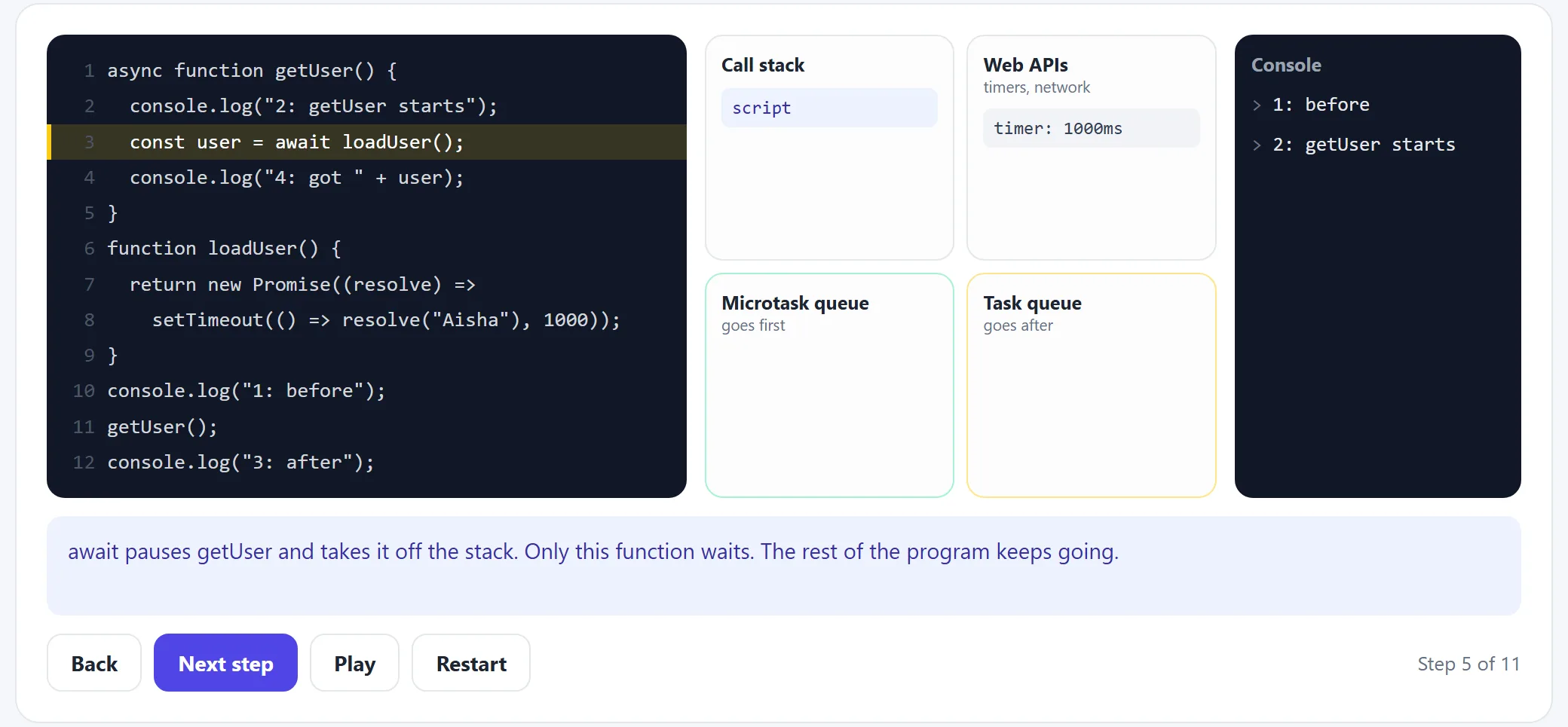
Here is the most important idea in this guide: await does not stop your
program. It only pauses the function it is in. The function steps off the call stack, and
everything else keeps running.
async function getUser() {
  console.log("2: getUser starts");
  const user = await loadUser();
  console.log("4: got " + user);
}

function loadUser() {
  return new Promise((resolve) =>
    setTimeout(() => resolve("Aisha"), 1000));
}

console.log("1: before");
getUser();
console.log("3: after");
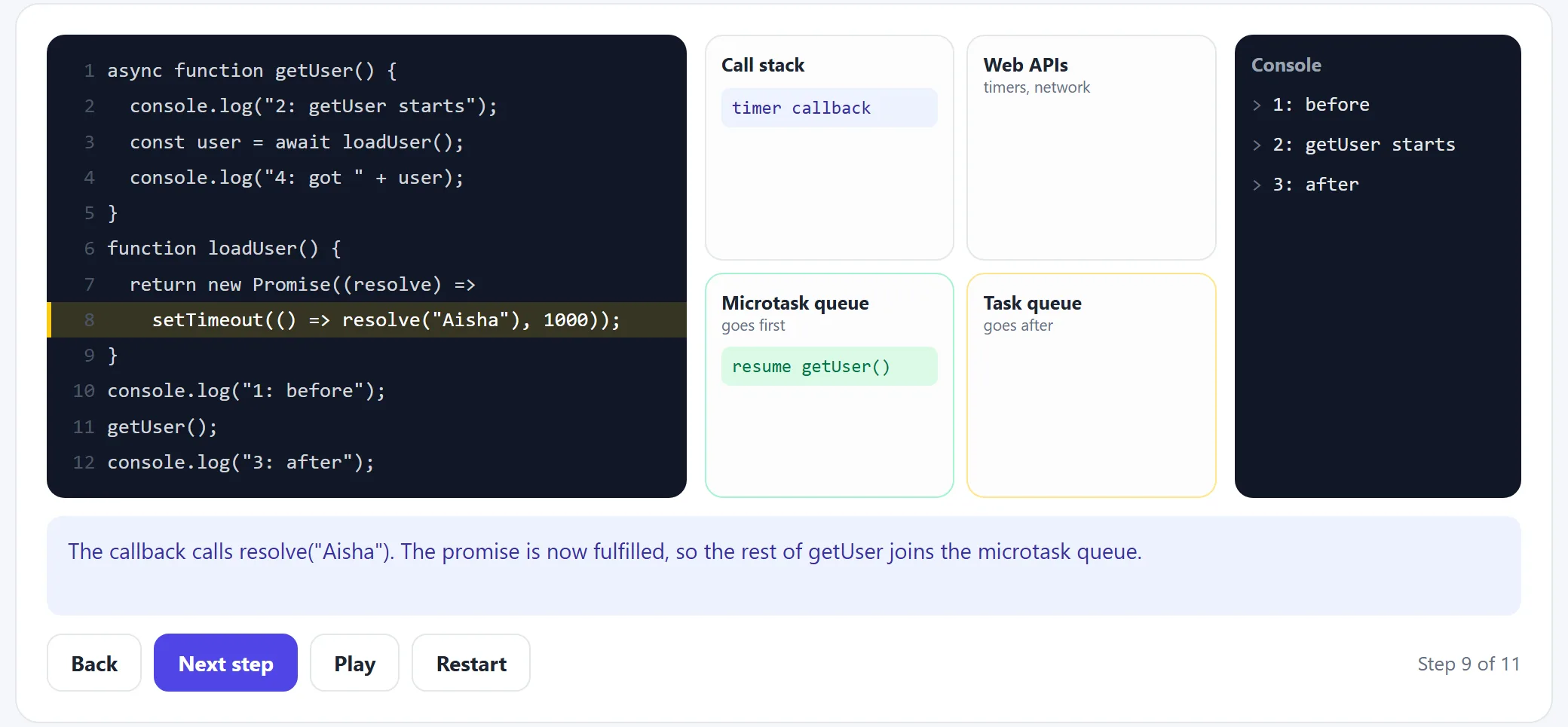
The output is 1, 2, 3, 4. Notice that “3: after” prints before the user has
loaded. The code before the first await runs straight away, then
getUser pauses and the script moves on. Step through this example to watch it happen.
The event loop
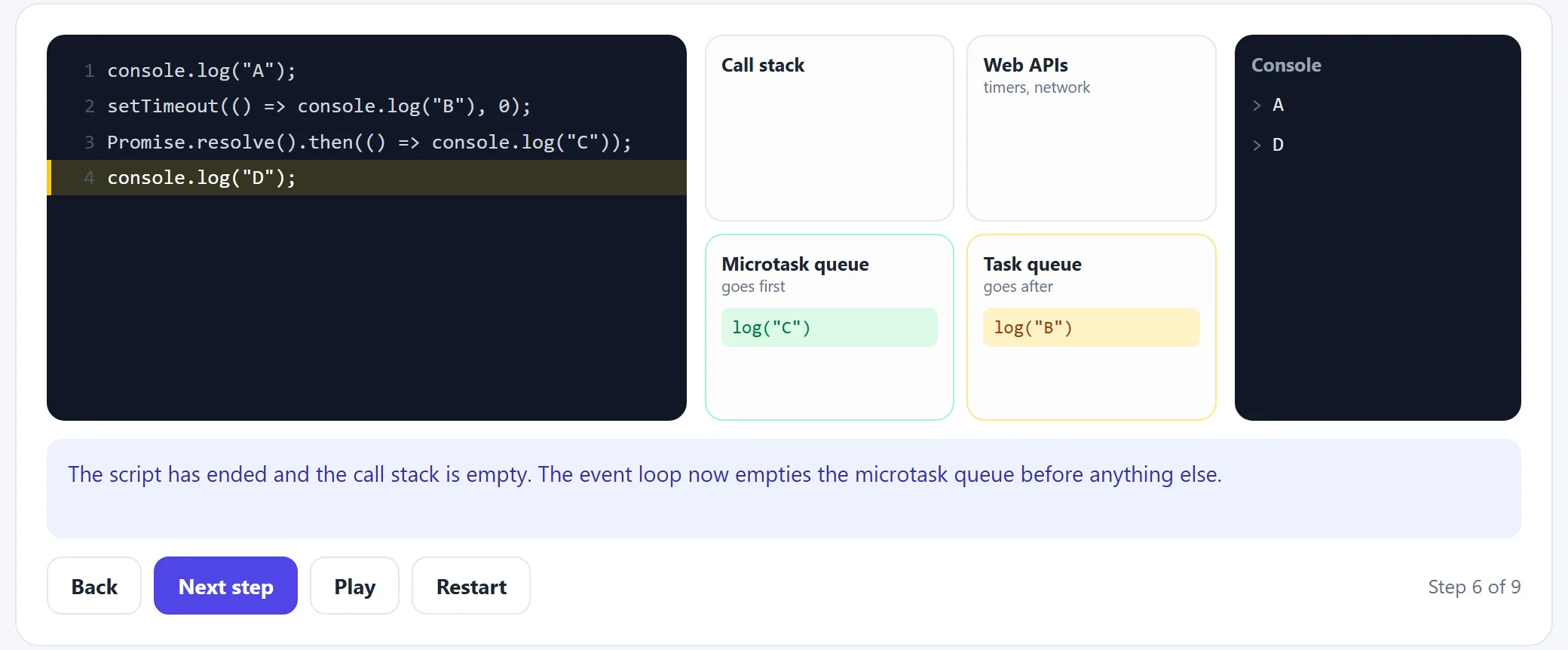
The event loop explains the A, D, C, B puzzle. JavaScript has one call stack, where code runs, and two waiting lines:
- The microtask queue holds Promise callbacks, including the rest of a function
after
await. - The task queue holds
setTimeoutcallbacks, clicks and other events.
The event loop follows three simple rules:
- Run the current code until the call stack is empty.
- Run all the microtasks, including any new ones they add.
- Take one task, run it, and go back to step 2.
Now the puzzle is easy. A and D are normal code, so they print first. Then the stack is empty, so the microtask (C) runs. Only then does the task (B) get a turn. A delay of 0 means “as soon as possible after everything else”, not “right now”. See every step, or test yourself on the harder interview question.
Real example: fetch data from an API
This is the code you'll write most often. It's worth learning as a pattern:
async function getUser(id) {
  const response = await fetch(`https://api.example.com/users/${id}`);

  if (!response.ok) {
    throw new Error(`Request failed: ${response.status}`);
  }

  return response.json();
}

async function showUser(id) {
  try {
    const user = await getUser(id);
    console.log(user.name);
  } catch (error) {
    console.log("Could not load the user:", error.message);
  } finally {
    console.log("Hide the loading spinner here");
  }
}
Two things here surprise people:
fetchdoes not fail on a 404 or a 500. It only rejects when the request itself fails, such as when the network is down. You must checkresponse.okyourself.response.json()is asynchronous too. The headers arrive first and the body later, so it returns a Promise.
Handling errors with try/catch
With await, a rejected Promise throws an error at that line, so a normal
try/catch handles it. An error thrown inside an async function rejects the
Promise it returned, so errors travel up to whichever caller catches them.
If nobody catches a rejection, the browser reports an unhandled rejection in the
console. Always have a try/catch or a .catch() at the top of the chain.
One at a time vs all at once
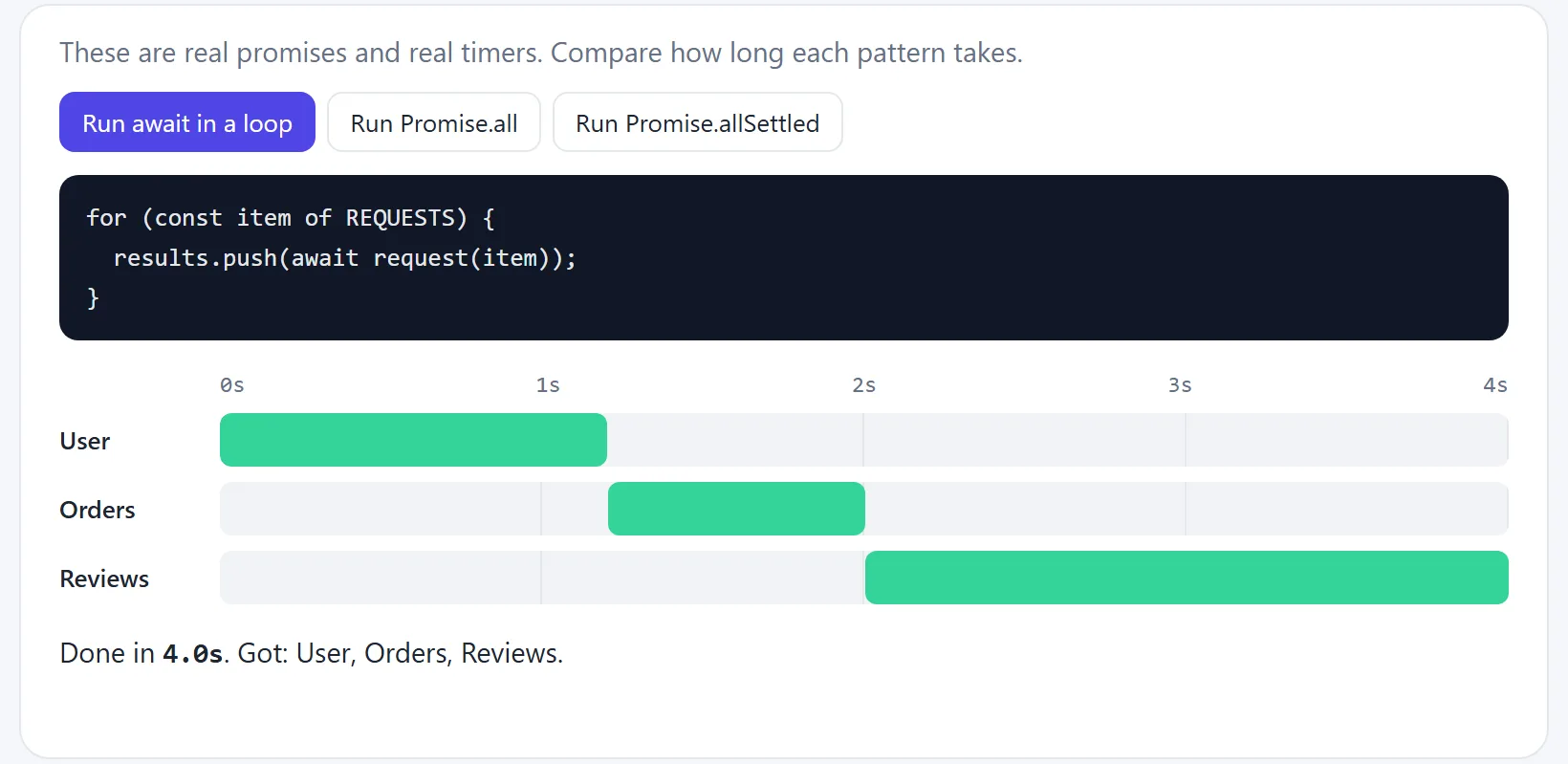
This is the most common performance mistake with await. If each request waits for the
one before it, the times add up:
const user = await fetchUser();        // 1.2s
const orders = await fetchOrders();    // 0.8s
const reviews = await fetchReviews();  // 2.0s
// total: 4.0s
When the requests don't depend on each other, start them together with
Promise.all. The total is then only as long as the slowest one:
const [user, orders, reviews] = await Promise.all([
  fetchUser(),
  fetchOrders(),
  fetchReviews()
]);
// total: 2.0s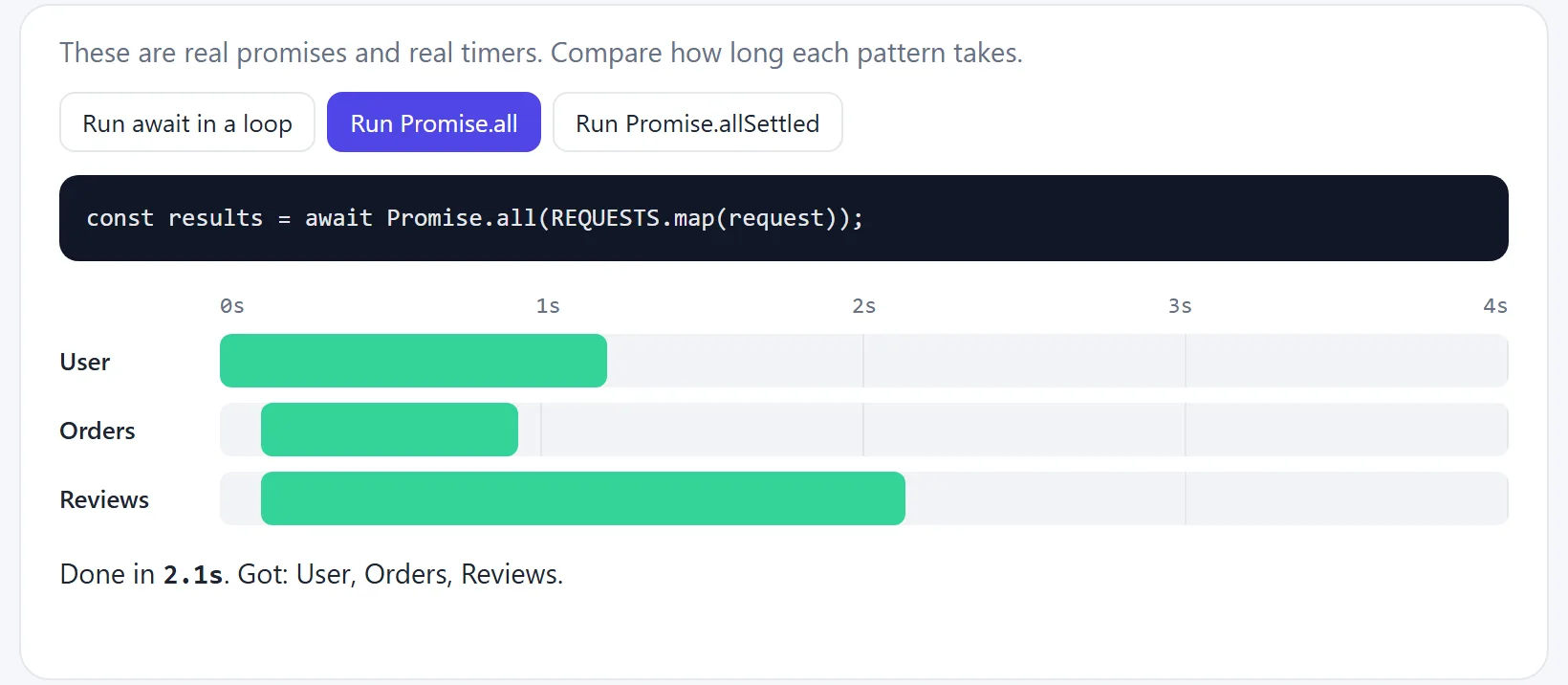
Keep them in sequence only when one result is needed for the next call, such as when you need the user's id to load their orders.
When one request fails
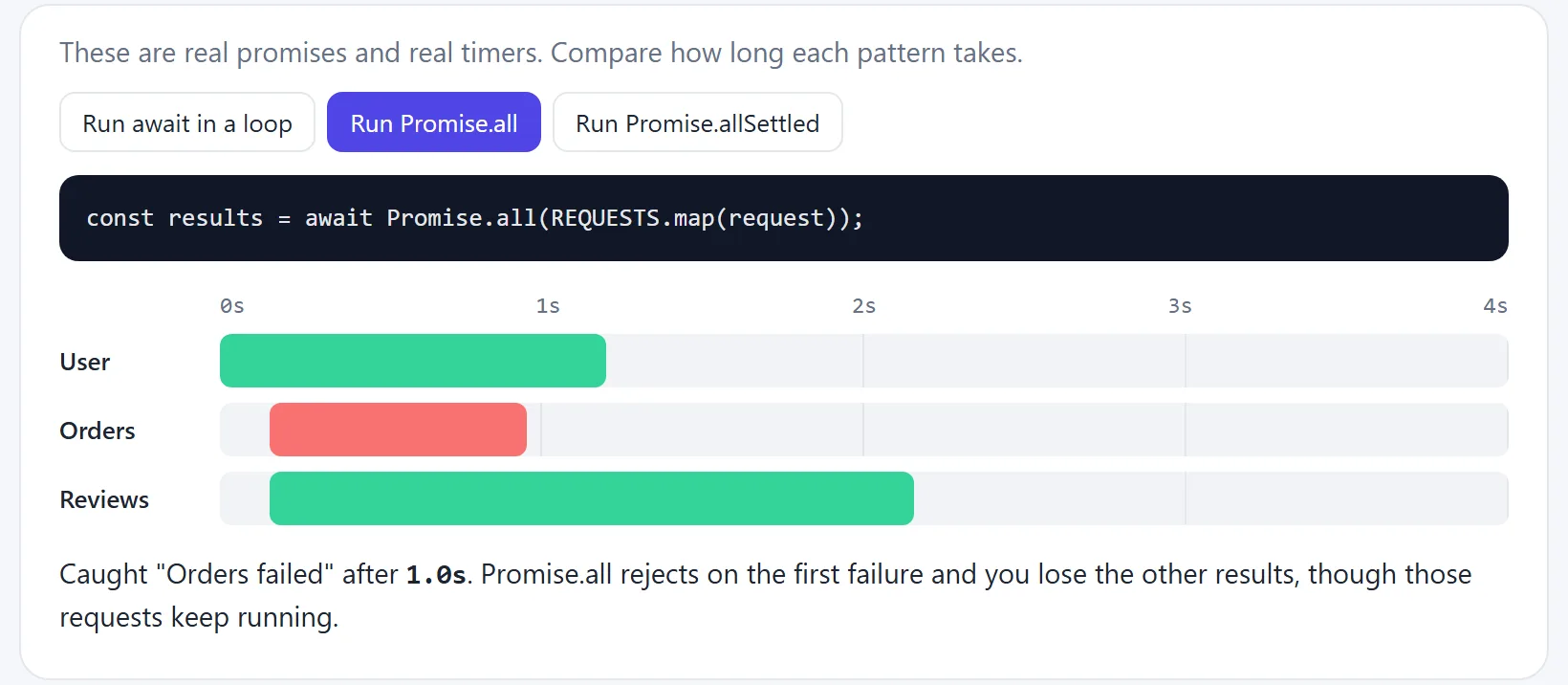
Each helper has a different rule for failure:
| Method | Finishes when | Use it when |
|---|---|---|
Promise.all | All succeed, or the first one fails | You need every result |
Promise.allSettled | All have finished, good or bad | Partial results are fine |
Promise.race | The first one finishes, good or bad | Adding a timeout |
Promise.any | The first one succeeds | Trying several sources |
const results = await Promise.allSettled([fetchUser(), fetchOrders()]);

for (const result of results) {
  if (result.status === "fulfilled") {
    console.log(result.value);
  } else {
    console.log("Failed:", result.reason.message);
  }
}
A page with several separate widgets is a good fit: if the reviews fail to load, you can still show the rest.
Common mistakes
- Forgetting
await.const user = getUser();gives you a Promise, not the user, souser.nameisundefined. - Using
awaitinsideforEach.forEachdoes not wait, so the code after the loop runs first. Usefor...ofto go one at a time, orPromise.allwithmapto go all at once. - Assuming a value is ready after an async call. Code on the next line runs before
the result arrives, unless you
awaitit. - Assuming
fetchthrows on a 404. Checkresponse.ok. - Returning nothing from
then. The nextthenreceivesundefined. Addreturn. - Using
awaitin a normal function. This is a syntax error. Mark the functionasync. - Assuming
asyncmakes slow code fast. A longforloop in an async function still freezes the page.asynchelps you wait, it doesn't add threads.
// Wrong: the log runs before any of these finish
items.forEach(async (item) => {
  await save(item);
});
console.log("Done?");

// Right: one at a time
for (const item of items) {
  await save(item);
}
console.log("Done");

// Right: all at once
await Promise.all(items.map((item) => save(item)));
console.log("Done");
Try it in the visualizer
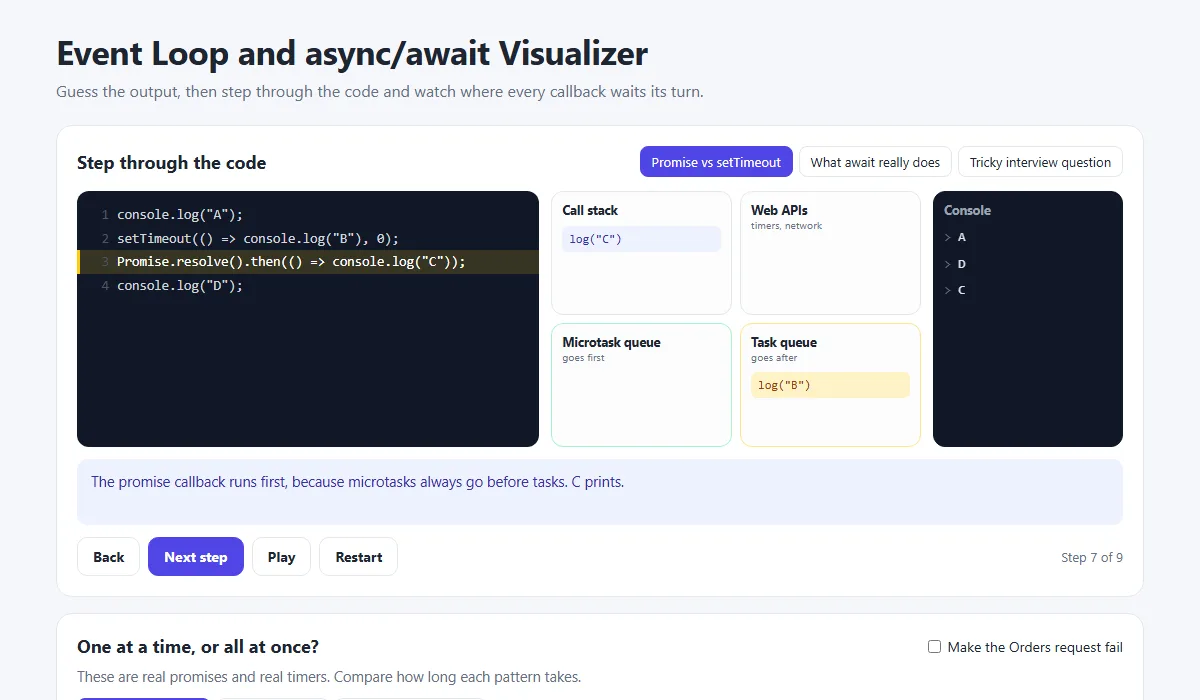
The event loop visualizer has two parts. The stepper shows the call stack, both queues and the console, with a plain explanation of each moment. The timeline below it runs real Promises so you can compare the patterns. Try these:
- Before you press Next on the tricky interview question, write down all six lines. Then check your answer.
- Run all three patterns on the timeline and compare the totals.
- Tick “Make the Orders request fail” and run them again. Notice that Reviews never starts in the loop.
Share your code
Stuck on an async bug? Share your code with the free code sharing tool, or share the error message as a link. No account needed.
Frequently asked questions
What is the difference between a Promise and async/await?
A Promise is an object that stands for a value you will get later. async/await is a cleaner way to write code that uses Promises. An async function always returns a Promise, and await waits for one, so they are the same system with different syntax.
Does await block the whole page?
No. await only pauses the async function it is inside. The function comes off the call stack, so the rest of your code keeps running and the page stays responsive. The function continues when the Promise settles.
Why does my async function return a Promise instead of the value?
An async function always returns a Promise, even when you return a plain value. To get the value, use await in another async function, or call .then() on the result.
Why does setTimeout with 0ms run after a Promise?
Promise callbacks go into the microtask queue and setTimeout callbacks go into the task queue. When the call stack is empty, the event loop empties the whole microtask queue before it takes the next task, so the Promise goes first.
Does fetch throw an error on a 404?
No. fetch only rejects when the request itself fails, such as a network error. A 404 or 500 is still a completed response, so check response.ok and throw your own error if it is false.
Can I use await outside an async function?
Only at the top level of a JavaScript module, meaning a file loaded with type="module". In a normal script or a regular function it is a syntax error.
What is the difference between Promise.all and Promise.allSettled?
Promise.all rejects as soon as one Promise fails, and you lose the other results. Promise.allSettled waits for every Promise to finish and gives you a list showing which succeeded and which failed.
Related articles
JavaScript map(), filter() and reduce() Explained with Examples
The three array methods you will use every day, explained step by step with pictures and real examples, plus find(), some(), every() and chaining.
Read More →
How to Build a Real Estate Website with HTML, CSS and JavaScript
A property site in 3 parts: search and sort listings built from data, saved homes, a native details popup and a mortgage calculator with a live donut chart.
Read More →
How to Format, Validate and Fix JSON (With Common Errors Explained)
Turn minified JSON into readable text, validate it, and fix the most common JSON errors: trailing commas, single quotes, unquoted keys and comments. Plus formatting in VS Code and on the command line.
Read More →