SQL Joins Explained: INNER, LEFT, RIGHT and FULL JOIN with Examples
Published November 7, 2026 · 13 min read
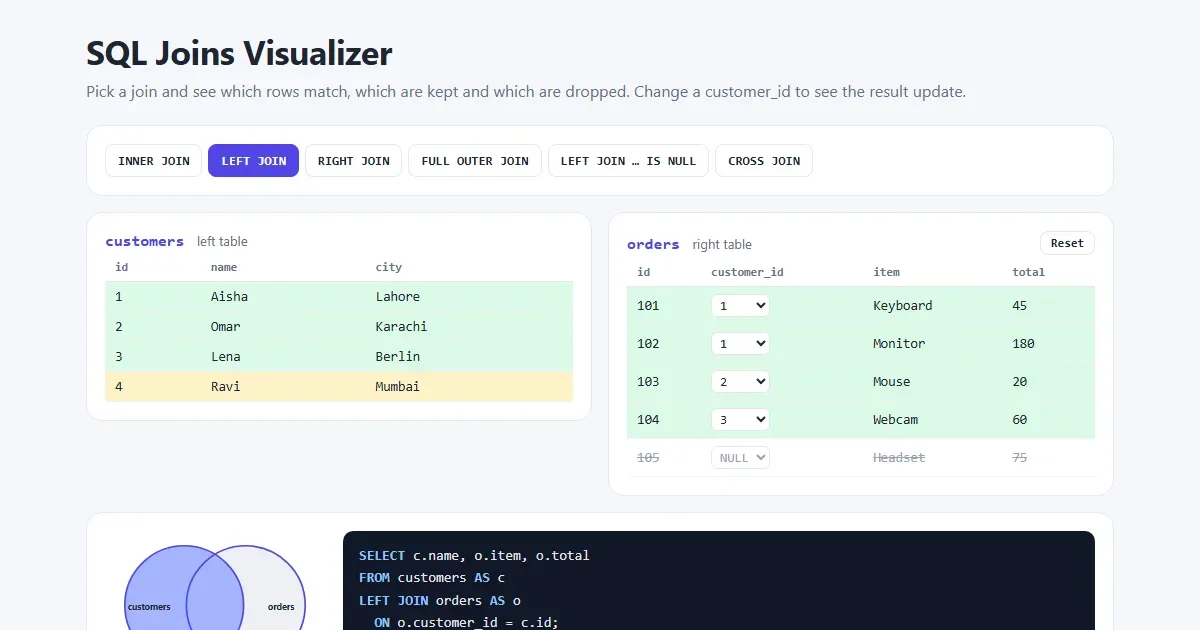
A database splits its data into separate tables, so customers live in one table and orders in another. A JOIN brings them back together in one result. The join type decides what happens to the rows that have no partner on the other side.
This guide explains every join using the same two small tables, so you can compare the results directly. All the queries were run on a real database, and the visualizer lets you change the data yourself.
Open the SQL joins visualizer Pick a join and see which rows are matched, kept or dropped.
The short version
| Join | What you get | Rows in our example |
|---|---|---|
INNER JOIN | Only rows that match on both sides | 4 |
LEFT JOIN | All left rows, plus matches from the right | 5 |
RIGHT JOIN | All right rows, plus matches from the left | 5 |
FULL OUTER JOIN | All rows from both sides | 6 |
CROSS JOIN | Every left row paired with every right row | 20 |
If you only learn two, learn INNER JOIN and LEFT JOIN. They cover most of
the joins you'll write.
The two example tables
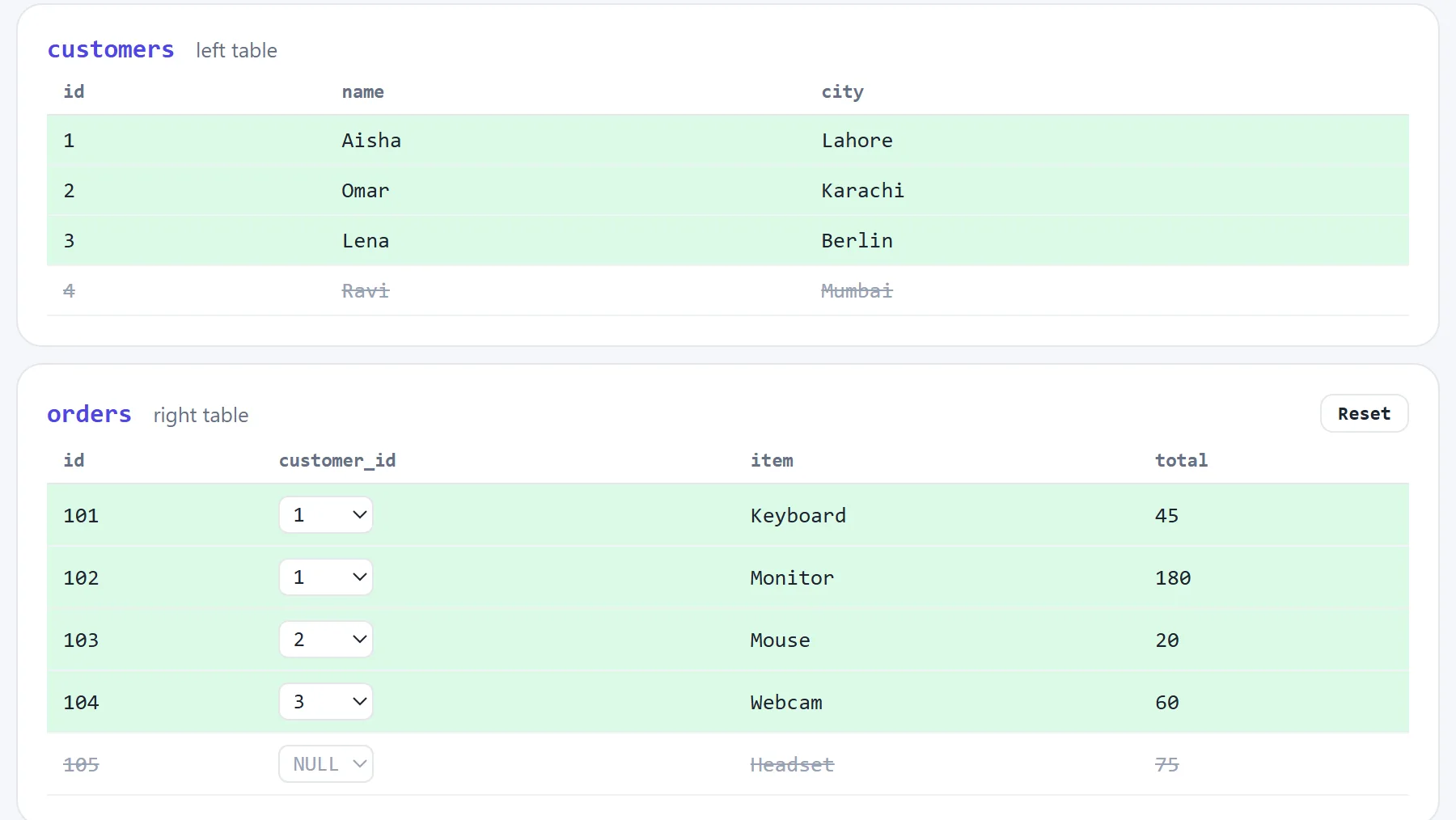
Create these tables to follow along. This works in MySQL, MariaDB, PostgreSQL and SQLite:
CREATE TABLE customers (
  id   INT PRIMARY KEY,
  name VARCHAR(50),
  city VARCHAR(50)
);

CREATE TABLE orders (
  id          INT PRIMARY KEY,
  customer_id INT,
  item        VARCHAR(50),
  total       INT
);

INSERT INTO customers VALUES
  (1, 'Aisha', 'Lahore'),
  (2, 'Omar',  'Karachi'),
  (3, 'Lena',  'Berlin'),
  (4, 'Ravi',  'Mumbai');

INSERT INTO orders VALUES
  (101, 1,    'Keyboard', 45),
  (102, 1,    'Monitor',  180),
  (103, 2,    'Mouse',    20),
  (104, 3,    'Webcam',   60),
  (105, NULL, 'Headset',  75);
The two tables link through orders.customer_id, which holds the id of a
customer. That column is called a foreign key. Two rows are there on purpose,
because they show the difference between the joins:
- Ravi is a customer with no orders.
- Headset is an order with no customer, such as a guest checkout.
How to read a JOIN
SELECT c.name, o.item, o.total        -- the columns you want
FROM customers AS c                   -- the left table, with a short name
INNER JOIN orders AS o                -- the right table, with a short name
  ON o.customer_id = c.id;            -- how rows match
The table after FROM is the left table, and the one after
JOIN is the right table. ON gives the matching rule. The
short names c and o are aliases, and they save a lot of typing.
INNER JOIN: only the matches
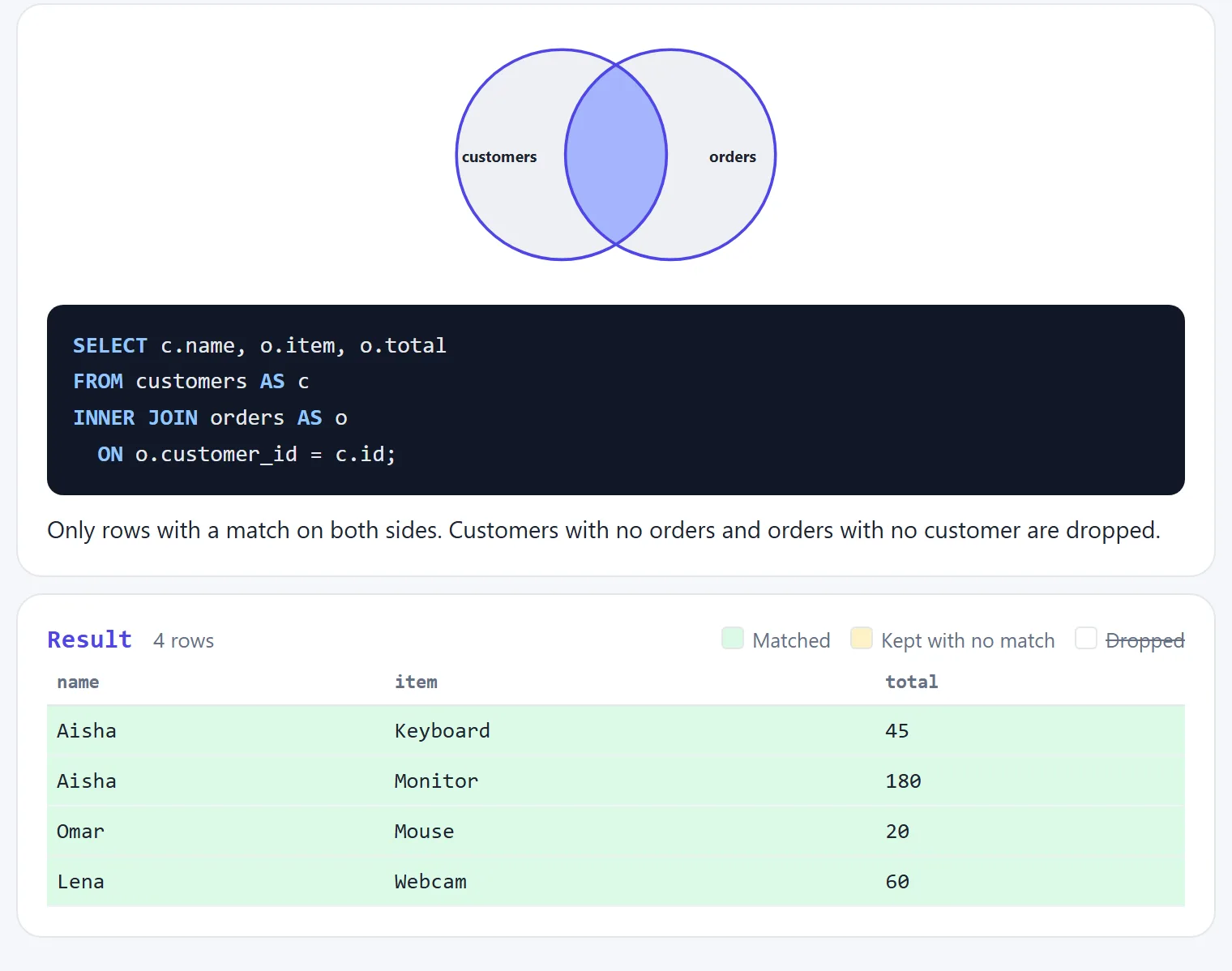
INNER JOIN keeps a row only when both sides match. Writing JOIN alone
means the same thing. Use it when you only care about records that have a partner, such as
“show every order with its customer's name”.
Aisha appears twice because she has two orders. A join returns one row for each matching pair, so this is correct. Try it yourself.
LEFT JOIN: keep everything on the left
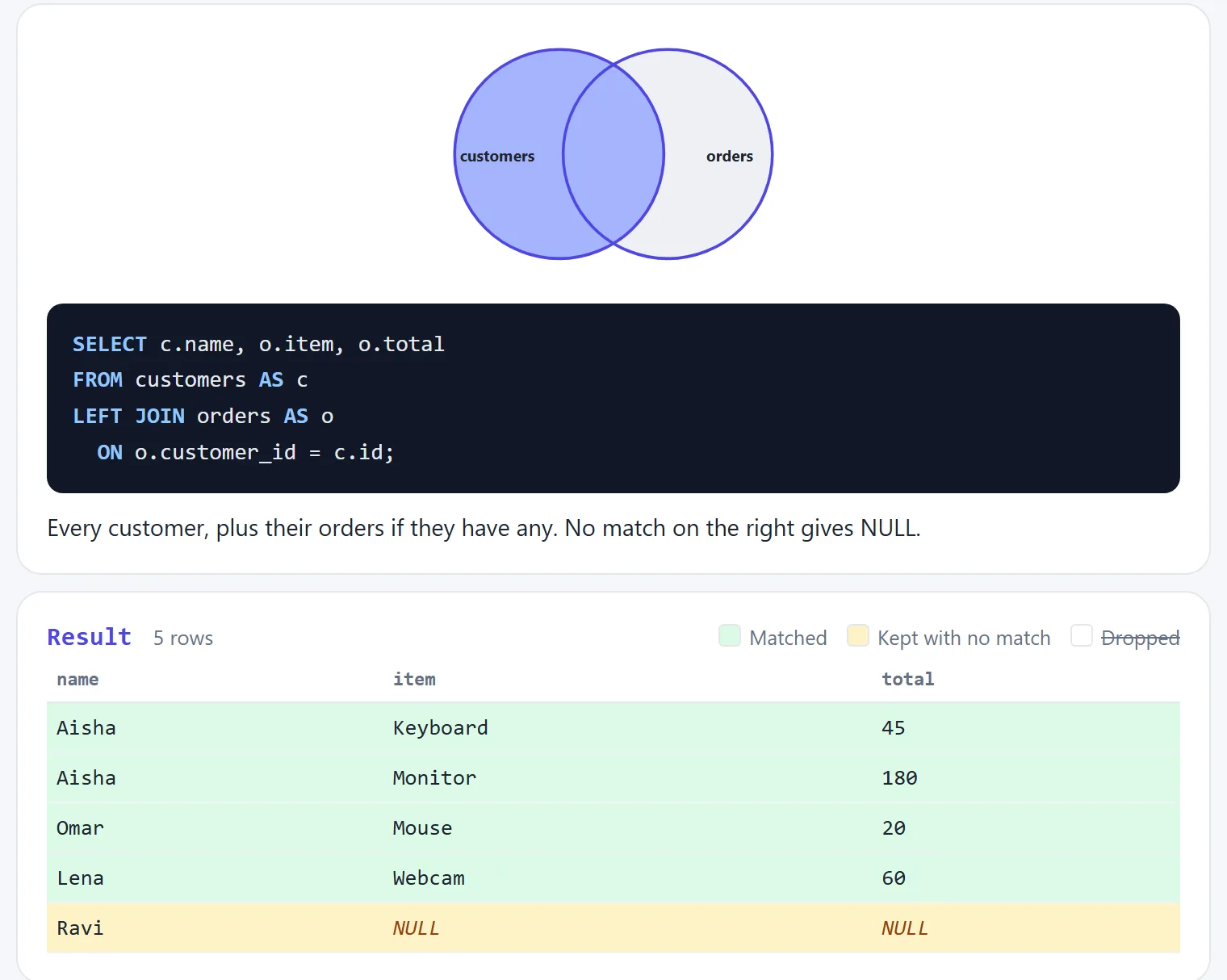
LEFT JOIN keeps every row from the left table. Where there is no match, the right-hand
columns are NULL. This is the second most useful join, and you need it whenever the
question says “all”: all customers, including those who have never
ordered.
SELECT c.name, COUNT(o.id) AS order_count
FROM customers AS c
LEFT JOIN orders AS o
  ON o.customer_id = c.id
GROUP BY c.id, c.name;| name | order_count |
|---|---|
| Aisha | 2 |
| Omar | 1 |
| Lena | 1 |
| Ravi | 0 |
Notice COUNT(o.id). COUNT(*) counts rows, so it would say Ravi has 1,
while COUNT(o.id) skips NULL and correctly gives 0.
RIGHT JOIN: keep everything on the right
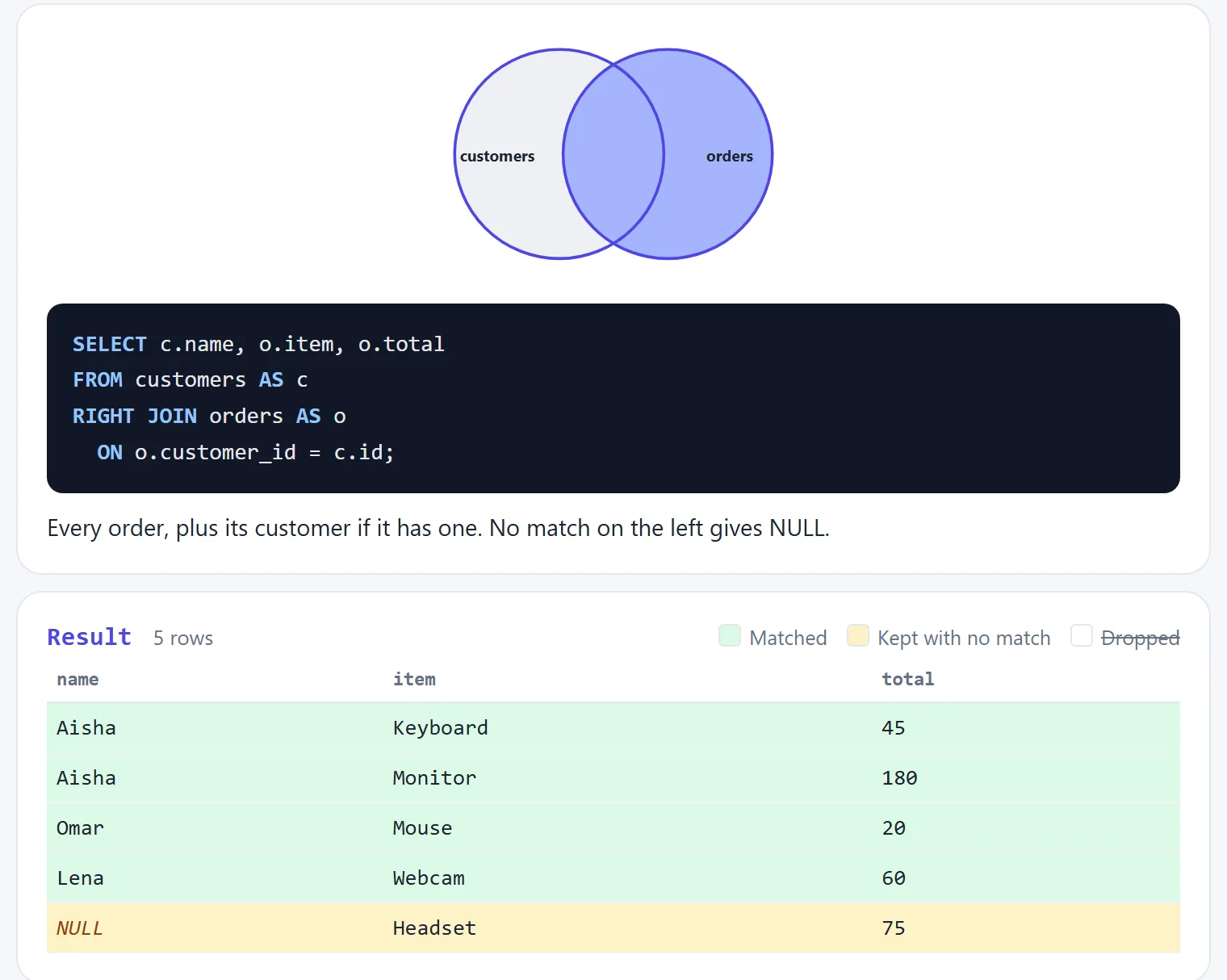
RIGHT JOIN is the mirror image, keeping every row from the right table. In practice
most developers don't use it, because swapping the tables gives the same rows as a
LEFT JOIN, and reading in one direction is easier. These two queries return the same
rows:
-- with RIGHT JOIN
SELECT c.name, o.item
FROM customers AS c
RIGHT JOIN orders AS o ON o.customer_id = c.id;

-- with LEFT JOIN, tables swapped
SELECT c.name, o.item
FROM orders AS o
LEFT JOIN customers AS c ON o.customer_id = c.id;
FULL OUTER JOIN: keep everything
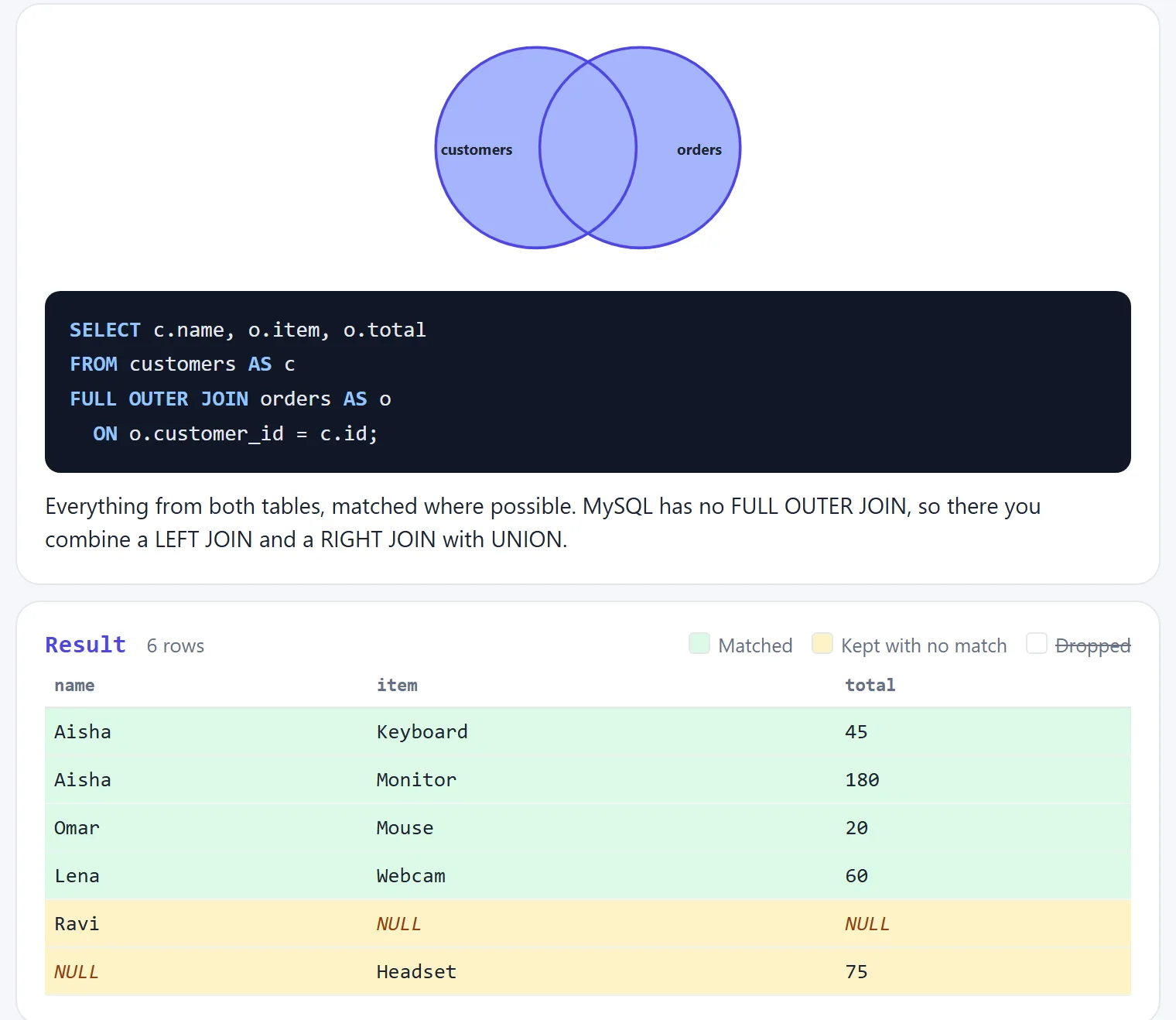
FULL OUTER JOIN keeps all rows from both tables and matches them where it can. It's
useful for comparing two lists, such as finding records that exist in only one of two systems.
MySQL and MariaDB don't have FULL OUTER JOIN. Combine a left and a
right join with UNION instead, which also removes the duplicates:
SELECT c.name, o.item, o.total
FROM customers AS c
LEFT JOIN orders AS o ON o.customer_id = c.id

UNION

SELECT c.name, o.item, o.total
FROM customers AS c
RIGHT JOIN orders AS o ON o.customer_id = c.id;
Find what's missing with LEFT JOIN and IS NULL
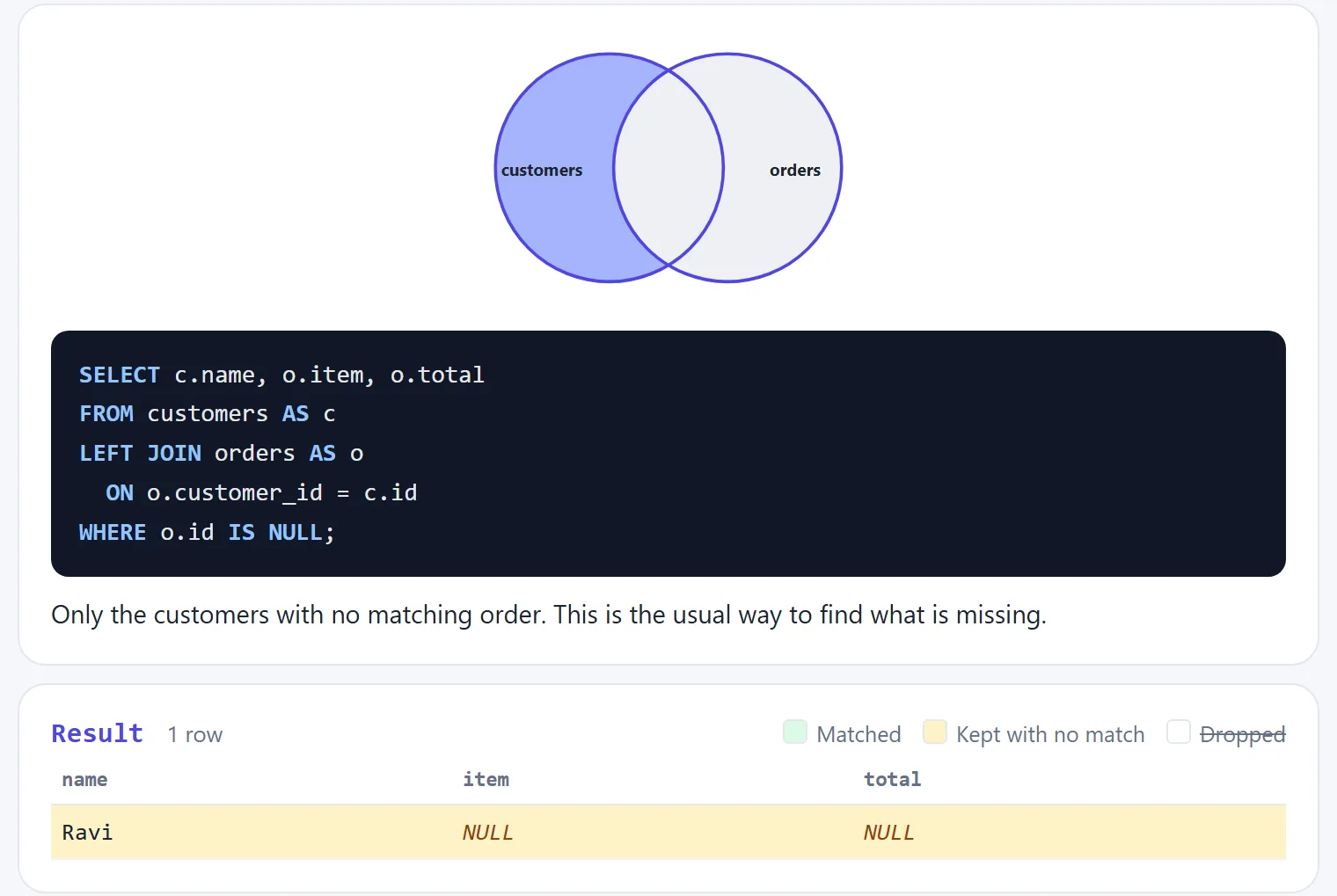
This pattern answers a very common question: which rows have no partner? Do a LEFT JOIN,
then keep only the rows where the right side is NULL.
It finds customers with no orders, products never sold, or users who never logged in. Check a
column that can't normally be NULL, such as the right table's primary key.
See it in the visualizer.
CROSS JOIN: every combination
CROSS JOIN pairs every left row with every right row, and it has no ON.
Our 4 customers and 5 orders give 4 × 5 = 20 rows.
SELECT s.name AS size, c.name AS colour
FROM sizes AS s
CROSS JOIN colours AS c;
It's useful for building combinations, such as all the size and colour options for a product. Be careful with large tables: two tables of 10,000 rows produce 100 million rows.
Joining more than two tables
Just add another JOIN. Each one adds a table to the result so far:
SELECT c.name, o.id AS order_id, p.title
FROM customers AS c
INNER JOIN orders AS o      ON o.customer_id = c.id
INNER JOIN order_items AS i ON i.order_id = o.id
INNER JOIN products AS p    ON p.id = i.product_id;
Be careful when mixing join types. If you start with a LEFT JOIN, a later
INNER JOIN on that side drops the unmatched rows you wanted to keep. Once you go left,
keep going left.
Self join: a table joined to itself
A self join links rows in the same table, for example staff and their managers. Use two aliases so you can treat it as two tables:
SELECT e.name AS employee, m.name AS manager
FROM employees AS e
LEFT JOIN employees AS m
  ON e.manager_id = m.id;
It's a LEFT JOIN so the person at the top, who has no manager, stays in the result.
ON vs WHERE: the classic LEFT JOIN trap
This is the join bug that catches almost everyone. Say you want every customer, plus any orders over 100. These two queries look almost the same, but return different results:
SELECT c.name, o.item
FROM customers AS c
LEFT JOIN orders AS o ON o.customer_id = c.id
WHERE o.total > 100;SELECT c.name, o.item
FROM customers AS c
LEFT JOIN orders AS o
ON o.customer_id = c.id AND o.total > 100;The first returns only one row: Aisha and her Monitor. WHERE runs after the join, and
NULL > 100 is not true, so every kept row with NULL is thrown away. Your
LEFT JOIN has quietly become an INNER JOIN.
The second returns all four customers, because the filter happens during the matching:
| name | item |
|---|---|
| Aisha | Monitor |
| Omar | NULL |
| Lena | NULL |
| Ravi | NULL |
The rule: with a LEFT JOIN, conditions on the right table go in
ON, and conditions on the left table go in WHERE.
Common mistakes
- Forgetting the
ONcondition. In MySQL and SQLite,JOINwith noONacts as aCROSS JOIN, and you get a huge result with wrong data. PostgreSQL gives a syntax error instead. - Expecting
NULL = NULLto match.NULLmeans “unknown”, so it never equals anything. UseIS NULLto test for it. - Summing after a join. If one row matches three rows, its values appear three
times. A
SUMover those rows counts them three times too. - Ambiguous column names. Both tables have an
id, so a bareidgives an error. Writec.idoro.id. - Using
SELECT *in a join. You get duplicate column names and data you don't need. List the columns. - No index on the join column. Joins on large tables get slow. Add an index on
foreign keys such as
orders.customer_id.
CREATE INDEX idx_orders_customer ON orders (customer_id);Try it in the visualizer
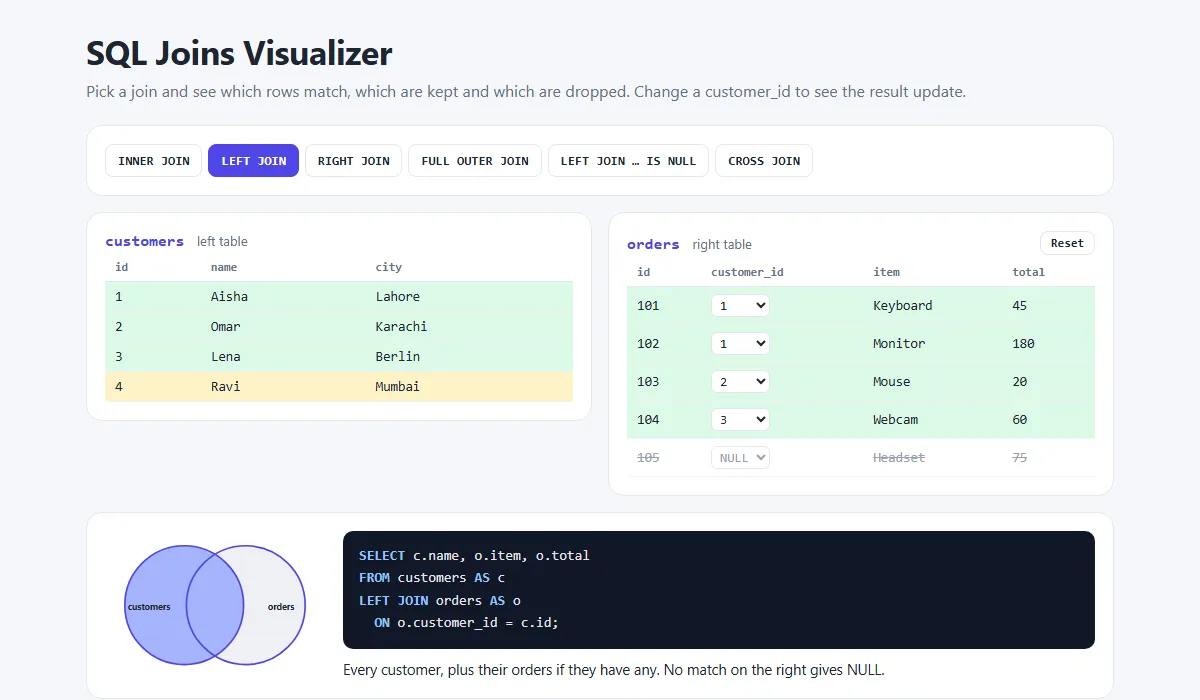
In the SQL joins visualizer, green rows matched, yellow rows were kept with no match, and crossed-out rows were dropped. Hover over a result row to see which source rows it came from. Try these:
- Change the Webcam's
customer_idto 4. Lena loses her order and Ravi gains one. - Set the Headset's
customer_idto 4, then look atLEFT JOIN … IS NULL. - Set every
customer_idtoNULLand see what each join returns.
Share your query
Need a second pair of eyes on a query? Learn how to share a SQL query online, or paste it into the free code sharing tool. No account needed.
Frequently asked questions
What is the difference between INNER JOIN and LEFT JOIN?
INNER JOIN returns only rows that have a match in both tables. LEFT JOIN returns every row from the left table, and fills the right side with NULL where there is no match. If you want to keep rows that have no match, use LEFT JOIN.
Is JOIN the same as INNER JOIN?
Yes. Writing JOIN on its own means INNER JOIN. In the same way, LEFT JOIN and LEFT OUTER JOIN mean the same thing. The word OUTER is optional.
Does MySQL support FULL OUTER JOIN?
No. MySQL and MariaDB do not have FULL OUTER JOIN. You get the same result by combining a LEFT JOIN and a RIGHT JOIN with UNION. PostgreSQL, SQL Server, Oracle and SQLite 3.39 or newer support it directly.
What is the difference between ON and WHERE in a join?
ON decides which rows match during the join. WHERE filters the finished result. With a LEFT JOIN, a condition on the right table belongs in ON. In WHERE, it removes the NULL rows and the join behaves like an INNER JOIN.
Why does my join return duplicate rows?
A join returns one row for every matching pair. If a customer has three orders, that customer appears three times. This is normal in a one-to-many relationship. Use GROUP BY or SELECT DISTINCT if you need one row each.
Why is a row missing from my INNER JOIN?
INNER JOIN drops any row with no match on the other side. NULL values never match anything, not even another NULL, so a row with a NULL key is always dropped. Use LEFT JOIN to keep those rows.
Related articles
How to Share a SQL Query for Review (Formatting, Context and Safety)
Share SQL so others can review it quickly: formatting conventions, the context to include (schema, EXPLAIN plan, sample data), removing real data, and sharing a clean link with line numbers.
Read More →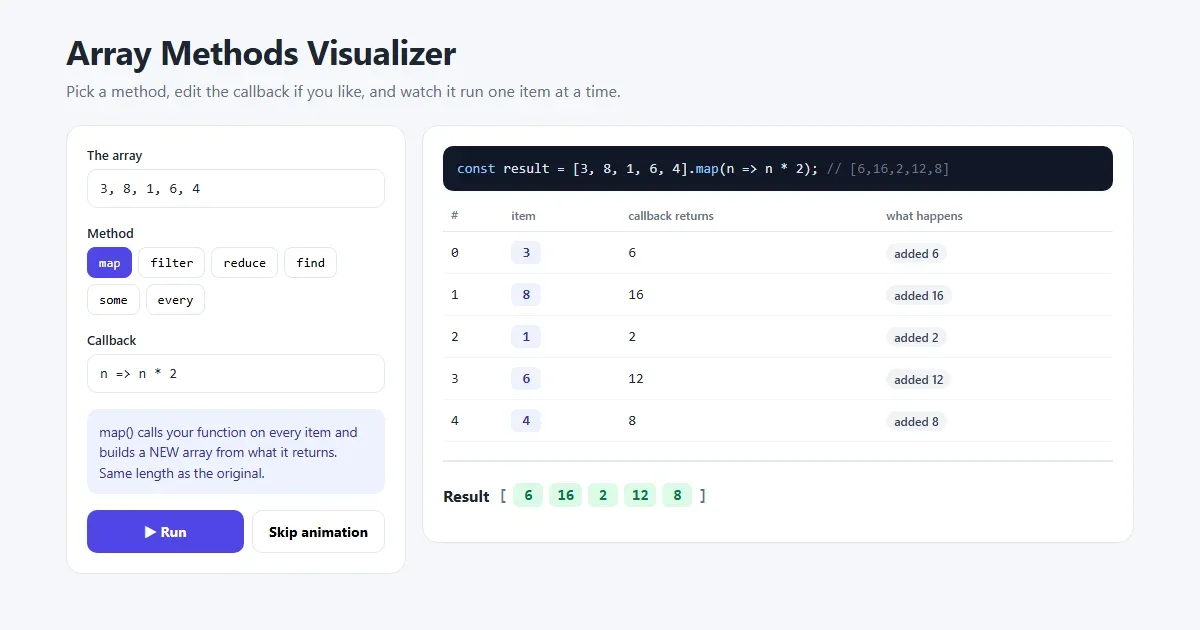
JavaScript map(), filter() and reduce() Explained with Examples
The three array methods you will use every day, explained step by step with pictures and real examples, plus find(), some(), every() and chaining.
Read More →
How to Share Code Snippets Online Without Breaking the Formatting
Share code so indentation survives: why chat apps mangle code, how to share a clean link with line numbers and a raw view, how to choose between a snippet link, a gist and a screenshot, and what to remove first.
Read More →